C# Writing a SignalR Client Requires Manual Injection of Client Methods: connection.On<string, string>("ReceiveMessage", (user, message) => { this.Dispatcher.Invoke(() => { var newMessage = $"{user}[......]继续阅读

C# 编写 SignalR 客户端时需要手动注入客户端方法: connection.On<string, string>("ReceiveMessage", (user, message) => { this.Dispatcher.Invoke(() => { var newMessage = $"{user}: {message}"; messagesList.Items.Add(n[......]继续阅读
The source code has been studied for a long time, and its operating mechanism has been discovered. If the page that BlazorWebView navigates to is not https://0.0.0.0, then it will open the page in a browser outside the client. // The URLs here are allowed to b…
研究了很久源码,发现了其运行机制。 如果 BlazorWebView 跳转的页面不是 https://0.0.0.0 ,那么就会使用客户端之外的浏览器打开页面。 // 这里的地址允许在浏览器中打开 public static readonly Uri[] URLS = new Uri[] { new Uri("https://open.feishu.cn") }; this.webView.BlazorWebViewInitializing += (s, e) =>[......]继续阅读
Model Class: public class Test { [JsonConverter(typeof(string))] public int Value { get; set; } } API Interface: [HttpPost("aaa")] public string AAA([FromBody] Test test) { return "11111111111"; } However, Swagger still displays the type as…
模型类: public class Test { [JsonConverter(typeof(string))] public int Value { get; set; } } API 接口: [HttpPost("aaa")] public string AAA([FromBody] Test test) { return "11111111111"; } 但是 Swagger 还是显示 int 类型,没有跟着 json 配置而变化。 所以我们需要[......] 继续阅读
using System; using System.Runtime.CompilerServices; using System.Threading.Tasks; async Task Main() { Task<int> task = CreateTask(); int result = await task; } Task<int> CreateTask() { // Create an asynchronous task method builder AsyncTaskMethodB…
using System; using System.Runtime.CompilerServices; using System.Threading.Tasks; async Task Main() { Task<int> task = CreateTask(); int result = await task; } Task<int> CreateTask() { // 创建一个异步任务方法构建器 AsyncTaskMethodBuilder<int> builder = A…
By default, WebView2 displays in English, including in places like the console and print interface. However, it can be modified to use the local language. public static void SetWebviewLanguage(string language = "zh-CN") { var cultureInfo = new Cultur…
默认 webview2 使用英文语言显示,包括控制台、打印台等地方,都是英文提示,因此可以修改为本地语言。 public static void SetWebviewLanguage(string language = "zh-CN") { var cultureInfo = new CultureInfo(language); // 设置程序使用的语言,可以忽略。 CultureInfo.CurrentCulture = cultureInfo; CultureIn[......]继续阅读
Default WebView2 will be installed in the system directory, which may lead to insufficient permissions when the program starts, preventing the use of WebView2, and can also cause storage directory conflicts between multiple versions of the program. Therefore, …
默认 Webview2 会被安装到系统目录,可能会导致程序启动时权限不足,无法使用 Webview2,以及多版本程序之间发生存储目录冲突。 因此需要自定义设置 Webview2 目录,最好就存储在程序安装目录下。 首先修改 App.xaml 文件,添加一行: <Application.Resources> <ResourceDictionary> <ResourceDictionary.MergedDictionaries> <ui:ThemesDictionary The…
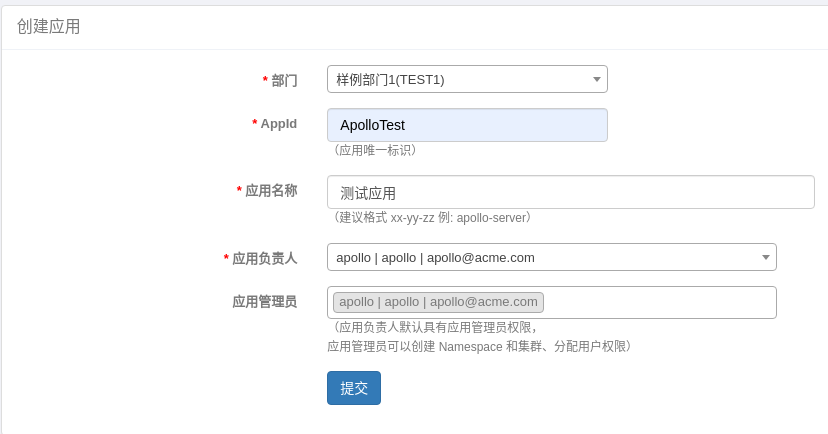
Deploy Apollo and create an application. Then create a namespace, select private to create a private namespace, and choose the json format. Click modify text and fill in the json content. Next, reference the package in the .NET program <PackageReference Inc…
部署 Apollo 之后,创建一个应用。 然后创建命名空间,选择 private 创建私有命名空间,选择 json 格式。 点击修改文本,填入 json 内容。 然后在 .NET 程序中引入包 <PackageReference Include="Com.Ctrip.Framework.Apollo.Configuration" Version="2.10.2" /> 在配置文件中定义 apollo 的设置。 { "apollo": { "AppId": "ApolloTest", "MetaServe…

First is the middleware, which determines which groups to display when there is time. All APIs can be obtained from the IApiDescriptionGroupCollectionProvider service, and then identified through APIs to check for groups. if (context.HostingEnvironment.IsDevel…
首先是中间件,它决定了有时间显示哪些分组。 可以从 IApiDescriptionGroupCollectionProvider 服务中获取所有 API,然后通过 API 进行识别,检查是否有分组。 if (context.HostingEnvironment.IsDevelopment()) { app.UseSwagger(); var descriptionProvider = app.ApplicationServices.GetRe[......]继续阅读
In SignalR, to obtain the client's connection information, you can use IHttpConnectionFeature to retrieve the client's communication IP and port. // Get the service var feature = Context.Features.Get<IHttpConnectionFeature>(); var httpContext = Context.G…
在 signalR 中如需获取客户端的连接信息,可以使用 IHttpConnectionFeature 获取客户端通讯的 IP 和端口。 // 获取服务 var feature = Context.Features.Get<IHttpConnectionFeature>(); var httpContext = Context.GetHttpContext(); ArgumentNullException.ThrowIfNull(feature); Argume[......]继续阅读
In ABP, by default, only local JSON language handling is available. However, for business purposes, we may have many customization needs. This article introduces how to implement multi-language handling based on Redis, fetching language information from Redis.…
在 ABP 中,默认只有本地 JSON 语言处理,但是在业务上我们可能有好多定制需求。本文介绍如何自己根据 redis 实现一个多语言处理,通过 redis 取得语言信息。 ABP 官方文档:https://docs.abp.io/en/abp/latest/Localization ABP 是这样配置多语言的: services.Configure<AbpLocalizationOptions>(options => { options.Resources .Add<TestResourc…

站长简介
有趣的博主,小小程序员,业余摄影师,主要研究微服务架构、人工智能、kubernetes、istio、Devops、AI 等,主要语言是 C#、Go、Python。日常喜欢看书、写博客、摄影、运动、看风景。