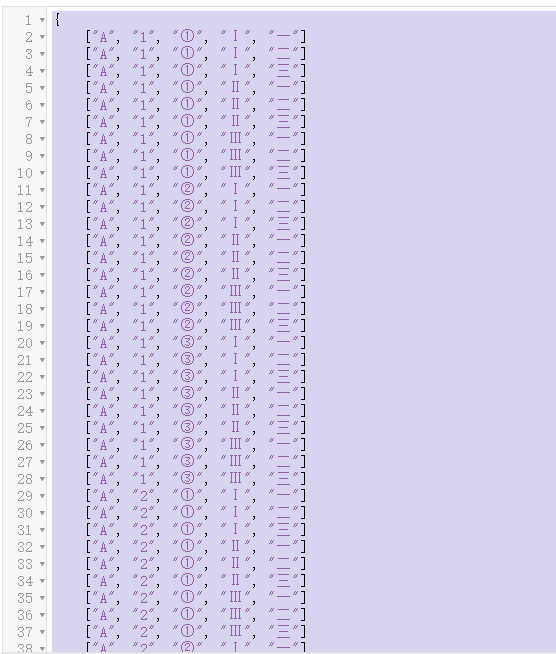
有以下 N 个因子: new List<string>{"A","B","C"}, // Position 0 new List<string>{"1","[......]继续阅读

在 Microsoft.Maui 的 Microsoft.Maui.LifecycleEvents 中,有个管理 MAUI 窗口生命周期的扩展。 public static MauiAppBuilder ConfigureLifecycleEvents( this MauiAppBuilder bu[......]继续阅读
In Microsoft.Maui, within Microsoft.Maui.LifecycleEvents, there is an extension that manages the MAUI window lifecycle. public static MauiAppBuilder C[......]继续阅读

说明 RulesEngine 是 C# 写的一个规则引擎类库,读者可以从这些地方了解它: 仓库地址: https://github.com/microsoft/RulesEngine 使用方法: https://microsoft.github.io/RulesEngine 文档地址: https:[......] 继续阅读
Description RulesEngine is a rule engine library written in C#. Readers can learn more about it from the following sources: Repository Address: https:[......] 继续阅读
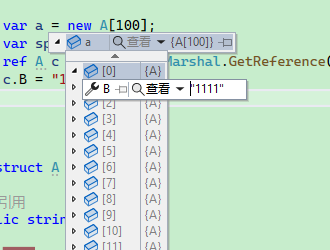
因为结构体或者值类型在传递时,是值复制,导致传递后修改其值,原先的值不会发生改变。 即使使用 ref 做参数,也没法改变传递数组是值复制的问题。 阅读 .NET 源码是发现了 .NET 6 的一个 API,可以很方便完成这个任务,让结构体像引用类型一样。 using System.Runtime.I[......]继续阅读
因为结构体或者值类型在传递时,是值复制,导致传递后修改其值,原先的值不会发生改变。 即使使用 ref 做参数,也没法改变传递数组是值复制的问题。 阅读 .NET 源码是发现了 .NET 6 的一个 API,可以很方便完成这个任务,让结构体像引用类型一样。 using System.Runtime.I[......]继续阅读
使用的类型是结构体,如果是对象,则在创建内存块的时候,需要使用别的方式。子所以使用块的形式而不是直接管理一个对象,是基于多个方面考虑的。 1,使用块的形式,可以一次性分配连续的内存;如果逐个分配,会导致碎片太多、每次分配都需要时间; 缺点: 1,不能扩增或减少对象数量、块大小; 2,以块的形式存在,[......] 继续阅读
后面改进了对象池算法,使用结构体来存储,其性能变得非常强。 参考对象池算法:https://www.whuanle.cn/archives/20888 New Version Define a structure to store each field: public struct JsonFiel[......]继续阅读
后面改进了对象池算法,使用结构体来存储,其性能变得非常强。 参考对象池算法:https://www.whuanle.cn/archives/20888 新版本 定义结构体存储每个字段: public struct JsonField { public string? Name {[......]继续阅读

数据: 格式: { "a_tttttttttttt": 1001, "b_tttttttttttt": "邱平", "c_tttttttttttt": "Nancy Lee", "d_tttttttttttt": "buqdu", "e_tttttttt[......]继续阅读
数据: 格式: { "a_tttttttttttt": 1001, "b_tttttttttttt": "邱平", "c_tttttttttttt": "Nancy Lee&quo[......]继续阅读
可复用Stream 需要安装 Microsoft.IO.RecyclableMemoryStream。 internal class StreamHandler { // Stream pool private static readonly Rec[......]继续阅读
Reusable Stream You need to install Microsoft.IO.RecyclableMemoryStream. internal class StreamHandler { // Stream pool private[......]继续阅读
bool IsDefine<T1, T2>(T2 t) where T1 : Enum where T2 : Enum { var value = Unsafe.As<T2, T1>(ref t); var array = Enum.GetValues(type[......]继续阅读
bool IsDefine<T1, T2>(T2 t) where T1 : Enum where T2 : Enum { var value = Unsafe.As<T2, T1>(ref t); var array = Enum.GetValue[......]继续阅读
In projects using partial classes, such as Razor, Blazor, WPF, etc., the compilation will generate .g.cs files. However, if there are issues that prev[......] 继续阅读
在项目使用分部类,如 Razor、Blazor、Wpf 等项目中,编译会生成 .g.cs 文件,但是因为出现了问题,不能编译成功,查看源代码,找不出错误,只能开始输出 .g.cs ,查看文件进行检查。 <PropertyGroup> <EmitCompilerGenerat[......]继续阅读
// json => Dictionary static Dictionary<string, string> Read(string jsonData) { var reader = new Utf8Jso[......]继续阅读

站长简介
有趣的博主,小小程序员,业余摄影师,主要研究微服务架构、人工智能、kubernetes、istio、Devops、AI 等,主要语言是 C#、Go、Python。日常喜欢看书、写博客、摄影、运动、看风景。