.NET Core does not have the functionality to obtain CPU usage and other information on Linux, so don't hold your breath. static void Main(string[] args) { Console.WriteLine("System Runtime Status"); var proc = Process.GetCurrentProcess();[......]继续阅读

.NET Core 中没有获取 Linux 的 CPU使用率等信息的功能,死心吧。 static void Main(string[] args) { Console.WriteLine("系统运行情况"); var proc = Process.GetCurrentProcess(); var mem = proc.WorkingSet64; var cpu = proc.TotalProcessorTime; Conso[......]继续阅读
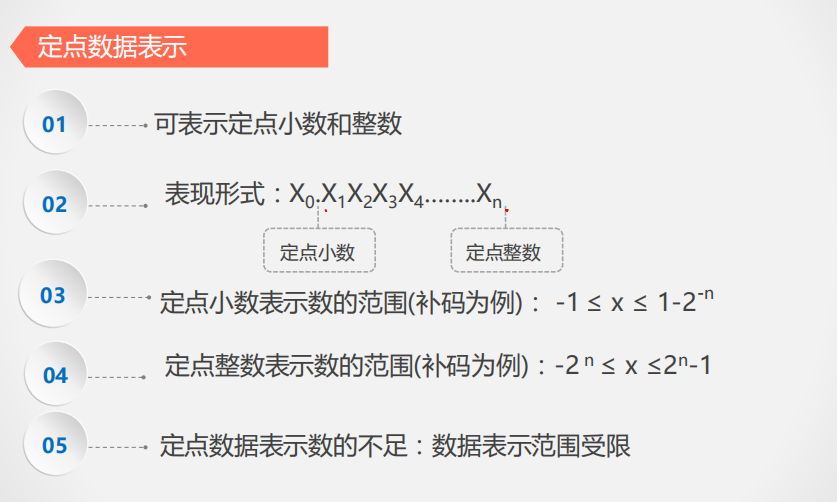
之前个人理解错误,浮点数转换少了一步。因为当时看视频和别人博客的时候,发现很多人没有说清楚一些很细致的东西。首先,浮点数的表示,有 定点数据表示 浮点数据表示 IEEE754 定点数据表示 原理是将一个浮点数的整数和小数部分各自转为二进制,最高位表示符号位。例如使用定点数据表示,表示 -86.25。``` 86 转为二进制:0_1010110 0.25 转为二进制为 0.01 86.25 二进制为 0_1010110.01 -86.25 = 1_1010110.01 反码 1_0101001.11 补码 1_010…
Example: Determining whether a string consists of alphanumeric characters and underscores: using System; using System.Diagnostics; using System.Text.RegularExpressions; namespace ConsoleApp6 { class Program { static Regex regex = new Regex(@"^[A-Za-z0-9]+…
示例: 判断字符串是否由字母数字下划线组成: using System; using System.Diagnostics; using System.Text.RegularExpressions; namespace ConsoleApp6 { class Program { static Regex regex = new Regex(@"^[A-Za-z0-9]+$"); static void Main(string[] args) { string[] a = new st[....…
In C#, Parallel and Task.WhenAll are both used for parallel computing. Parallel is generally used only for CPU-bound operations. Refer to this link for more information. Task.WhenAll is primarily used for high IO concurrency. [......] 继续阅读
C# 中,Parallel 和 Task.WhenAll 都用于并行计算。 Parallel 一般只用于 CPU 集中的操作。 查看 https://www.cnblogs.com/scmail81/archive/2018/08/22/9521096.html 学习。 Task.WhenAll主要用于高 IO 并发。 [......] 继续阅读
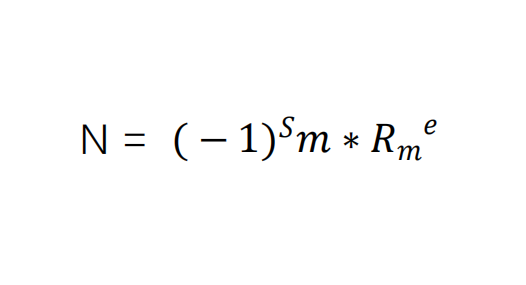
Computer System Architecture - Data Representation Table of Contents Computer System Architecture - Data Representation Data Representation Floating-point Numbers Floating-point Standards Example Problems Computer System Conclusion Data Representation: Data re…
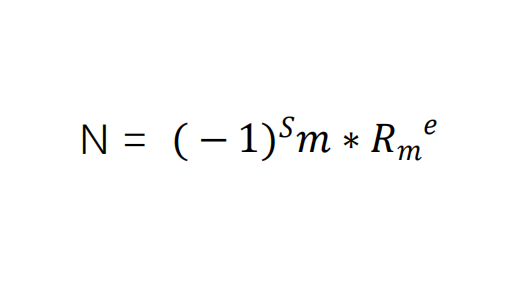
计算机系统结构-数据表示 目录 计算机系统结构-数据表示 数据表示 浮点数 浮点数标准 例题 计算机系统结 数据表示:数据表示是指能由计算机硬件直接识别和引用的数据类型。(例如定点数浮点数) 表现在什么地方:表现在它有对这种数据类型进行操作的指令和功能部件。 数据结构种类:串,队,列,栈,阵列,链表,树,图 什么是数据结构:它反映了应用中要用到的各种数据元素和或信息单元之间的结构关系。 数据表示 自定义数据表示 自定义数据表示,包括标志符的数据表示、数据描述符的数据表示。 标志符的数据表示 标识符的数据表示:指用于…
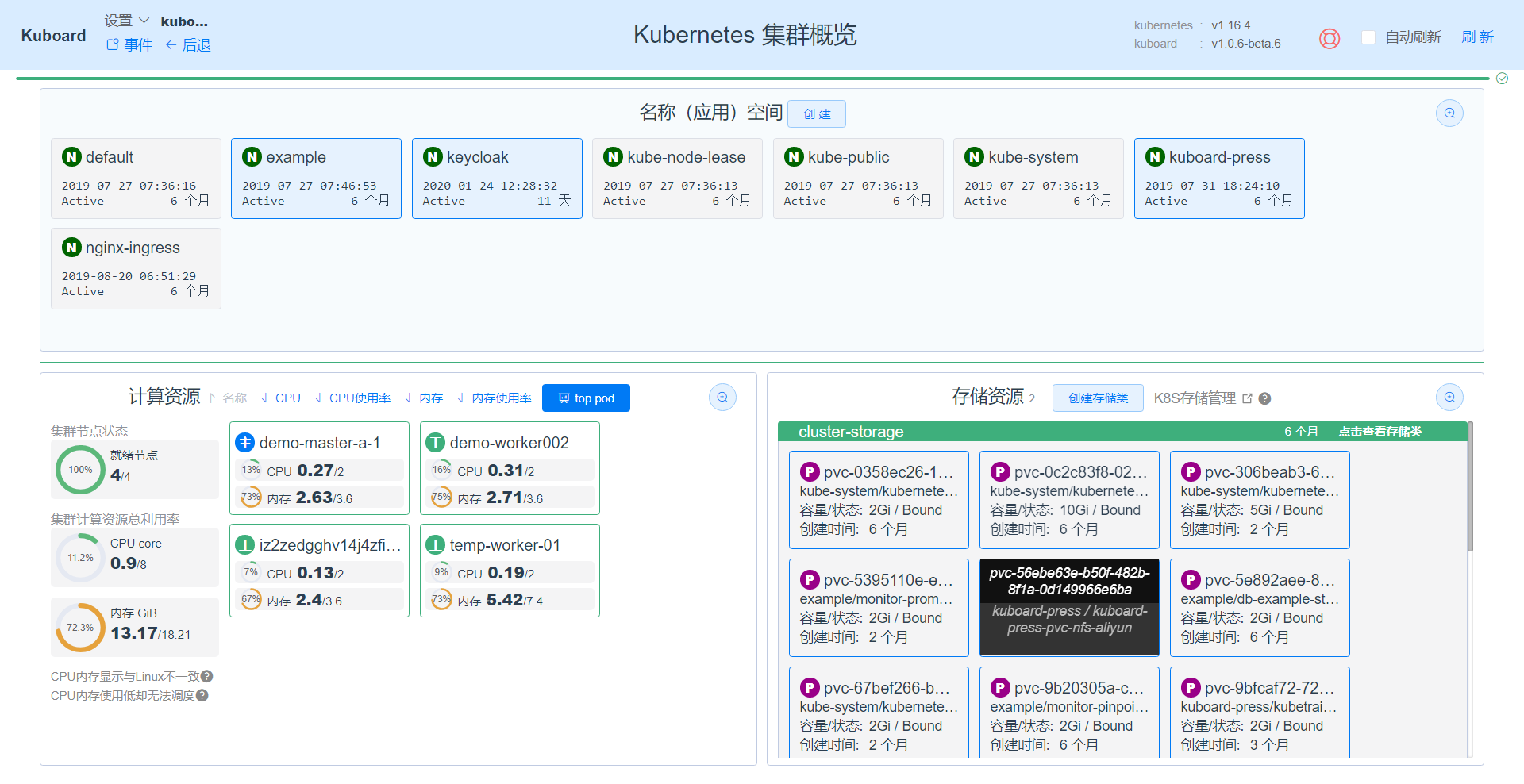
K8S Installation Tutorial on Ubuntu [TOC] 1. Update System Sources If the system's default mirror address is located abroad, downloads may be slow. You can open /etc/apt/sources.list and replace it with domestic mirror sources. apt upgrade 2. Update Software P…
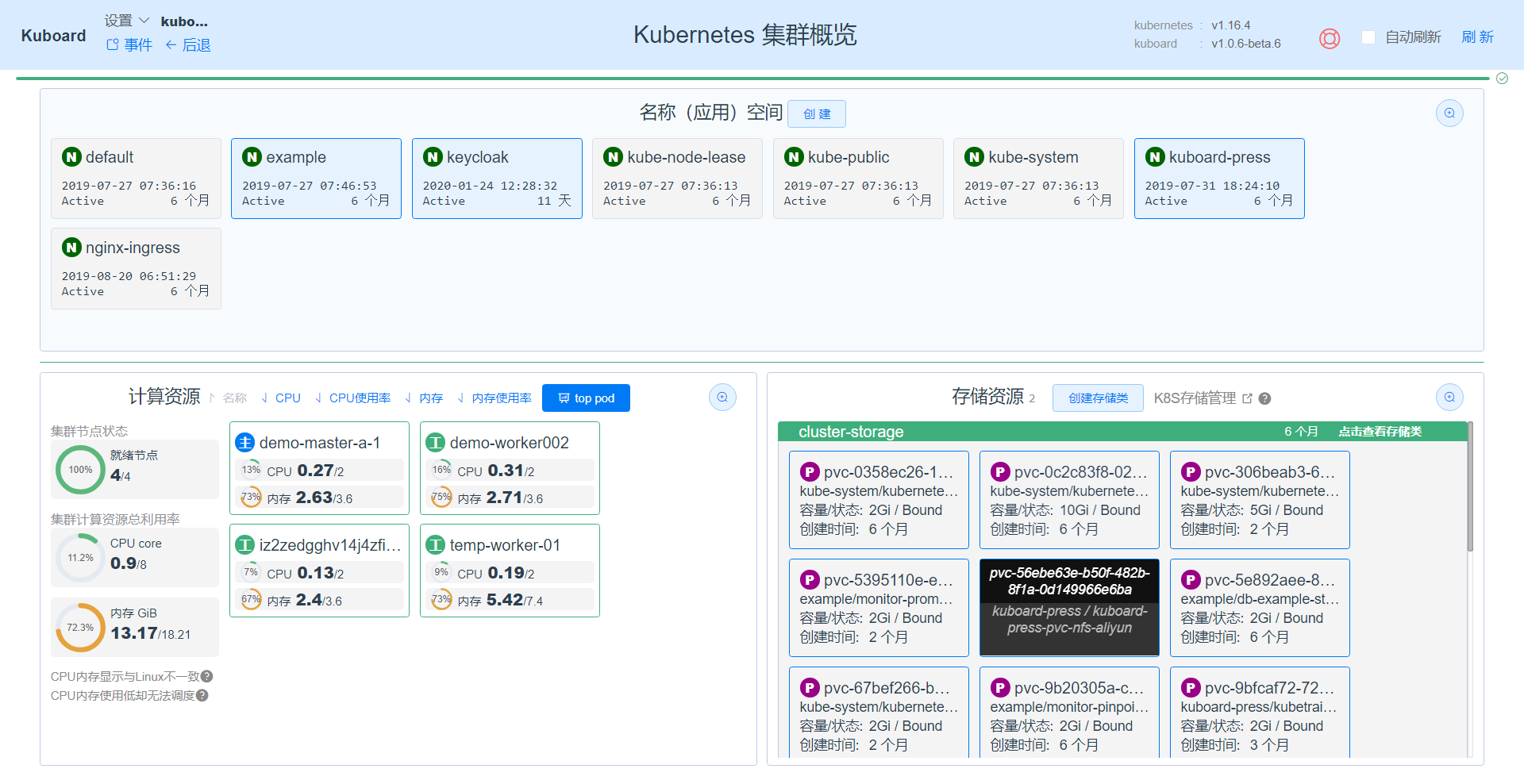
在 Ubuntu 上安装 K8S教程 [TOC] 1,更新系统源 如果系统本身自带得镜像地址,服务器在国外,下载速度会很慢,可以打开 /etc/apt/sources.lis 替换为国内得镜像源。 apt upgrade 2,更新软件包 将系统得软件组件更新至最新稳定版本。 apt update 3,安装 Docker 也可以参考其它过程安装 apt-get install docker.io 如果需要配置为开机启动,可执行以下命令 systemcd enable docker systemcd start doc…
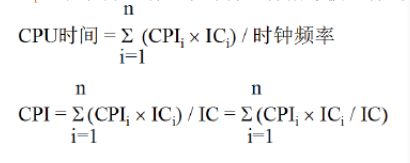
Computer System Architecture: CPU Performance Formula Basic Knowledge CPU Time: The time a program runs on the CPU. (Excluding I/O time) Clock Frequency: The frequency of the internal main clock of the CPU, indicating how many cycles can be completed in one se…
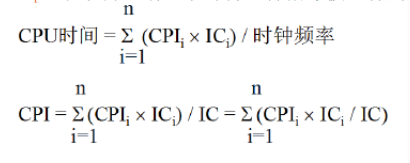
计算机系统结构:CPU性能公式 基础知识 CPU 时间:一个程序在 CPU 上运行的时间。(不包括I/O时间) 主频、时钟频率:CPU 内部主时钟的频率,表示1秒可以完成多少个周期。 例如,主频为 4.1GHz,表示每秒可以完成 4.1*109 个时钟周期。 时钟周期:时钟周期也称为振荡周期,定义为时钟频率的倒数。时钟周期是计算机中最基本的、最小的时间单位。在一个时钟周期内,CPU仅完成一个最基本的动作。 时钟周期 = 1 / 频率,例如 1/ 4.1*109 。 CPU 的时钟周期越短,CPU 性能越好。 指令周…
Computer System Architecture - Introduction Knowledge Points Hierarchical structure of computer systems Computer architecture, computer organization, and implementation of computers Trade-offs between hardware and software as well as quantitative design princi…
计算机系统结构-概论 考察知识点 计算机系统的层次结构 计算机系统结构、计算机组成、计算机的实现 计算机的软硬件取舍及定量设计原理 软件、应用、器件的发展对系统结构的影响 系统结构中的并行性开发及计算机系统的分类 知识难度: 每个知识点使用 ※ 号标记掌握程度和类型。 ※:标识,能够记住知识点和概念; ※※:领会,需要领悟和理解,能够消化和吸收,对知识点做出正确的解释、说明、论述。 ※※※:简单应用,能够运用课程中的知识点,例如计算、绘图,去分析、实现和解决一般的应用问题。 ※※※※:综合应用,要求考生能够运用课程…
ASP.NET Core Getting Started to Mastery - Resource Collection Navigation Table of Contents ASP.NET Core Getting Started to Mastery - Resource Collection Navigation Learning Path Comprehensive Resource Navigation for the Learning Path Introduction Getting Start…
[ASP.NET Core 从入门到精通-资源收集导航]() 目录 ASP.NET Core 从入门到精通-资源收集导航 学习路线 学习路线资源导航大全 1,介绍 2,入门 3,教程 4,基础知识 5,Razor页面 6,MVC 7,Web API 8,授权认证 9,安全性 10,测试、调试、API测试 11,SignalR 12,gRPC 13,部署和托管 14,性能优化 开源项目仓库 公众号 学习路线 来自 dotNET匠人 的(中文翻译) ASP.NET Core开发者成长路线图 原英文地址 ASP.NET …
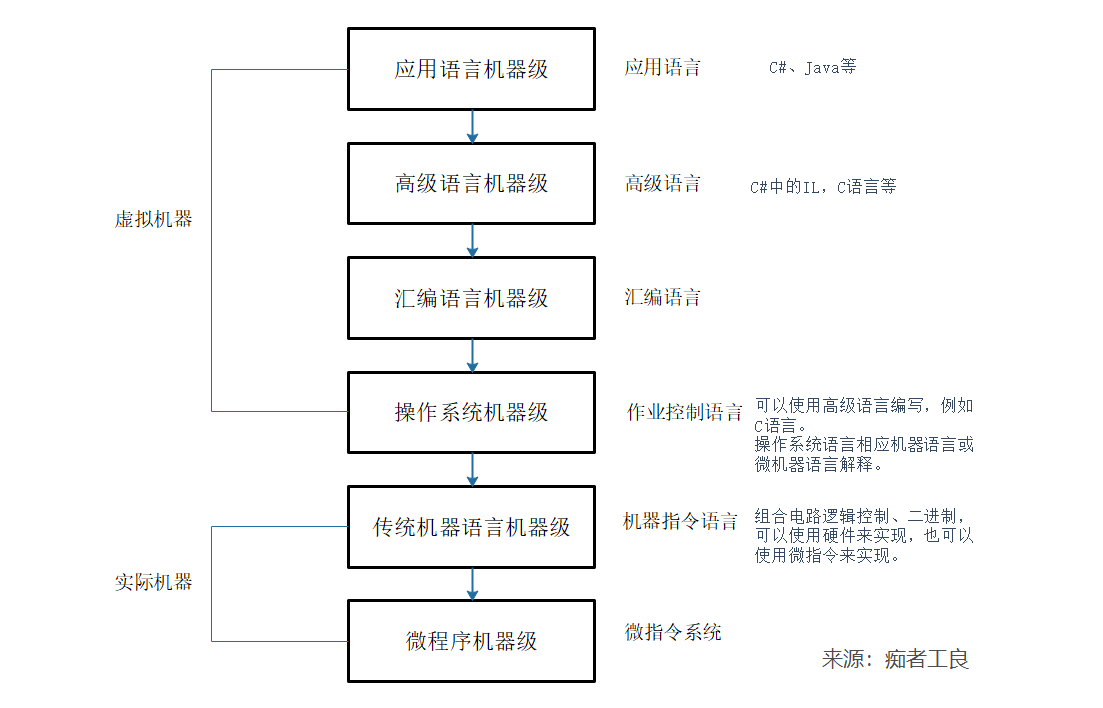
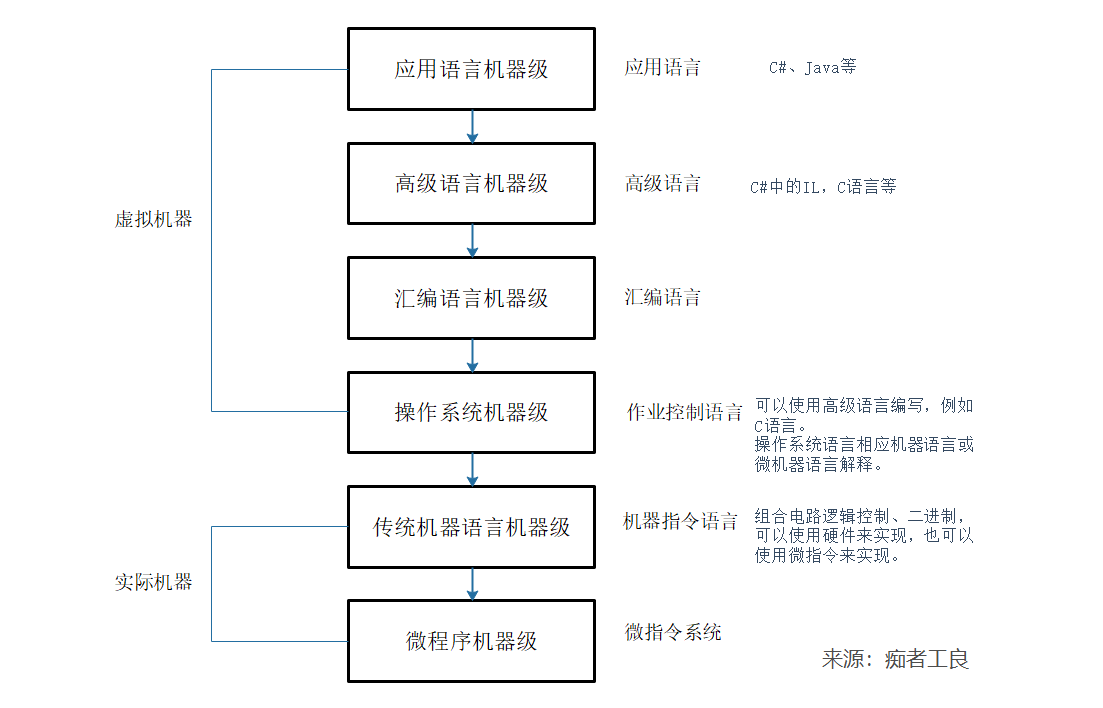
1. Hierarchical Structure of Computer Systems From a linguistic perspective, a computer is a combination of hardware and software, which can be organized into a hierarchical structure composed of multi-layered machine-level components based on functionality. D…
1,计算机系统的层次结构 从语言角度来看,一台计算机是由软硬件组合成的,按照功能划分,可以形成多层机器级组成的层次结构。 不同层次的语言,可以使用翻译或解释技术来实现。例如 C# 语言是应用语言,在编译时会生成 IL 语言(高级语言),属于翻译(Translation 美 /trænzˈleɪʃn,trænsˈleɪʃn/ )。 在启动程序时,IL 翻译成汇编,由操作系统执行。 不断将高一级的语言转换为低一级的语言。 而解释(Interpretation 美 /ɪnˌtɜːrprəˈteɪʃn/) 则是指低一层的机…

站长简介
有趣的博主,小小程序员,业余摄影师,主要研究微服务架构、人工智能、kubernetes、istio、Devops、AI 等,主要语言是 C#、Go、Python。日常喜欢看书、写博客、摄影、运动、看风景。