Author: whuanle
Author blog addresses:
https://www.whuanle.cn
https://www.cnblogs.com/whuanle
Tutorial address: https://docs.whuanle.cn/zh/maomi_framework
Framework source code: https://github.com/whuanle/maomi
Contents:
- HTTP client development
- HttpClient basics
- Request parameters
- Request credentials
- Exception handling
- IHttpClientFactory
- IHttpClientFactory basics
- Request policies
- How to use the Refit framework
- CLI tools
- Refit code generation tool
- Creating .NET tool packages
HTTP Client Development
With the development of cloud computing, microservice architecture has become the preferred choice for many projects. Each sub-service must work collaboratively to provide complete functionality to users, which makes communication between sub-services an important part of development. As the most commonly used protocol in network communication, HTTP is the preferred communication protocol in microservice architectures. Sub-services interact with each other through network requests, accessing various static resources or API interfaces on the network. However, writing HTTP client code is a time-consuming task, and various exceptions often occur due to network issues and other factors. Developers must consider many situations during development. Therefore, in this chapter, the author introduces how to use HttpClient in .NET to request network resources, explores how to customize HTTP request code, and leverages related tools to reduce repetitive work and improve efficiency.
HttpClient Basics
This section explains some basic knowledge of HttpClient and how to handle common HTTP request operations. Code examples can be found in the Demo6.API and Demo6.Console projects.
Request Parameters
There are four common ways to carry parameters in HTTP requests: query, header, form, and JSON. The author will introduce them one by one below.
Query
A query request actually appends parameters to the URL using the & symbol. For example, in https://localhost:5001/test?a=1&b=2, there are two parameters, a and b. Since query parameters exist directly in the URL, you can manually generate a URL with query parameters using string interpolation or concatenation.
// URL Query parameters
public static async Task Query(string a, string b)
{
	using var httpClient = new HttpClient(httpclientHandler);
	var response = await httpClient.GetAsync($"https://localhost:5001/query?a={a}&b={b}");
}
In ASP.NET Core, the [FromQuery] attribute can be used to parse values from URL parameters.
[HttpGet("/query")]
public string Query([FromQuery] string a, [FromQuery] string b)
{
	return a + b;
}
Parameters decorated with
[FromQuery]are case-insensitive.
However, constructing query parameters manually is cumbersome and prone to errors. We can use the System.Web.HttpUtility class to handle query parameters.
var nv = System.Web.HttpUtility.ParseQueryString(string.Empty);
nv.Add("a", "1");
nv.Add("b", "2");
var query = nv.ToString();
var url = "https://localhost:5001/query?" + nv;
// https://localhost:5001/query?a=1&b=2
ASP.NET Core also provides a similar method to append query parameters.
var dic = new Dictionary<string, string>()
            {
                { "a","1"},
                { "b","2"}
            };
var query = QueryHelpers.AddQueryString("https://localhost:5001/query", dic);
If parameter values in the URL contain special characters, they must be escaped. For example, if a=http://localhost:5001/query?a=1&b=2 is set and the URL is concatenated directly, the output becomes:
http://localhost:5001/query?a=http://localhost:5001/query?a=1&b=2&b=2
After the server receives the request, the parsed result is actually:
a=http://localhost:5001/query?a=1
b=2
Therefore, when query parameters contain special characters, they must be escaped before being appended to the URL.
In C#, you can use Uri.EscapeDataString to escape special characters in query parameters, as shown below:
a = Uri.EscapeDataString("http://localhost:5001/query?a=1&b=2");
b = "2";
var response = await httpClient.GetAsync($"https://localhost:5001/query?a={a}&b={b}");
The final generated URL is:
http://localhost:5001/query?a=http%3A%2F%2Flocalhost%3A5001%2Fquery%3Fa%3D1%26b%3D2&b=2
Header
Headers are part of the HTTP communication protocol and contain a lot of important information.
HttpClient stores headers as key-value pairs, as shown in the following example:
public static async Task Header()
{
	using var httpClient = new HttpClient(httpclientHandler);
    // Header
	httpClient.DefaultRequestHeaders.Add("MyEmail", "123@qq.com");

	var response = await httpClient.GetAsync($"https://localhost:5001/header");
	var result = await response.Content.ReadAsStringAsync();
}
When writing APIs in ASP.NET Core, the [FromHeader] attribute can be used to obtain header parameters directly in function parameters without accessing HttpContext, which helps simplify the code.
[HttpGet("/header")]
public string Header([FromHeader] string? myEmail)
{
	return myEmail;
}
Parameters decorated with
[FromHeader]are case-insensitive; usingmyEmailorMyEmailworks the same.
HttpRequestHeaders already defines some commonly used headers and encapsulates their logic into related properties. Common headers include:
Accept
AcceptCharset
AcceptEncoding
AcceptLanguage
Authorization
In HttpClient, these can be set directly without inserting them as key-value pairs. Example:
httpClient.DefaultRequestHeaders.Authorization = new AuthenticationHeaderValue("Bearer", token);
httpClient.DefaultRequestHeaders.AcceptLanguage = ...;
Form
Forms have two request types: x-www-form-urlencoded and form-data. form-data is compatible with x-www-form-urlencoded and can be used for uploading files, while x-www-form-urlencoded can only transmit string key-value pairs. Since x-www-form-urlencoded performs slightly better than form-data, it is preferable when file uploads are not required.
The following example shows how to send request parameters using x-www-form-urlencoded:
// Form submission
// application/x-www-form-urlencoded
public static async Task From()
{
	var fromContent = new FormUrlEncodedContent(new[]
	{
				new KeyValuePair<string,string>("Id","1"),
				new KeyValuePair<string,string>("Name","whuanle"),
				new KeyValuePair<string, string>("Number","666666")
			});

	using var httpClient = new HttpClient(httpclientHandler);
	var response = await httpClient.PostAsync("http://localhost:5001/form1", fromContent);
}
In ASP.NET Core, you can use a dictionary type to receive the corresponding parameters.
[HttpPost("/form1")]
public string Form1([FromForm] Dictionary<string, string> dic)
{
	return "success";
}
You can also use a model class to receive form parameters.
[HttpPost("/form2")]
public string Form2([FromForm] Form2Model model)
{
	return "success";
}

public class Form2Model
{
	public string Id { get; set; }
	public string Name { get; set; }
	public string Number { get; set; }
}
HttpClient can also upload files using form-data. Example code:
// Upload file
public static async Task SendFile(string filePath, string fromName, string url)
{
	using var client = new HttpClient();

	FileStream imagestream = System.IO.File.OpenRead(filePath);
	// multipartFormDataContent.Add( ... ...);
	var multipartFormDataContent = new MultipartFormDataContent()
				{
					{
						new StreamContent(File.OpenRead(filePath)),
						// Corresponds to the parameter in the server WebAPI
                        fromName,
						// Uploaded file name
                        Path.GetFileName(filePath)
					},
					// Multiple files can be uploaded
				};

	HttpResponseMessage response = await client.PostAsync(url, multipartFormDataContent);
}
HttpClient uses HttpContent to abstract body parameter types. There are many derived types such as MultipartFormDataContent, StreamContent, StringContent, FormUrlEncodedContent, etc. MultipartFormDataContent implements the IEnumerable<HttpContent> interface, so it can also contain other HttpContent types. For example, when uploading files, additional form parameters can be included.
MultipartContent multipartContent = new MultipartContent();
multipartContent.Add(multipartFormDataContent);
multipartContent.Add(fromContent);
var multipartFormDataContent = new MultipartFormDataContent()
				{
    				// File
					{
						new StreamContent(File.OpenRead(filePath)),
						fromName,
						Path.GetFileName(filePath)
					},
					// Form
					fromContent,
				};
In ASP.NET Core, if only files are received, you can use the IFormFile type as the function parameter. The parameter name must match the file field name in the form.
[HttpPost("/form3")]
public string Form3([FromForm] IFormFile img)
{
	return "success";
}
var multipartFormDataContent = new MultipartFormDataContent()
				{
					{
						new StreamContent(File.OpenRead(filePath)),
						// This name must match the API parameter name
                        "img",
						Path.GetFileName(filePath)
					},
				};
If multiple files need to be uploaded, you can use IFormFileCollection to receive them.
[HttpPost("/form4")]
public string Form4([FromForm] IFormFileCollection imgs)
{
	return "success";
}
If both files and form data need to be received simultaneously, you can use a model class:
[HttpPost("/form5")]
public string Form5([FromForm] Form5Model model)
{
	return "success";
}

public class Form5Model
{
	public string Id { get; set; }
	public string Name { get; set; }
	public IFormFile Img { get; set; }
}
JSON
When an HTTP request carries JSON data in the body, the Content-Type must be specified in the header to indicate the body type.
Common body types include the following:
| Type | content-type |
| ---------- | ---------------------- |
| Text | text/plain |
| JavaScript | application/javascript |
| HTML | text/html |
| JSON | application/json |
| XML | application/xml |
In HttpClient, the request body can be represented using StringContent, and then Content-Type is added to the header.
// Json etc.
public static async Task Json<T>(T obj)
	where T : class
{
	var json = System.Text.Json.JsonSerializer.Serialize(obj);
	var jsonContent = new StringContent(json);

	// Content-Type must be specified when making the request
	jsonContent.Headers.ContentType = new System.Net.Http.Headers.MediaTypeHeaderValue("application/json");

	using var httpClient = new HttpClient();
	var response = httpClient.PostAsync("https://localhost:5001/json", jsonContent).Result;
	var result = await response.Content.ReadAsStringAsync();
}

public class JsonModel
{
	public string Id { get; set; }
	public string Name { get; set; }
}

await HttpClientHelper.Json(new JsonModel
{
	Id = "1",
	Name = "工良"
});
In ASP.NET Core, JSON can be received through a model class:
[HttpPost("/json")]
public string Json([FromBody] JsonModel model)
{
	return "success";
}

public class JsonModel
{
	public string Id { get; set; }
	public string Name { get; set; }
}
If the fields or structure of the pushed JSON data are uncertain or dynamic, the parameter can be received using the object type:
[HttpPost("/json1")]
public string Json1([FromBody] object model)
{
	return "success";
}
However, what specific type this object becomes depends on the serialization framework configured in ASP.NET Core.
[HttpPost("/json2")]
public string Json2([FromBody] object model)
{
	if (model is System.Text.Json.Nodes.JsonObject jsonObject)
	{
	}
	else if (model is Newtonsoft.Json.Linq.JObject jObject)
	{
	}
    ... ...
	return "success";
}
Request Credentials
When a client requests resources from a server, authorization authentication is required before access is granted. Common authentication methods include basic, jwt, cookie, etc.
Basic authentication example
Basic authentication is relatively simple and is mainly used in trusted networks, commonly for routers and embedded devices. The username and password are only encoded using base64, so the security is relatively weak.
。
// Basic authentication
public static async Task<string> Basic(string url, string user, string password)
{
	using HttpClient client = new HttpClient(httpclientHandler);

	AuthenticationHeaderValue authentication = new AuthenticationHeaderValue(
		"Basic",
		Convert.ToBase64String(Encoding.UTF8.GetBytes($"{user}:{password}")
		));
	client.DefaultRequestHeaders.Authorization = authentication;

	var response = await client.GetAsync(url);
	return await response.Content.ReadAsStringAsync();
}
JWT authentication example
JWT is currently one of the most commonly used authentication methods and is increasingly widely used in the microservices era. It works by adding an Authentication parameter containing the JWT in the header.
// JWT authentication
public static async Task<string> Jwt(string token, string url)
{
	using var client = new HttpClient(httpclientHandler);
	// Create authentication
	// System.Net.Http.Headers.AuthenticationHeaderValue;
	client.DefaultRequestHeaders.Authorization = new AuthenticationHeaderValue("Bearer", token);
	var response = await client.GetAsync(url);
	return await response.Content.ReadAsStringAsync();
}
Cookie example
In HttpClient, there are two ways to handle cookies.
One is when the cookie value is already available, and you directly store the cookie in HttpClient. The other is when the cookie is not yet available: you log in using a username and password to obtain the cookie, which is automatically stored in the HttpClient object, and then use the same HttpClient instance to request other URLs.
In many cases, we need to reuse the same HttpClient. You can set the UseCookies property of HttpClientHandler. UseCookies gets or sets a value indicating whether the handler uses the CookieContainer property to store server cookies and send those cookies with requests. In this way, cookies carried within the same HttpClient remain consistent.
httpclientHandler configuration:
var httpclientHandler = new HttpClientHandler()
{
	UseCookies = true
};
First log in with the username and password and then make requests. After a successful login, the server writes cookies to the HTTP client, so reusing the same HttpClient will carry the cookies.
// Get the HttpClient after login
public static async Task<HttpClient> Cookie(string user, string password, string loginUrl)
{
	var httpclientHandler = new HttpClientHandler()
	{
		ServerCertificateCustomValidationCallback = (message, cert, chain, error) => true,
		UseCookies = true
	};

	var loginContent = new FormUrlEncodedContent(new[]
	{
			 new KeyValuePair<string,string>("user",user),
			 new KeyValuePair<string, string>("password",password)
			});

	var httpClient = new HttpClient(httpclientHandler);
	var response = await httpClient.PostAsync(loginUrl, loginContent);
	if (response.IsSuccessStatusCode) return httpClient;
	throw new Exception($"Request failed, HTTP status code: {response.StatusCode}");
}
When the cookie has already been obtained, you can directly set its value:
// Manually set cookie
public static async Task<string> Cookie(string cookie, string url)
{
	var httpclientHandler = new HttpClientHandler()
	{
		ServerCertificateCustomValidationCallback = (message, cert, chain, error) => true,
	};

	using var client = new HttpClient(httpclientHandler);
	client.DefaultRequestHeaders.Add("Cookie", cookie);
	var response = await client.GetAsync(url);
	return await response.Content.ReadAsStringAsync();
}
Exception Handling
There are mainly three types of HttpClient exceptions: request exception HttpRequestException, operation cancellation exception OperationCanceledException, and timeout exception TimeoutException. In addition, there are some exceptions caused by special situations.
After HttpClient receives a response, if the status code is less than 0 or greater than 999, it is considered an invalid status code and an ArgumentOutOfRangeException is thrown:
public HttpResponseMessage(HttpStatusCode statusCode)
{
	if (((int)statusCode < 0) || ((int)statusCode > 999))
	{
		throw new ArgumentOutOfRangeException("statusCode");
	}
}
HttpClient considers status codes in the range 200–299 as successful. When other status codes appear, an HttpRequestException is thrown:
public bool IsSuccessStatusCode
{
	get { return ((int)statusCode >= 200) && ((int)statusCode <= 299); }
}
public HttpResponseMessage EnsureSuccessStatusCode()
{
	if (!IsSuccessStatusCode)
	{
        ... ...
		throw new HttpRequestException(... ...);
	}
    ... ...
}
OperationCanceledException is thrown when a CancellationToken times out or is canceled. TimeoutException mainly occurs in two situations: one is when the network request times out, and the other is when the CancellationToken times out. Since both exceptions may be thrown due to CancellationToken timeouts, care should be taken to distinguish between them when catching exceptions:
catch (OperationCanceledException ex) when (ex.InnerException is TimeoutException tex)
{
    Console.WriteLine($"Timed out: {ex.Message}, {tex.Message}");
}
IHttpClientFactory
Generally speaking, when using HttpClient directly, you need to manage its lifecycle yourself and manually release connection resources. Additionally, using HttpClient heavily in a short period can significantly degrade system performance. Therefore, C# introduced IHttpClientFactory, which can create automatically managed HttpClient objects and centrally control their behavior, such as configuring HttpClientMessageHandler or adding timeout retry mechanisms.
IHttpClientFactory Basics
The sample code in this section can be found in the Demo6.HttpFactory project.
You only need to add the Microsoft.Extensions.Http package to use IHttpClientFactory.
There are mainly three ways to inject IHttpClientFactory:
static void Main()
{
	var services = new ServiceCollection();
	services.AddScoped<Test1>();
	services.AddScoped<Test2>();
	services.AddScoped<Test3>();

	// 1
	services.AddHttpClient();

	// 2
	services.AddHttpClient("Default");

	// 3
	services.AddHttpClient<Program>();
}
public class Test1
{
	public Test1(IHttpClientFactory httpClientFactory)
	{
		var httpClient = httpClientFactory.CreateClient();
		// You can also use:
		// httpClientFactory.CreateClient("Default");
	}
}
public class Test2
{
	public Test2(IHttpClientFactory httpClientFactory)
	{
		var httpClient = httpClientFactory.CreateClient("Default");
	}
}
public class Test3
{
	public Test3(HttpClient httpClient)
	{
	}
}
By injecting HttpClient using the second and third methods, you can configure HttpClient behavior, such as attaching default parameters or binding HttpMessageHandler.
// 2
services.AddTransient<MyDelegatingHandler>();
services.AddHttpClient("Default")
	.ConfigureHttpClient(x =>
	{
		x.MaxResponseContentBufferSize = 1024;
		x.DefaultRequestHeaders.Authorization = new AuthenticationHeaderValue("Bearer", "xxxxx");
	})
	.AddHttpMessageHandler<MyDelegatingHandler>();
To clearly record request logs for troubleshooting or intercept HTTP requests and responses, you can implement a DelegatingHandler type, register it as a Transient service in the container, and finally inject the DelegatingHandler service using .AddHttpMessageHandler<MyDelegatingHandler>();.
Example DelegatingHandler:
public class MyDelegatingHandler : DelegatingHandler
{
	private readonly ILogger<MyDelegatingHandler> _logger;

	public MyDelegatingHandler(ILogger<MyDelegatingHandler> logger)
	{
		_logger = logger;
	}

	protected override async Task<HttpResponseMessage> SendAsync(HttpRequestMessage request, CancellationToken cancellationToken)
	{
		HttpResponseMessage httpResponseMessage = null;
		try
		{
			httpResponseMessage = await base.SendAsync(request, cancellationToken);
#if DEBUG
			_logger.LogDebug(MyException.CreateMessage(request, httpResponseMessage));
#endif
			if (httpResponseMessage.IsSuccessStatusCode)
			{
				return httpResponseMessage;
			}
			throw new MyException(request, httpResponseMessage);
		}
		catch (Exception)
		{
			_logger.LogError(MyException.CreateMessage(request, httpResponseMessage));
			throw;
		}
	}
}
Request Policies
Microsoft.Extensions.Http.Polly is an HttpClient extension library that can handle HTTP request retries, circuit breakers, timeouts, bulkhead isolation, and fallback in a fluent and thread-safe way.
Example code can be found in the Demo6.Polly project.
public static void Test()
{
	var services = new ServiceCollection();
	services.AddHttpClient("Default", client =>
	{
		client.BaseAddress = new Uri("http://localhost:5000");
	})
		.AddPolicyHandler(GetRetryPolicy())
		.SetHandlerLifetime(TimeSpan.FromMinutes(5));
}

static IAsyncPolicy<HttpResponseMessage> GetRetryPolicy()
{
	return HttpPolicyExtensions
		.HandleTransientHttpError()
		.OrResult(msg => msg.StatusCode == System.Net.HttpStatusCode.NotFound)
		.WaitAndRetryAsync(6, retryAttempt => TimeSpan.FromSeconds(Math.Pow(2, retryAttempt)));
}
In addition, the Polly.Contrib.WaitAndRetry package contains many extensions that allow more fine-grained customization of retry strategies and other policies.
Example code can be found in the Demo6.PollyContrib project.
public async Task<string> GetAsync()
{
	var delay = Backoff.DecorrelatedJitterBackoffV2(medianFirstRetryDelay: TimeSpan.FromSeconds(1), retryCount: 5);

	var retryPolicy = Policy
		.Handle<HttpRequestException>(ex =>
		{
			// Allow retries when these situations occur during the request
			if (ex.StatusCode == HttpStatusCode.BadGateway ||
			ex.StatusCode == HttpStatusCode.GatewayTimeout ||
			ex.StatusCode == HttpStatusCode.ServiceUnavailable)
				return true;

			return false;
		})
		// Capture other types of exceptions
		.WaitAndRetryAsync(delay);

	var result = await retryPolicy.ExecuteAsync<string>(async () =>
	{
		var responseMessage = await _httpClient.GetAsync("https://www.baidu.com");
		return await responseMessage.Content.ReadAsStringAsync();
	});
	return result;
}
How to Use the Refit Framework
Refit is a dynamic code generation library. Developers only need to write interfaces, and Refit automatically generates the corresponding HttpClient code. When making HTTP requests directly using HttpClient, we need to write a large amount of calling code and handle parameter passing and exception handling. If we use the Refit framework to write the client, we can reduce a lot of repetitive work.
This book will not provide a detailed introduction to Refit. If you want to learn more about Refit, please refer to the official documentation https://reactiveui.github.io/refit/
The example code in this section can be found in the Demo6.Refit project. Use NuGet to install Refit.HttpClientFactory and Refit.Newtonsoft.Json.
There is an API like this:
[ApiController]
[Route("[controller]")]
public class IndexController : ControllerBase
{
	[HttpGet("name")]
	public string GetName([FromQuery] string name)
	{
		return name;
	}
}
When using Refit, the client only needs to write an interface and then specify the corresponding parameter types and return values.
public interface IDemo6Client
{
	[Get("/index/name")]
	Task<string> GetAsync([Query] string name);
}
Register the IDemo6Client service through dependency injection.
services.AddRefitClient<IDemo6Client>()
    .ConfigureHttpClient(c => c.BaseAddress = new Uri(url))
    .SetHandlerLifetime(TimeSpan.FromSeconds(3));
Or generate it using a static construction method:
var client = RestService.For<IDemo6Client>(url, new RefitSettings());
You can customize how serialization and deserialization are performed during HTTP requests.
。
JsonSerializerSettings j1 = new JsonSerializerSettings()
{
	DateFormatString = "yyyy-MM-dd HH:mm:ss"
};
RefitSettings r1 = new RefitSettings(new NewtonsoftJsonContentSerializer(j1));

//JsonSerializerOptions j2 = new JsonSerializerOptions();
//RefitSettings r2 = new RefitSettings(new SystemTextJsonContentSerializer(j2));

services.AddRefitClient<IDemo6Client>(r1)
	.ConfigureHttpClient(c => c.BaseAddress = new Uri("https://baidu.com"));
In many cases, the request address is dynamic and can only be determined at runtime. For example, in IoT scenarios there are many devices, each providing a web service. We may write a console application to send requests to these devices.
You can add an HttpClient Client property when defining the interface. Refit will automatically inject the HttpClient service.
public interface IDemo6ClientDynamic
{
	HttpClient Client { get; }

	[Get("/index/name")]
	Task<string> GetAsync([Query] string name);
}
After obtaining an instance of the IDemo6ClientDynamic service, you can configure a new address.
services.AddRefitClient<IDemo6ClientDynamic>()
	.ConfigureHttpClient(c => c.BaseAddress = new Uri("https://baidu.com"))
	.SetHandlerLifetime(TimeSpan.FromSeconds(3));

ioc = services.BuildServiceProvider();
var clientDynamic = ioc.GetRequiredService<IDemo6ClientDynamic>();

clientDynamic.Client.BaseAddress = new Uri("https://baidu.com");
await clientDynamic.GetAsync("test");
Of course, Refit can also be used together with Policy-based frameworks.
services.AddRefitClient<IDemo6Client>()
	.ConfigureHttpClient(c => c.BaseAddress = new Uri("https://baidu.com"))
	.SetHandlerLifetime(TimeSpan.FromSeconds(3))
	.AddPolicyHandler(BuildRetryPolicy());

// Build retry policy
static IAsyncPolicy<HttpResponseMessage> BuildRetryPolicy()
{
	return HttpPolicyExtensions
		.HandleTransientHttpError()
		.OrResult(msg => msg.StatusCode == System.Net.HttpStatusCode.NotFound)
		.WaitAndRetryAsync(6, retryAttempt => TimeSpan.FromSeconds(Math.Pow(2, retryAttempt)));
}
When writing HttpClient code, try to use IHttpClientFactory. To speed up development, we can use frameworks like Refit to dynamically generate code. Pay attention to handling request errors, request timeout settings, retry strategies, and different failure causes for requests.
CLI Tool
Refit Code Generation Tool
However, manually configuring each API is extremely repetitive and inefficient. Therefore, we need a tool that can directly convert Swagger documentation into Refit code.
Install the Refitter tool.
dotnet tool install --global Refitter
Start the Demo6.Api service.
Then execute the command to generate C# code from the Swagger file.
refitter http://localhost:5001/swagger/v1/swagger.json --namespace "MyApi" --output ./IDemo6Api.cs
After the command finishes, you will find the IDemo6Api.cs file in the directory.
When using the Refit framework, we only need to define interfaces instead of writing a large amount of complex HttpClient code, which greatly simplifies HttpClient configuration and request strategy control. With the Refitter framework, even the interface-writing step is eliminated.
Creating a .NET Tool Package
A .NET tool package is a special type of NuGet package. For example, dotnet-dump and Refitter are both tool packages. During internal enterprise development, to improve work efficiency, it is common to create various script-like tools. .NET tool packages are very suitable for building such scripts and distributing them for others to use.
For the sample code in this section, refer to the Maomi.Curl project. Maomi.Curl is a tool similar to curl that can initiate HTTP requests. Before starting formal development, install Maomi.Curl first and learn how it works.
Install Maomi.Curl using the command:
dotnet tool install --global Maomi.Curl --version 2.0.0
Maomi.Curl has the alias mmurl. Enter mmurl in the terminal to view the parameter list and usage examples.
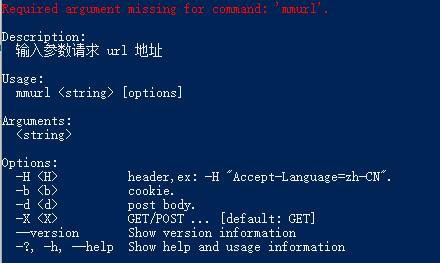
jsonplaceholder.typicode.com is a website used for testing API requests. We can test the functionality of mmurl through its APIs. Use mmurl to send a GET request:
mmurl https://jsonplaceholder.typicode.com/todos/1
request: https://jsonplaceholder.typicode.com/todos/1
{
  "userId": 1,
  "id": 1,
  "title": "delectus aut autem",
  "completed": false
}
Use mmurl to send a POST request:
mmurl -X POST -d '{\"userId\":2}' https://jsonplaceholder.typicode.com/posts
request: https://jsonplaceholder.typicode.com/posts
{
  "userId": 2,
  "id": 101
}
After understanding Maomi.Curl, we can start writing our own tool package. Creating a tool package requires knowledge in two areas: project configuration for the tool package and how to use command-line tools.
A tool package project is essentially a console project, but it requires adding some property configurations in the .csproj file:
<Project Sdk="Microsoft.NET.Sdk">

	<PropertyGroup>
		<OutputType>Exe</OutputType>
		<TargetFramework>net8.0</TargetFramework>
		<ImplicitUsings>enable</ImplicitUsings>
		<Nullable>enable</Nullable>
		<RootNamespace>Maomi.Curl</RootNamespace>
	</PropertyGroup>

	<PropertyGroup>
        <!--Set as a tool package project-->
		<PackAsTool>true</PackAsTool>
        <!--Command-line tool name-->
		<ToolCommandName>mmurl</ToolCommandName>
		<Version>2.0.0</Version>
		<Description>A tool similar to curl</Description>
		<PackageId>Maomi.Curl</PackageId>
	</PropertyGroup>

	<ItemGroup>
	  <PackageReference Include="System.CommandLine" Version="2.0.0-beta4.22272.1" />
	</ItemGroup>

</Project>
First, write the get and post request methods. These methods simply use HttpClient to send requests, and the code is relatively straightforward.
private static async Task GetAsync(string url, IReadOnlyDictionary<string, string> headers, string? cookie = null)
{
	var client = new HttpClient();
	BuildHeader(headers, cookie, client);

	var response = await client.GetAsync(new Uri(url));
	Console.WriteLine(await response.Content.ReadAsStringAsync());
}

private static async Task PostAsync(string url, IReadOnlyDictionary<string, string> headers, string body, string? cookie = null)
{
	var client = new HttpClient();
	BuildHeader(headers, cookie, client);

	var jsonContent = new StringContent(body);
	jsonContent.Headers.ContentType = new System.Net.Http.Headers.MediaTypeHeaderValue("application/json");

	var response = await client.PostAsync(new Uri(url), jsonContent);
	Console.WriteLine(await response.Content.ReadAsStringAsync());
}

private static void BuildHeader(IReadOnlyDictionary<string, string> headers, string? cookie, HttpClient client)
{
	if (headers != null && headers.Count > 0)
	{
		foreach (var item in headers)
			client.DefaultRequestHeaders.Add(item.Key, item.Value);
	}
	if (!string.IsNullOrEmpty(cookie))
	{
		client.DefaultRequestHeaders.Add("Cookie", cookie);
	}
}
So how do we parse the corresponding parameters from command-line arguments? System.CommandLine is a command-line toolkit that helps developers simplify the process of parsing command-line arguments.
static async Task<int> Main(string[] args)
{
	// Define command parameters
	// http header
	var headers = new Option<Dictionary<string, string>?>(
		name: "-H",
		description: "header,ex: -H \"Accept-Language=zh-CN\".",
		parseArgument: result =>
		{
			var dic = new Dictionary<string, string>();
			if (result.Tokens.Count == 0) return dic;

			foreach (var item in result.Tokens)
			{
				var header = item.Value.Split("=");
				dic.Add(header[0], header[1]);
			}
			return dic;
		})
	{
		// Can appear 0 or more times
		Arity = ArgumentArity.ZeroOrMore,
	};

	var cookie = new Option<string?>(
		name: "-b",
		description: "cookie.")
	{
		Arity = ArgumentArity.ZeroOrOne
	};

	var body = new Option<string?>(
		name: "-d",
		description: "post body.")
	{
		Arity = ArgumentArity.ZeroOrOne
	};

	var httpMethod = new Option<string?>(
		name: "-X",
		description: "GET/POST ...",
		getDefaultValue: () => "GET")
	{
		Arity = ArgumentArity.ZeroOrOne
	};

	// Other unnamed parameters
	var otherArgument = new Argument<string>();

	// Build command-line parameters
	var rootCommand = new RootCommand("Enter parameters to request a URL address");
	rootCommand.AddOption(headers);
	rootCommand.AddOption(cookie);
	rootCommand.AddOption(body);
	rootCommand.AddOption(httpMethod);
	rootCommand.Add(otherArgument);

	// Parse parameters and invoke
	rootCommand.SetHandler(async (headers, cookie, body, httpMethod, otherArgument) =>
	{
		Console.WriteLine($"request: {otherArgument}");

		if (headers == null) headers = new Dictionary<string, string>();

		try
		{
			if (!string.IsNullOrEmpty(body) ||
			"POST".Equals(httpMethod, StringComparison.InvariantCultureIgnoreCase))
			{
				ArgumentNullException.ThrowIfNull(body);
				await PostAsync(otherArgument, headers, body, cookie);
			}
			else
			{
				await GetAsync(otherArgument, headers, cookie);
			}
		}
		catch (Exception ex)
		{
			Console.ForegroundColor = ConsoleColor.Red;
			Console.WriteLine(ex.Message);
			Console.ResetColor();
		}

	}, headers, cookie, body, httpMethod, otherArgument);
	return await rootCommand.InvokeAsync(args);
}
After the tool package project is completed, it can be packaged as a NuGet package and uploaded to nuget.org, allowing others to use the tool you developed.

文章评论