Design of a Multilingual Framework
Author blog:
https://www.whuanle.cn
https://www.cnblogs.com/whuanle
Tutorial: https://docs.whuanle.cn/zh/maomi_framework
Framework source code: https://github.com/whuanle/moai
With the internationalization of business, in order to meet the needs of different customer groups, software products must support multiple languages and present interfaces in different languages according to the user's selected language. Frameworks such as ASP.NET Core or ABP both provide multilingual solutions. Although their configuration methods differ, they all use key-value pairs. Developers need to provide values for each key in different languages, and the framework automatically matches the key with the value of the corresponding language according to the request context.
In this chapter, the author briefly explains how to implement an i18n multilingual framework based on ASP.NET Core. Maomi.I18n supports usage in Console, ASP.NET Core, WPF, and other projects, and supports custom multilingual resources.
Experiencing Maomi.I18n
Maomi.I18n is the final code result after completing this chapter. Before implementing a multilingual framework, let's first learn how to use Maomi.I18n.
Console Example
If JSON files are used to store language resource packages, directories need to be created according to the project name. Next, we will create a sample project to demonstrate this process.
Create a project named Demo5.Lib and introduce the Maomi.I18n framework.
Add an i18n directory and corresponding multilingual resource files to both the Demo5.Lib and Console projects.
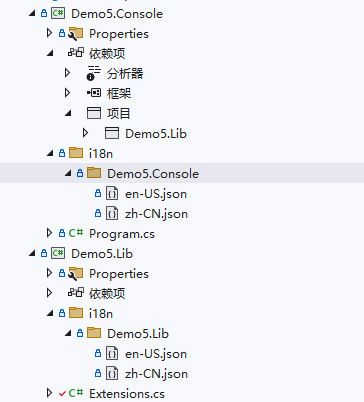
Create en-US.json and zh-CN.json files in the i18n/Demo5.Lib directory.
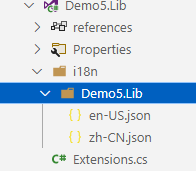
Set the contents of both files to:
{
  "test": "lib"
}
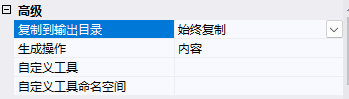
Right-click to modify the properties of en-US.json and zh-CN.json, set Build Action to Content, and Copy to Output Directory to Always.
Then create a Demo5.Console project and reference Demo5.Lib.
Create en-US.json and zh-CN.json files in the i18n/Demo5.Console directory.
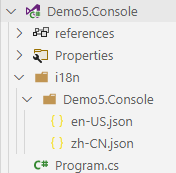
Set the contents of both files to:
{
  "test": "console"
}
Finally, the directory structure will be as follows:
├─Demo5.Console
│  │  Demo5.Console.csproj
│  │  Program.cs
│  │
│  ├─i18n
│  │  └─Demo5.Console
│  │          en-US.json
│  │          zh-CN.json
│
├─Demo5.Lib
│  │  Demo5.Lib.csproj
│  │  Extensions.cs
│  │
│  ├─i18n
│  │  └─Demo5.Lib
│  │          en-US.json
│  │          zh-CN.json
In the Program of Demo5.Console, use IStringLocalizer<T> to obtain the value of a key under different languages.
var ioc = new ServiceCollection();
ioc.AddI18n("zh-CN");
ioc.AddI18nResource(options =>
{
	options.ParseDirectory("i18n");
});

ioc.AddLib();

var services = ioc.BuildServiceProvider();

// Manually set the current request language
using (var c = new I18nScope("en-US"))
{
	var l1 = services.GetRequiredService<IStringLocalizer<Program>>();
	var l2 = services.GetRequiredService<IStringLocalizer<Test>>();
	var s1 = l1["test"];
	var s2 = l2["test"];
	Console.WriteLine(s1);
	Console.WriteLine(s2);
}
Compile Demo5.Console and open the bin/Debug/net8.0 directory. In the i18n directory you will see the following file structure:
.
├── Demo5.Console
│   ├── en-US.json
│   └── zh-CN.json
└── Demo5.Lib
    ├── en-US.json
    └── zh-CN.json
The principle of Maomi.I18n is very simple. Each project defines its own multilingual files. After compilation, all files are merged into the i18n directory for unified management and loading. Each subdirectory corresponds to a project name for easy distinction. When using IStringLocalizer<T> to read a key, the framework automatically loads the JSON file from the directory corresponding to the project where type T resides.
Managing in a Single Project
In the previous example, each project had its own multilingual resource files. Of course, we can also share a single language file across the entire solution without dividing them by directories.
Manually import multilingual resource files:
ioc.AddI18nResource(options =>
{
	options.AddJsonFile("zh-CN", "i18n/zh-CN.json");
	options.AddJsonFile("en-US", "i18n/en-US.json");
});
Or automatically scan a directory and use the JSON file names as language identifiers:
ioc.AddI18nResource(options =>
{
	options.AddJsonDirectory("i18n");
});
When using it, simply inject IStringLocalizer instead of IStringLocalizer<T>:
// Manually set the current request language
using (var c = new I18nScope("en-US"))
{
	var l1 = services.GetRequiredService<IStringLocalizer>();
	var l2 = services.GetRequiredService<IStringLocalizer>();
	var s1 = l1["test"];
	var s2 = l2["test"];
	Console.WriteLine(s1);
	Console.WriteLine(s2);
}
How to Set the Current Language
To set the current context language, simply set the current culture:
CultureInfo.CurrentCulture = new CultureInfo("zh-CN");
Another method is to bind it to the current container context. Developers can freely define how the multilingual context of the current program is resolved.
public class MyI18nContext : I18nContext
{
    public MyI18nContext()
    {
        base.Culture = ...
    }

    public void Set(CultureInfo cultureInfo)
    {
        base.Culture = cultureInfo;
    }
}

builder.Services.AddScoped<I18nContext, MyI18nContext>();
Web Example
Create an API project named Demo5.Api and introduce Maomi.I18n.AspNetCore.
Create a directory i18n/Demo5.Api in the project and add two JSON files.
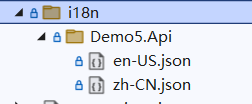
Contents of zh-CN.json:
{
  "购物车": {
    "商品名称": "商品名称",
    "加入时间": "加入时间",
    "清理失效商品": "清理失效商品"
  },
  "会员等级": {
    "用户名": "用户名",
    "积分": "积分:{0}",
    "等级": "等级"
  }
}
Contents of en-US.json:
{
  "购物车": {
    "商品名称": "Product name",
    "加入时间": "Join date",
    "清理失效商品": "Cleaning up failures"
  },
  "会员等级": {
    "用户名": "Username",
    "积分": "Member points:{0}",
    "等级": "Level"
  }
}
The Maomi.I18n framework scans JSON files in the assembly directory and parses them into key-value pairs stored in memory. The key format is the same as the IConfiguration key mentioned in Chapter 3. Chapter 4 also explained how to parse JSON files. For example, to obtain the value of a product name, you can use ["购物车:商品名称"] to access nested values. String interpolation is also supported, such as "积分": "Member points:{0}".
To use Maomi.I18n, only two steps are required: inject the i18n service and import i18n language resources.
// Add i18n multilingual support
builder.Services.AddI18nAspNetCore(defaultLanguage: "zh-CN");
// Configure multilingual source - JSON
builder.Services.AddI18nResource(option =>
{
    var basePath = "i18n";
    option.AddJson(basePath);
});
Next, add the i18n middleware. The middleware parses the language from the user's request context.
var app = builder.Build();
app.UseI18n();	// <- place near the beginning of the middleware pipeline
Then add a controller or directly write middleware for testing. Simply inject the IStringLocalizer service.
app.UseRouting();
app.Use(async (HttpContext context, RequestDelegate next) =>
{
	var localizer = context.RequestServices.GetRequiredService<IStringLocalizer<Program>>();
	await context.Response.WriteAsync(localizer["购物车:商品名称"]);
	return;
});
Start the program and open the URL
http://localhost:5177/test?culture=en-US&ui-culture=en-US
You will observe the output Product name.

Carrying Language Information in Requests
Maomi.I18n is essentially an extension built on top of the multilingual interfaces of ASP.NET Core. Therefore, it does not need to do much language parsing itself, but instead relies on the built-in ASP.NET Core localization functionality to determine the language used in client requests and related context information.
In ASP.NET Core, you can introduce the RequestLocalizationMiddleware middleware using app.UseRequestLocalization(); to provide localization handling. The middleware automatically calls IRequestCultureProvider to determine the request language. Then we can obtain the corresponding language using:
context.Features.Get<IRequestCultureFeature>();
This simplifies the design of our multilingual framework.
ASP.NET Core defines an IRequestCultureProvider interface used to parse the cultural information carried in client requests and determine the language used. ASP.NET Core itself provides three implementations of this interface, meaning it has three built-in ways to obtain the current request language. Let's examine how these methods parse the language identifier from the request context.
The first method uses URL query parameters. The provider is QueryStringRequestCultureProvider. The URL must include two parameters: culture and ui-culture. Example format:
?culture=en-US&ui-culture=en-US
The second method uses cookies. The provider is CookieRequestCultureProvider. The cookie must include a cookie named .AspNetCore.Culture. Example format:
c=en-US|uic=en-US
Example:
.AspNetCore.Culture=c=en-US|uic=en-US
The third method uses HTTP headers, which is also the most common approach. The provider is AcceptLanguageHeaderRequestCultureProvider. Example format:
Accept-Language: zh-CN,zh;q=0.9
Developers can modify the configuration of these three methods according to their needs, allowing language parsing from different request locations or parameter names.
new QueryStringRequestCultureProvider()
{
	QueryStringKey = "lan",
	UIQueryStringKey = "ui"
}
Since ASP.NET Core automatically parses the request language, we only need to retrieve the language information from the IRequestCultureFeature service without parsing it ourselves.
var requestCultureFeature = context.Features.Get<IRequestCultureFeature>();
var requestCulture = requestCultureFeature?.RequestCulture;
When a client sends a request, ASP.NET Core automatically retrieves the IRequestCultureProvider service list from RequestLocalizationOptions and calls them one by one until it determines the language information of the request. By default, ASP.NET Core executes QueryStringRequestCultureProvider, CookieRequestCultureProvider, and AcceptLanguageHeaderRequestCultureProvider in order. If the first provider cannot find the corresponding parameters, the next provider will attempt to parse the request language. If none of the default providers succeed, user-defined providers will be called. Once a result is obtained, no further providers are invoked. Of course, developers can change the order of these components, but that will not be discussed here.
Implementing an IRequestCultureProvider is simple. For example, suppose we require using c and uic parameters in the URL to carry multilingual information. The example code is as follows:
	// Custom request culture provider
	// Or directly inherit from RequestCultureProvider
	public class I18nRequestCultureProvider : IRequestCultureProvider
	{
		private readonly string _defaultLanguage;
		public I18nRequestCultureProvider(string defaultLanguage)
		{
			_defaultLanguage = defaultLanguage;
		}

		private const string RouteValueKey = "c";
		private const string UIRouteValueKey = "uic";
		public override Task<ProviderCultureResult> DetermineProviderCultureResult(HttpContext  httpContext)
		{
			var request = httpContext.Request;
			if (!request.RouteValues.Any())
			{
				return NullProviderCultureResult;
			}

			string? queryCulture = null;
			string? queryUICulture = null;

			// Parse from route values
			if (!string.IsNullOrWhiteSpace(RouteValueKey))
			{
				queryCulture = request.RouteValues[RouteValueKey]?.ToString();
			}

            // Other steps omitted

			var providerResultCulture = new ProviderCultureResult(queryCulture, queryUICulture);

			return Task.FromResult<ProviderCultureResult?>(providerResultCulture);
		}
	}
Developers need to parse the request parameters in HttpContext to determine the language used in the current request. If the language cannot be determined, NullProviderCultureResult should be returned so the framework can continue to the next IRequestCultureProvider. If the request language is found, a ProviderCultureResult should be returned.
It should be noted that services implementing the IRequestCultureProvider interface cannot be injected through the DI container; instead, they must be configured in RequestLocalizationOptions.
			services.Configure<RequestLocalizationOptions>(options =>
			{
				// By default, there are three built-in request culture providers that will first attempt to identify the language from these providers
// QueryStringRequestCultureProvider
// CookieRequestCultureProvider
// AcceptLanguageHeaderRequestCultureProvider
// Custom request language provider
options.RequestCultureProviders.Add(new I18nRequestCultureProvider(defaultLanguage));
});
If you want to adjust the order of the providers, you only need to modify the IRequestCultureProvider collection in options.RequestCultureProviders.
Implementing the i18n Framework
In this section, we will introduce how to design and implement an i18n framework. The complete code of the framework is shown below.
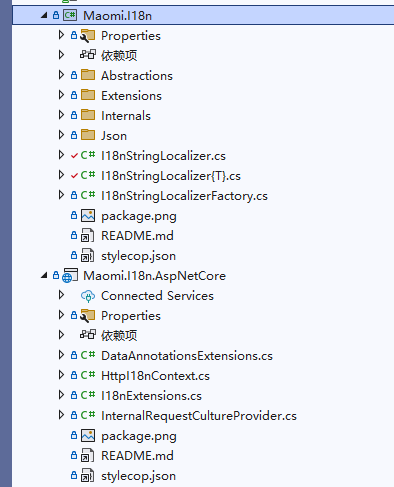
Some file descriptions are as follows:
// Current program multilingual context
I18nContext.cs
// Multilingual resource interface definition
I18nResource.cs
// i18n language resource factory
I18nResourceFactory.cs
// Set the current language scope
I18nScope.cs
// Service injection extensions
I18nExtensions.cs
// Extension for loading multilingual resources from json files
JsonResourceExtensions.cs
// Implementation of I18nResourceFactory
InternalI18nResourceFactory.cs
// Custom request language resolver
I18nRequestCultureProvider.cs
// Implementation of the IStringLocalizer interface
I18nStringLocalizer.cs
// Implementation of the IStringLocalizer<T> interface
I18nStringLocalizer`.cs
// Implement I18nResource and import language resources through json files
JsonResource.cs
// Helper class for parsing json
ReadJsonHelper.cs
Abstract Interfaces
When designing a multilingual framework, we first divide the framework into three roles: the user, the framework itself, and the multilingual provider. The user obtains the language value corresponding to a key through an abstract interface, while the multilingual provider supplies multilingual key-value data through an abstract interface. Therefore, the abstract interfaces are mainly designed for users and multilingual providers. The framework itself acts as a bridge between users and providers. In addition, some context classes and model classes need to be defined to pass information.
First consider how to store multilingual resource data, for example embedding them into assemblies, carrying JSON files in the project, storing them in Redis, etc. The i18n framework does not need to care where the multilingual data is stored; it only needs to load them through interfaces.
Define an I18nResource interface. The i18n framework loads multilingual data through this interface.
/// <summary>
/// i18n language resource.
/// </summary>
/// <remarks>Each I18nResource corresponds to a resource file for a specific language.</remarks>
public interface I18nResource
{
    /// <summary>
    /// The language provided by this resource.
    /// </summary>
    CultureInfo SupportedCulture { get; }

    /// <summary>
    /// Gets the string resource with the given name.
    /// </summary>
    /// <param name="culture">Language name.</param>
    /// <param name="name">String name.</param>
    /// <returns><see cref="LocalizedString"/>.</returns>
    LocalizedString Get(string culture, string name);

    /// <summary>
    /// Gets the string resource with the given name.
    /// </summary>
    /// <param name="culture">Language name.</param>
    /// <param name="name">String name.</param>
    /// <param name="arguments">String interpolation arguments.</param>
    /// <returns><see cref="LocalizedString"/>.</returns>
    LocalizedString Get(string culture, string name, params object[] arguments);

    /// <summary>
    /// Gets all strings from the i18n resource file.
    /// </summary>
    /// <param name="includeParentCultures"></param>
    /// <returns><see cref="LocalizedString"/>.</returns>
    public IEnumerable<LocalizedString> GetAllStrings(bool includeParentCultures);
}

/// <summary>
/// i18n language resource.
/// </summary>
/// <remarks>Each I18nResource corresponds to a resource file for a specific language.</remarks>
/// <typeparam name="T">Type.</typeparam>
public interface I18nResource<T> : I18nResource
{
}
Next, create a multilingual management factory to manage the I18nResource list and support retrieving multilingual resource files from the container.
/// <summary>
/// I18n resource factory.
/// </summary>
public interface I18nResourceFactory
{
    /// <summary>
    /// Currently supported languages.
    /// </summary>
    IList<CultureInfo> SupportedCultures { get; }

    /// <summary>
    /// All resource providers.
    /// </summary>
    IList<I18nResource> Resources { get; }

    /// <summary>
    /// Resource services in the container.
    /// </summary>
    IList<Type> ServiceResources { get; }

    /// <summary>
    /// Add an i18n language resource. This type will be retrieved from the container.
    /// </summary>
    /// <param name="resourceType">i18n language resource.</param>
    /// <returns><see cref="I18nResourceFactory"/>.</returns>
    I18nResourceFactory AddServiceType(Type resourceType);

    /// <summary>
    /// Add an i18n language resource.
    /// </summary>
    /// <param name="resource">i18n language resource.</param>
    /// <returns><see cref="I18nResourceFactory"/>.</returns>
    I18nResourceFactory Add(I18nResource resource);

    /// <summary>
    /// Add an i18n language resource.
    /// </summary>
    /// <typeparam name="T">Type.</typeparam>
    /// <param name="resource">i18n language resource.</param>
    /// <returns><see cref="I18nResourceFactory"/>.</returns>
    I18nResourceFactory Add<T>(I18nResource<T> resource);
}
Next is the abstraction of the user-facing interface.
ASP.NET Core retrieves the current request language through IRequestCultureProvider. To simplify the code for parsing language identifiers, define an I18nContext type to store the multilingual identifier parsed from the request context. Downstream services in the i18n framework can obtain the current request language through I18nContext.
// Records the i18n information of the current request
public class I18nContext
{
    // The language requested by the current user
    public CultureInfo Culture { get; internal set; } = CultureInfo.CurrentCulture;
}
IStringLocalizer and IStringLocalizer<T> are interfaces for multilingual services in ASP.NET Core. Users can query multilingual strings through these two interfaces. We implement two corresponding services that look up the corresponding string values from the I18nResource collection.
。
/// <summary>
/// Represents a service that provides localized strings.
/// </summary>
public class I18nStringLocalizer : IStringLocalizer
{
    private readonly IServiceProvider _serviceProvider;
    private readonly I18nContext _context;
    private readonly I18nResourceFactory _resourceFactory;

    /// <summary>
    /// Initializes a new instance of the <see cref="I18nStringLocalizer"/> class.
    /// </summary>
    /// <param name="context"></param>
    /// <param name="resourceFactory"></param>
    /// <param name="serviceProvider"></param>
    public I18nStringLocalizer(I18nContext context, I18nResourceFactory resourceFactory, IServiceProvider serviceProvider)
    {
        _context = context;
        _resourceFactory = resourceFactory;
        _serviceProvider = serviceProvider;
    }

    /// <inheritdoc/>
    public LocalizedString this[string name] => Find(name);

    /// <inheritdoc/>
    public LocalizedString this[string name, params object[] arguments] => Find(name, arguments);

    /// <inheritdoc/>
    public IEnumerable<LocalizedString> GetAllStrings(bool includeParentCultures)
    {
        foreach (var serviceType in _resourceFactory.ServiceResources)
        {
            var resource = _serviceProvider.GetRequiredService(serviceType) as I18nResource;
            if (resource == null)
            {
                continue;
            }

            foreach (var item in resource.GetAllStrings(includeParentCultures))
            {
                yield return item;
            }
        }

        foreach (var resource in _resourceFactory.Resources)
        {
            foreach (var item in resource.GetAllStrings(includeParentCultures))
            {
                yield return item;
            }
        }
    }

    private LocalizedString Find(string name)
    {
        foreach (var serviceType in _resourceFactory.ServiceResources)
        {
            var resource = _serviceProvider.GetRequiredService(serviceType) as I18nResource;
            if (resource == null)
            {
                continue;
            }

            if (_context.Culture.Name != resource.SupportedCulture.Name)
            {
                continue;
            }

            var result = resource.Get(_context.Culture.Name, name);
            if (result == null || result.ResourceNotFound)
            {
                continue;
            }

            return result;
        }

        foreach (var resource in _resourceFactory.Resources)
        {
            if (_context.Culture.Name != resource.SupportedCulture.Name)
            {
                continue;
            }

            var result = resource.Get(_context.Culture.Name, name);
            if (result == null || result.ResourceNotFound)
            {
                continue;
            }

            return result;
        }

        // When none of the resources can be found, use the default value
        return new LocalizedString(name, name);
    }

    private LocalizedString Find(string name, params object[] arguments)
    {
        foreach (var serviceType in _resourceFactory.ServiceResources)
        {
            var resource = _serviceProvider.GetRequiredService(serviceType) as I18nResource;
            if (resource == null)
            {
                continue;
            }

            if (_context.Culture.Name != resource.SupportedCulture.Name)
            {
                continue;
            }

            var result = resource.Get(_context.Culture.Name, name, arguments);
            if (result == null || result.ResourceNotFound)
            {
                continue;
            }

            return result;
        }

        foreach (var resource in _resourceFactory.Resources)
        {
            if (_context.Culture.Name != resource.SupportedCulture.Name)
            {
                continue;
            }

            var result = resource.Get(_context.Culture.Name, name, arguments);
            if (result == null || result.ResourceNotFound)
            {
                continue;
            }

            return result;
        }

        // When none of the resources can be found, use the default value
        return new LocalizedString(name, string.Format(name, arguments));
    }
}
/// <summary>
/// Represents a service that provides localized strings.
/// </summary>
/// <typeparam name="T">Type.</typeparam>
public class I18nStringLocalizer<T> : IStringLocalizer<T>
{
    private readonly IServiceProvider _serviceProvider;
    private readonly I18nContext _context;
    private readonly I18nResourceFactory _resourceFactory;

    /// <summary>
    /// Initializes a new instance of the <see cref="I18nStringLocalizer{T}"/> class.
    /// </summary>
    /// <param name="context"></param>
    /// <param name="resourceFactory"></param>
    /// <param name="serviceProvider"></param>
    public I18nStringLocalizer(I18nContext context, I18nResourceFactory resourceFactory, IServiceProvider serviceProvider)
    {
        _context = context;
        _resourceFactory = resourceFactory;
        _serviceProvider = serviceProvider;
    }

    /// <inheritdoc/>
    public LocalizedString this[string name] => Find(name);

    /// <inheritdoc/>
    public LocalizedString this[string name, params object[] arguments] => Find(name, arguments);

    /// <inheritdoc/>
    public IEnumerable<LocalizedString> GetAllStrings(bool includeParentCultures)
    {
        foreach (var serviceType in _resourceFactory.ServiceResources)
        {
            var resource = _serviceProvider.GetRequiredService(serviceType) as I18nResource;
            if (resource == null)
            {
                continue;
            }

            foreach (var item in resource.GetAllStrings(includeParentCultures))
            {
                yield return item;
            }
        }

        foreach (var resource in _resourceFactory.Resources)
        {
            foreach (var item in resource.GetAllStrings(includeParentCultures))
            {
                yield return item;
            }
        }
    }

    private LocalizedString Find(string name)
    {
        var resourceType = typeof(I18nResource<T>);

        foreach (var serviceType in _resourceFactory.ServiceResources)
        {
            if (!serviceType.IsGenericType && serviceType.GenericTypeArguments[0].Assembly != typeof(T).Assembly)
            {
                continue;
            }

            var resource = _serviceProvider.GetRequiredService(serviceType) as I18nResource;
            if (resource == null)
            {
                continue;
            }

            if (_context.Culture.Name != resource.SupportedCulture.Name)
            {
                continue;
            }

            var result = resource.Get(_context.Culture.Name, name);
            if (result == null || result.ResourceNotFound)
            {
                continue;
            }

            return result;
        }

        foreach (var resource in _resourceFactory.Resources)
        {
            if (_context.Culture.Name != resource.SupportedCulture.Name)
            {
                continue;
            }

            // I18nResource<T>
            if (!resource.GetType().IsGenericType || resource.GetType().GenericTypeArguments[0].Assembly != typeof(T).Assembly)
            {
                continue;
            }

            var result = resource.Get(_context.Culture.Name, name);
            if (result == null || result.ResourceNotFound)
            {
                continue;
            }

            return result;
        }

        // When none of the resources can be found, use the default value
        return new LocalizedString(name, name);
    }

    private LocalizedString Find(string name, params object[] arguments)
    {
        var resourceType = typeof(I18nResource<T>);

        foreach (var serviceType in _resourceFactory.ServiceResources)
        {
            if (!serviceType.IsGenericType && serviceType.GenericTypeArguments[0].Assembly != typeof(T).Assembly)
            {
                continue;
            }

            var resource = _serviceProvider.GetRequiredService(serviceType) as I18nResource;
            if (resource == null)
            {
                continue;
            }

            if (_context.Culture.Name != resource.SupportedCulture.Name)
            {
                continue;
            }

            var result = resource.Get(_context.Culture.Name, name, arguments);
            if (result == null || result.ResourceNotFound)
            {
                continue;
            }

            return result;
        }

        foreach (var resource in _resourceFactory.Resources)
        {
            if (_context.Culture.Name != resource.SupportedCulture.Name)
            {
                continue;
            }

            // I18nResource<T>
            if (!resource.GetType().IsGenericType || resource.GetType().GenericTypeArguments[0].Assembly != typeof(T).Assembly)
            {
                continue;
            }

            var result = resource.Get(_context.Culture.Name, name, arguments);
            if (result == null || result.ResourceNotFound)
            {
                continue;
            }

            return result;
        }

        // When none of the resources can be found, use the default value
        return new LocalizedString(name, string.Format(name, arguments));
    }
}
The role of CultureInfoScope is very simple: within its scope, it modifies the value of CultureInfo.CurrentCulture.
.
/// <summary>
/// i18n scope.
/// </summary>
public class I18nScope : IDisposable
{
    private readonly CultureInfo _defaultCultureInfo;

    /// <summary>
    /// Initializes a new instance of the <see cref="I18nScope"/> class.
    /// </summary>
    /// <param name="language"></param>
    public I18nScope(string language)
    {
        _defaultCultureInfo = CultureInfo.CurrentCulture;
        CultureInfo.CurrentCulture = CultureInfo.CreateSpecificCulture(language);
    }

    /// <inheritdoc/>
    public void Dispose()
    {
        CultureInfo.CurrentCulture = _defaultCultureInfo;
    }
}
At this point, we have designed the abstraction of the i18n framework. Next, we will further implement the i18n framework.
Implement reading language resources from JSON
Maomi.I18n itself provides an I18nResource service that reads multilingual resource packages from JSON files. Regardless of where multilingual resources are loaded from, most of them can be stored in memory in a key-value (kv) form. Therefore, we will explain how developers can implement a DictionaryResource service to store multilingual resource content loaded from different sources.
To ensure that each project can carry its own language information, we can require creating an i18n directory under the project, and then creating a subdirectory with the same name as the current project. The language files for that project are stored inside this subdirectory.
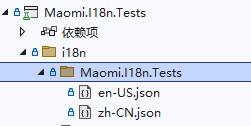
The advantage of doing this is that when compiling the project, the i18n directory under the main project will collect language files from all projects without conflicts. In addition, when we package the project using NuGet, the NuGet package will also include these files. After pulling this NuGet package, these multilingual files can also be used.
/// <summary>
/// Dictionary storage for multilingual file resources.
/// </summary>
public class DictionaryResource : I18nResource
{
    /// <inheritdoc/>
    public CultureInfo SupportedCulture => _cultureInfo;

    private readonly CultureInfo _cultureInfo;
    private readonly IReadOnlyDictionary<string, LocalizedString> _kvs;

    /// <summary>
    /// Initializes a new instance of the <see cref="DictionaryResource"/> class.
    /// </summary>
    /// <param name="cultureInfo"></param>
    /// <param name="kvs"></param>
    public DictionaryResource(CultureInfo cultureInfo, IReadOnlyDictionary<string, object> kvs)
    {
        _cultureInfo = cultureInfo;
        _kvs = kvs.ToDictionary(x => x.Key, x => new LocalizedString(x.Key, x.Value.ToString()!));
    }

    /// <inheritdoc/>
    public virtual LocalizedString Get(string culture, string name)
    {
        if (culture != _cultureInfo.Name)
        {
            return new LocalizedString(name, name, resourceNotFound: true);
        }

        var value = _kvs.GetValueOrDefault(name);
        if (value == null)
        {
            return new LocalizedString(name, name, resourceNotFound: true);
        }

        return value;
    }

    /// <inheritdoc/>
    public virtual LocalizedString Get(string culture, string name, params object[] arguments)
    {
        if (culture != _cultureInfo.Name)
        {
            return new LocalizedString(name, name, resourceNotFound: true);
        }

        var value = _kvs.GetValueOrDefault(name);
        if (value == null)
        {
            return new LocalizedString(name, name, resourceNotFound: true);
        }

        return new LocalizedString(name, string.Format(value, arguments));
    }

    /// <inheritdoc/>
    public virtual IEnumerable<LocalizedString> GetAllStrings(bool includeParentCultures)
    {
        return _kvs.Values;
    }
}
/// <summary>
/// Dictionary storage for multilingual file resources.
/// </summary>
/// <typeparam name="TResource">Type.</typeparam>
public class DictionaryResource<TResource> : DictionaryResource, I18nResource<TResource>
{
    private readonly Assembly _assembly;

    /// <summary>
    /// Initializes a new instance of the <see cref="DictionaryResource{TResource}"/> class.
    /// </summary>
    /// <param name="cultureInfo"></param>
    /// <param name="kvs"></param>
    /// <param name="assembly"></param>
    public DictionaryResource(CultureInfo cultureInfo, IReadOnlyDictionary<string, object> kvs, Assembly assembly)
        : base(cultureInfo, kvs)
    {
        _assembly = assembly;
    }

    /// <inheritdoc/>
    public override LocalizedString Get(string culture, string name)
    {
        if (typeof(TResource).Assembly != _assembly)
        {
            return new LocalizedString(name, name, resourceNotFound: true);
        }

        return base.Get(culture, name);
    }

    /// <inheritdoc/>
    public override LocalizedString Get(string culture, string name, params object[] arguments)
    {
        if (typeof(TResource).Assembly != _assembly)
        {
            return new LocalizedString(name, name, resourceNotFound: true);
        }

        return base.Get(culture, name, arguments);
    }
}
Write extension methods to inject JSON language resources. This extension method will only load JSON files under the directory with the same name as the assembly where type T is located.
。
/// <summary>
/// Json multilingual file resources.
/// </summary>
public static class JsonResourceExtensions
{
    /// <summary>
    /// Scan all subdirectories under the directory and automatically match them to the corresponding project/assembly. The json file name will be used as the language name.
    /// </summary>
    /// <param name="resourceFactory"></param>
    /// <param name="basePath"></param>
    /// <returns><see cref="I18nResourceFactory"/>.</returns>
    public static I18nResourceFactory ParseDirectory(
        this I18nResourceFactory resourceFactory,
        string basePath)
    {
        var basePathDirectoryInfo = new DirectoryInfo(basePath);
        Queue<DirectoryInfo> directoryInfos = new Queue<DirectoryInfo>();
        var assemblies = AppDomain.CurrentDomain.GetAssemblies();
        var basePathFullName = basePathDirectoryInfo.FullName;

        directoryInfos.Enqueue(basePathDirectoryInfo);

        while (directoryInfos.Count > 0)
        {
            var curDirectory = directoryInfos.Dequeue();
            var lanDir = curDirectory.GetDirectories();
            foreach (var lan in lanDir)
            {
                directoryInfos.Enqueue(lan);
            }

            var files = curDirectory.GetFiles().Where(x => x.Name.EndsWith(".json")).ToArray();
            if (files.Length == 0)
            {
                continue;
            }

            // Remove the prefix part of the path
            var curPath = curDirectory.FullName[basePathFullName.Length..].Trim('/', '\\');

            var assembly = assemblies.FirstOrDefault(x => string.Equals(curPath, x.GetName().Name, StringComparison.CurrentCultureIgnoreCase));
            if (assembly == null)
            {
                continue;
            }

            foreach (var file in files)
            {
                var language = Path.GetFileNameWithoutExtension(file.Name);
                var text = File.ReadAllText(file.FullName);
                var dic = ReadJsonHelper.Read(new ReadOnlySequence<byte>(Encoding.UTF8.GetBytes(text)), new JsonReaderOptions { AllowTrailingCommas = true });

                DictionaryResource jsonResource = (Activator.CreateInstance(
                    typeof(DictionaryResource<>).MakeGenericType(assembly.GetTypes()[0]),
                    new object[] { new CultureInfo(language), dic, assembly }) as DictionaryResource)!;
                resourceFactory.Add(jsonResource);
            }
        }

        return resourceFactory;
    }

    /// <summary>
    /// Add json file resources. The json file name will be used as the language name.
    /// </summary>
    /// <param name="resourceFactory"></param>
    /// <param name="basePath">Base path.</param>
    /// <returns><see cref="I18nResourceFactory"/>.</returns>
    public static I18nResourceFactory AddJsonDirectory(
        this I18nResourceFactory resourceFactory,
        string basePath)
    {
        var rootDir = new DirectoryInfo(basePath);

        var files = rootDir.GetFiles().Where(x => x.Name.EndsWith(".json"));
        foreach (var file in files)
        {
            var language = Path.GetFileNameWithoutExtension(file.Name);
            var text = File.ReadAllText(file.FullName);
            var dic = ReadJsonHelper.Read(new ReadOnlySequence<byte>(Encoding.UTF8.GetBytes(text)), new JsonReaderOptions { AllowTrailingCommas = true });

            DictionaryResource jsonResource = new DictionaryResource(new CultureInfo(language), dic);
            resourceFactory.Add(jsonResource);
        }

        return resourceFactory;
    }

    /// <summary>
    /// Add json file resources. All json files in the directory will be categorized under this assembly. The json file name will be used as the language name.
    /// </summary>
    /// <typeparam name="T">Type.</typeparam>
    /// <param name="resourceFactory"></param>
    /// <param name="basePath">Base path.</param>
    /// <returns><see cref="I18nResourceFactory"/>.</returns>
    public static I18nResourceFactory AddJsonDirectory<T>(
        this I18nResourceFactory resourceFactory,
        string basePath)
        where T : class
    {
        var rootDir = new DirectoryInfo(basePath);

        var files = rootDir.GetFiles().Where(x => x.Name.EndsWith(".json"));
        foreach (var file in files)
        {
            var language = Path.GetFileNameWithoutExtension(file.Name);
            var text = File.ReadAllText(file.FullName);
            var dic = ReadJsonHelper.Read(new ReadOnlySequence<byte>(Encoding.UTF8.GetBytes(text)), new JsonReaderOptions { AllowTrailingCommas = true });

            DictionaryResource<T> jsonResource = new DictionaryResource<T>(new CultureInfo(language), dic, typeof(T).Assembly);
            resourceFactory.Add(jsonResource);
        }

        return resourceFactory;
    }

    /// <summary>
    /// Add json file resources.
    /// </summary>
    /// <param name="resourceFactory"></param>
    /// <param name="language">Language.</param>
    /// <param name="jsonFile">Json file path.</param>
    /// <returns><see cref="I18nResourceFactory"/>.</returns>
    public static I18nResourceFactory AddJsonFile(this I18nResourceFactory resourceFactory, string language, string jsonFile)
    {
        string s = File.ReadAllText(jsonFile);
        Dictionary<string, object> kvs = ReadJsonHelper.Read(new ReadOnlySequence<byte>(Encoding.UTF8.GetBytes(s)), new JsonReaderOptions
        {
            AllowTrailingCommas = true
        });

        DictionaryResource resource = new DictionaryResource(new CultureInfo(language), kvs);
        resourceFactory.Add(resource);
        return resourceFactory;
    }

    /// <summary>
    /// Add json file resources.
    /// </summary>
    /// <typeparam name="T">Type.</typeparam>
    /// <param name="resourceFactory"></param>
    /// <param name="language">Language.</param>
    /// <param name="jsonFile">Json file path.</param>
    /// <returns><see cref="I18nResourceFactory"/>.</returns>
    public static I18nResourceFactory AddJsonFile<T>(this I18nResourceFactory resourceFactory, string language, string jsonFile)
        where T : class
    {
        string s = File.ReadAllText(jsonFile);
        Dictionary<string, object> kvs = ReadJsonHelper.Read(new ReadOnlySequence<byte>(Encoding.UTF8.GetBytes(s)), new JsonReaderOptions
        {
            AllowTrailingCommas = true
        });

        DictionaryResource<T> resource = new DictionaryResource<T>(new CultureInfo(language), kvs, typeof(T).Assembly);
        resourceFactory.Add(resource);
        return resourceFactory;
    }
}
After the middleware is prepared, we start implementing the management of the I18nResourceFactory interface so that various language resource services can be properly managed.
/// <summary>
/// i18n language resource manager.
/// </summary>
public class InternalI18nResourceFactory : I18nResourceFactory
{
    private readonly List<CultureInfo> _supportedCultures;
    private readonly List<I18nResource> _resources;
    private readonly List<Type> _serviceResources;

    /// <summary>
    /// Initializes a new instance of the <see cref="InternalI18nResourceFactory"/> class.
    /// </summary>
    public InternalI18nResourceFactory()
    {
        _supportedCultures = new();
        _resources = new();
        _serviceResources = new();
    }

    /// <inheritdoc/>
    public IList<CultureInfo> SupportedCultures => _supportedCultures;

    /// <inheritdoc/>
    public IList<I18nResource> Resources => _resources;

    /// <inheritdoc/>
    public IList<Type> ServiceResources => _serviceResources;

    /// <inheritdoc/>
    public I18nResourceFactory Add(I18nResource resource)
    {
        _supportedCultures.Add(resource.SupportedCulture);
        _resources.Add(resource);
        return this;
    }

    /// <inheritdoc/>
    public I18nResourceFactory Add<T>(I18nResource<T> resource)
    {
        _supportedCultures.Add(resource.SupportedCulture);
        _resources.Add(resource);
        return this;
    }

    /// <inheritdoc/>
    public I18nResourceFactory AddServiceType(Type resourceType)
    {
        _serviceResources.Add(resourceType);
        return this;
    }
}
Implement the IStringLocalizerFactory interface and create an IStringLocalizer object based on the generic type.
。
/// <summary>
/// Represents a factory that creates <see cref="IStringLocalizer"/> instances.
/// </summary>
public class I18nStringLocalizerFactory : IStringLocalizerFactory
{
    private readonly I18nResourceFactory _i18nResourceFactory;
    private readonly IServiceProvider _serviceProvider;

    /// <summary>
    /// Initializes a new instance of the <see cref="I18nStringLocalizerFactory"/> class.
    /// </summary>
    /// <param name="i18nResourceFactory"></param>
    /// <param name="serviceProvider"></param>
    public I18nStringLocalizerFactory(I18nResourceFactory i18nResourceFactory, IServiceProvider serviceProvider)
    {
        _i18nResourceFactory = i18nResourceFactory;
        _serviceProvider = serviceProvider;
    }

    /// <inheritdoc/>
    public IStringLocalizer Create(Type resourceSource)
    {
        var type = typeof(I18nStringLocalizer<>).MakeGenericType(resourceSource);
        return (_serviceProvider.GetRequiredService(type) as IStringLocalizer)!;
    }

    /// <inheritdoc/>
    public IStringLocalizer Create(string baseName, string location)
    {
        return _serviceProvider.GetRequiredService<IStringLocalizer>();
    }
}
Finally, add the AddI18n extension method in I18nExtensions to register the related services.
/// <summary>
/// i18n extensions.
/// </summary>
public static class I18nExtensions
{
    /// <summary>
    /// Add i18n support services.
    /// </summary>
    /// <param name="services"></param>
    /// <param name="defaultLanguage">Default language.</param>
    public static void AddI18n(this IServiceCollection services, string defaultLanguage = "zh-CN")
    {
        InternalI18nResourceFactory resourceFactory = new InternalI18nResourceFactory();

        // i18n context
        services.AddScoped<I18nContext, DefaultI18nContext>();

        // Register i18n services
        services.AddSingleton<I18nResourceFactory>(s => resourceFactory);
        services.AddScoped<IStringLocalizerFactory, I18nStringLocalizerFactory>();
        services.AddScoped<IStringLocalizer, I18nStringLocalizer>();
        services.TryAddEnumerable(new ServiceDescriptor(typeof(IStringLocalizer<>), typeof(I18nStringLocalizer<>), ServiceLifetime.Scoped));
    }

    /// <summary>
    /// Add i18n resources.
    /// </summary>
    /// <param name="services"></param>
    /// <param name="resourceFactory"></param>
    public static void AddI18nResource(this IServiceCollection services, Action<I18nResourceFactory> resourceFactory)
    {
        var service = services.BuildServiceProvider().GetRequiredService<I18nResourceFactory>();
        resourceFactory.Invoke(service);
    }
}
For ASP.NET Core applications, some additional extension functions need to be added:
/// <summary>
/// i18n extensions.
/// </summary>
public static class I18nExtensions
{
    /// <summary>
    /// Add i18n support services.
    /// </summary>
    /// <param name="services"></param>
    /// <param name="defaultLanguage">Default language.</param>
    public static void AddI18nAspNetCore(this IServiceCollection services, string defaultLanguage = "zh-CN")
    {
        services.AddI18n(defaultLanguage);

        var resourceFactory = services.BuildServiceProvider().GetRequiredService<I18nResourceFactory>();

        // Built-in ASP.NET Core service
        services.AddLocalization();

        // Configure ASP.NET Core localization services
        services.Configure<RequestLocalizationOptions>(options =>
        {
            options.ApplyCurrentCultureToResponseHeaders = true;
            options.DefaultRequestCulture = new RequestCulture(culture: defaultLanguage, uiCulture: defaultLanguage);
            options.SupportedCultures = resourceFactory.SupportedCultures;
            options.SupportedUICultures = resourceFactory.SupportedCultures;

            // Three request language providers are included by default, which will first try to determine the language from them.
            // QueryStringRequestCultureProvider
            // CookieRequestCultureProvider
            // AcceptLanguageHeaderRequestCultureProvider
            // Custom request language provider
            options.RequestCultureProviders.Add(new InternalRequestCultureProvider(options));
        });

        // i18n context
        services.AddScoped<I18nContext, HttpI18nContext>();
    }

    /// <summary>
    /// i18n middleware.
    /// </summary>
    /// <param name="app"></param>
    public static void UseI18n(this IApplicationBuilder app)
    {
        var options = app.ApplicationServices.GetRequiredService<IOptions<RequestLocalizationOptions>>();
        app.UseRequestLocalization(options.Value);
    }
}
/// <summary>
/// Use multilingual support for model validation.
/// </summary>
public static partial class DataAnnotationsExtensions
{
    /// <summary>
    /// Inject i18n services for API model validation.
    /// </summary>
    /// <param name="builder"></param>
    /// <returns><see cref="IMvcBuilder"/>.</returns>
    public static IMvcBuilder AddI18nDataAnnotation(this IMvcBuilder builder)
    {
        builder
            .AddDataAnnotationsLocalization(options =>
            {
                options.DataAnnotationLocalizerProvider = (modelType, stringLocalizerFactory) =>
                stringLocalizerFactory.Create(modelType);
            });
        return builder;
    }
}
In this chapter, we explained how to write a globalization language library. Its implementation is relatively simple and may not fully meet the needs of business systems. You can build a more practical i18n library based on the content of this chapter and the requirements of your business system.
Unit Testing
Writing unit tests and performance tests is one of the skills developers should master. Chapter 4 of this book introduced examples of writing performance tests. In this chapter, we continue to introduce methods for writing unit tests. Readers can also find more unit test examples in the source code of the Maomi repository.
Create an xUnit unit test project. The project file structure is as follows:
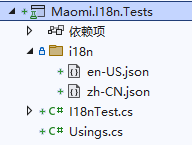
Add references to the Maomi.I18n and Microsoft.AspNetCore.Mvc.Testing libraries.
Create a test method in I18nTest:
[Fact]
public async Task I18n_Request()
{
}
First build a Web Host for testing and inject the required services to simulate starting a Web service.
using var host = await new HostBuilder()
	.ConfigureWebHost(webBuilder =>
	{
		webBuilder
			.UseTestServer()
			.ConfigureServices(services =>
			{
				services.AddControllers();
				services.AddI18n(defaultLanguage: "zh-CN");
				services.AddI18nResource(option =>
				{
					var basePath = "i18n";
					option.AddJson(basePath);
				});
			})
			.Configure(app =>
			{
				app.UseI18n();
				app.UseRouting();
				app.Use(async (HttpContext context, RequestDelegate next) =>
				{
					var localizer = context.RequestServices.GetRequiredService<IStringLocalizer<Program>>();
					await context.Response.WriteAsync(localizer["ShoppingCart:ProductName"]);
					return;
				});
			});
	})
	.StartAsync();
Since this Host will not actually start a Web service, you cannot directly send HttpClient requests for testing. Instead, you need to create an HttpClient object from the Host:
var httpClient = host.GetTestClient();
Below is example code for testing the three language identifier parsing methods—route, Cookie, and Accept-Language header—to verify the i18n framework:
httpClient.DefaultRequestHeaders.AcceptLanguage.Clear();
var response = await httpClient.GetStringAsync("/test?culture=en-US&ui-culture=en-US");
Assert.Equal("Product name", response);

response = await httpClient.GetStringAsync("/test?culture=zh-CN&ui-culture=zh-CN");
Assert.Equal("Product name", response);

httpClient.DefaultRequestHeaders.Add("Cookie", ".AspNetCore.Culture=c=en-US|uic=en-US");
response = await httpClient.GetStringAsync("/test");
Assert.Equal("Product name", response);

httpClient.DefaultRequestHeaders.Add("Cookie", ".AspNetCore.Culture=c=zh-CN|uic=zh-CN");
response = await httpClient.GetStringAsync("/test");
Assert.Equal("Product name", response);
httpClient.DefaultRequestHeaders.Remove("Cookie");

httpClient.DefaultRequestHeaders.AcceptLanguage.Clear();
httpClient.DefaultRequestHeaders.AcceptLanguage.Add(new StringWithQualityHeaderValue("zh-CN"));
httpClient.DefaultRequestHeaders.AcceptLanguage.Add(new StringWithQualityHeaderValue("zh", 0.9));
response = await httpClient.GetStringAsync("/test");
Assert.Equal("Product name", response);

httpClient.DefaultRequestHeaders.AcceptLanguage.Clear();
httpClient.DefaultRequestHeaders.AcceptLanguage.Add(new StringWithQualityHeaderValue("en-US"));
httpClient.DefaultRequestHeaders.AcceptLanguage.Add(new StringWithQualityHeaderValue("en", 0.9));
response = await httpClient.GetStringAsync("/test");
Assert.Equal("Product name", response);

httpClient.DefaultRequestHeaders.AcceptLanguage.Clear();
httpClient.DefaultRequestHeaders.AcceptLanguage.Add(new StringWithQualityHeaderValue("sv"));
httpClient.DefaultRequestHeaders.AcceptLanguage.Add(new StringWithQualityHeaderValue("en-US", 0.9));
response = await httpClient.GetStringAsync("/test");
Assert.Equal("Product name", response);
Dynamic Multilingual Support Based on Redis
The example code in this section is located in Maomi.I18n.Redis. This extension library implements the I18nResource interface to load multilingual data from Redis and cache it locally on the client. When the data in Redis changes, the client automatically pulls the latest values. Because the data is cached locally, this extension library can update multilingual data in real time while maintaining high performance.
Create a new Maomi.I18n.Redis project, reference the Maomi.I18n library and the FreeRedis library, and create the RedisI18nResource class implementing the I18nResource interface to read values from Redis.
。
// i18n Redis resource
public class RedisI18nResource : I18nResource
{
	private readonly RedisClient _redisClient;
	private readonly string _pathPrefix;

	internal RedisI18nResource(RedisClient redisClient, string pathPrefix, TimeSpan expired, int capacity = 10)
	{
		_redisClient = redisClient;
		_pathPrefix = pathPrefix;

		// Redis client-side mode
		redisClient.UseClientSideCaching(new ClientSideCachingOptions
		{
			Capacity = capacity,
			KeyFilter = key => key.StartsWith(pathPrefix),
			CheckExpired = (key, dt) => DateTime.Now.Subtract(dt) > expired
		});

		// FreeRedis client-side mode when using Hash type.
		// The first time HGetAll() must be called so the framework pulls the cache to local memory.
		GetAllStrings(default);
	}

	public IReadOnlyList<CultureInfo> SupportedCultures => _redisClient
		.Keys(_pathPrefix)
		.Select(x => new CultureInfo(x.Remove(0, _pathPrefix.Length + 1))).ToList();

	public IReadOnlyList<CultureInfo> SupportedUICultures => _redisClient
		.Keys(_pathPrefix)
		.Select(x => new CultureInfo(x.Remove(0, _pathPrefix.Length + 1))).ToList();

	public LocalizedString Get(string culture, string name)
	{
		var key = $"{_pathPrefix}:{culture}";
		var value = _redisClient.HGet<string>(key, name);
		if (string.IsNullOrEmpty(value)) return new LocalizedString(name, name, resourceNotFound: true);
		return new LocalizedString(name, value);
	}

	public LocalizedString Get(string culture, string name, params object[] arguments)
	{
		var key = $"{_pathPrefix}:{culture}";
		var value = _redisClient.HGet<string>(key, name);
		if (string.IsNullOrEmpty(value)) return new LocalizedString(name, name, resourceNotFound: true);
		var v = string.Format(value, arguments);
		return new LocalizedString(name, v);
	}

	public LocalizedString Get<T>(string culture, string name)
	{
		var key = $"{_pathPrefix}:{culture}";
		var value = _redisClient.HGet<string>(key, name);
		if (string.IsNullOrEmpty(value)) return new LocalizedString(name, name, resourceNotFound: true);
		return new LocalizedString(name, value);
	}

	public LocalizedString Get<T>(string culture, string name, params object[] arguments)
	{
		var key = $"{_pathPrefix}:{culture}";
		var value = _redisClient.HGet<string>(key, name);
		if (string.IsNullOrEmpty(value)) return new LocalizedString(name, name, resourceNotFound: true);
		var v = string.Format(value, arguments);
		return new LocalizedString(name, v);
	}

	public IEnumerable<LocalizedString> GetAllStrings(bool includeParentCultures)
	{
		var keys = _redisClient.Keys(_pathPrefix);
		foreach (var key in keys)
		{
			var vs = _redisClient.HGetAll<string>(key);
			foreach (var item in vs)
			{
				yield return new LocalizedString(item.Key, item.Value);
			}
		}
	}
}
Then write an extension class that uses the API in FreeRedis to pull the cache from Redis into local memory. When the cache in Redis changes, FreeRedis will automatically pull the updates into the local cache.
Based on this feature, although we store multilingual data in Redis, each read operation is actually performed from local memory. Therefore, it achieves extremely high performance and speed, while also avoiding network overhead.
public static class Extensions
{
	// Add i18n Redis resource
	public static I18nResourceFactory AddRedis(this I18nResourceFactory resourceFactory,
		RedisClient.DatabaseHook redis,
		string pathPrefix,
		TimeSpan expired,
		int capacity = 10
		)
	{
		redis.UseClientSideCaching(new ClientSideCachingOptions
		{
			Capacity = capacity,
			KeyFilter = key => key.StartsWith(pathPrefix),
			CheckExpired = (key, dt) => DateTime.Now.Subtract(dt) > expired
		});

		var keys = redis.Keys(pathPrefix);
		resourceFactory.Add(new RedisI18nResource(redis, pathPrefix));
		return resourceFactory;
	}
}
The Demo6.Redis project demonstrates how to use this extension. The key part of the code is shown below:
WRedisClient cli = new RedisClient("127.0.0.1:6379,defaultDatabase=0");
builder.Services.AddI18n(defaultLanguage: "zh-CN");
builder.Services.AddI18nResource(option =>
{
	option.AddRedis(cli, "language", TimeSpan.FromMinutes(100), 10);
	option.AddJson<Program>("i18n");
});
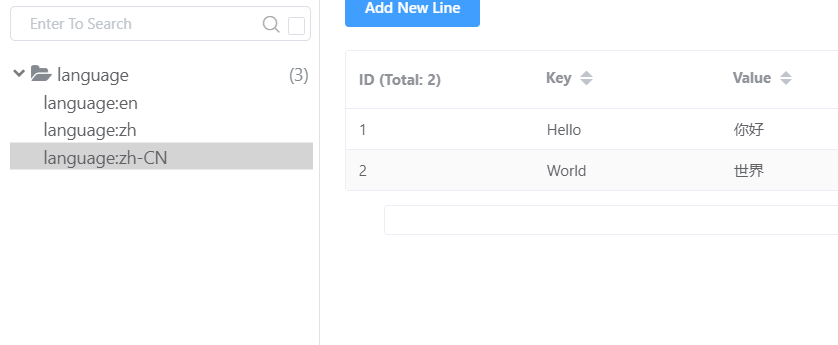
Create a Hash-type key in Redis and set several key-value pairs, then read them from the client.
NuGet packaging with embedded JSON
When developing internally within an enterprise, the project may need to be packaged as a NuGet package for other developers to use. Therefore, multilingual resource files also need to be packaged into the NuGet package.
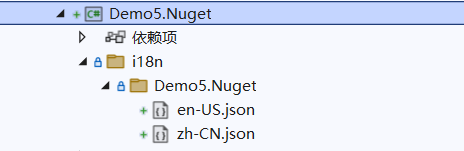
Create a Demo5.Nuget class library project with the following directory structure:
Modify the .csproj file and change the relevant properties to the following configuration:
	<ItemGroup>
		<Content Include="i18n\Demo5.Nuget\en-US.json" Pack="true">
			<PackageCopyToOutput>true</PackageCopyToOutput>
			<CopyToOutputDirectory>Always</CopyToOutputDirectory>
			<PackagePath>contentFiles\any\any\i18n\Demo5.Nuget\en-US.json</PackagePath>
		</Content>

		<Content Include="i18n\Demo5.Nuget\zh-CN.json" Pack="true">
			<PackageCopyToOutput>true</PackageCopyToOutput>
			<CopyToOutputDirectory>Always</CopyToOutputDirectory>
			<PackagePath>contentFiles\any\any\i18n\Demo5.Nuget\zh-CN.json</PackagePath>
		</Content>
	</ItemGroup>
In a Web project, the compiler automatically sets the EnableDefaultContentItems property, which automatically assigns the <Content></Content> attribute to files such as web.config, .json, and .cshtml. Therefore, when we customize the Content property, a conflict will occur. We need to disable this configuration in the <PropertyGroup></PropertyGroup> section.
<EnableDefaultContentItems>false</EnableDefaultContentItems>
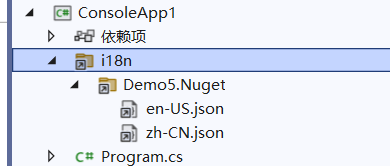
After the user installs the NuGet package, the corresponding files will appear in the project.

文章评论