Serialization and Deserialization in .NET
In ASP.NET Core applications, the framework hides many implementation details of serialization and deserialization. We only need to define parameter models, and ASP.NET Core will automatically deserialize the HTTP request Body into model objects. However, in daily development we often need to customize serialization and deserialization behavior, such as ignoring fields whose values are null, handling time formats, ignoring case sensitivity, converting field types, and so on. Therefore, the author dedicates a separate chapter to explain how to use serialization frameworks and how to customize them, in order to gain a deeper understanding of serialization and deserialization mechanisms in .NET.
System.Text.Json is the serialization framework built into the .NET platform. It is simple to use and has excellent performance. Using System.Text.Json to deserialize a string into an object is straightforward, as shown below:
// Custom serialization configuration
static JsonSerializerOptions jsonSerializerOptions = new JsonSerializerOptions()
{
	PropertyNameCaseInsensitive = true,
	WriteIndented = true
};

public static void Main()
{
	const string json =
		"""
            {
                "Name": "whuanle"
            }
            """;
	var obj = JsonSerializer.Deserialize<Model>(json, jsonSerializerOptions);
}

public class Model
{
	public string Name { get; set; }
}
JsonSerializerOptions defines how serialization and deserialization should behave. Common properties are listed below:
| Property | Type | Description |
| --------------------------- | ---------------------- | ------------------------------------------------------------ |
| AllowTrailingCommas | bool | Ignore extra commas in JSON |
| Converters | IList<JsonConverter> | List of converters |
| DefaultBufferSize | int | Default buffer size |
| DefaultIgnoreCondition | JsonIgnoreCondition | Whether to ignore fields/properties when their value is the default |
| DictionaryKeyPolicy | JsonNamingPolicy | Dictionary key renaming rule, such as converting the first letter to lowercase |
| IgnoreNullValues | bool | Ignore fields/properties whose value is null in JSON |
| IgnoreReadOnlyFields | bool | Ignore read-only fields |
| IgnoreReadOnlyProperties | bool | Ignore read-only properties |
| IncludeFields | bool | Whether to process fields; by default only properties are processed |
| MaxDepth | int | Maximum nesting depth, default is 64 |
| NumberHandling | JsonNumberHandling | How numeric types are handled |
| PropertyNameCaseInsensitive | bool | Ignore case sensitivity |
| PropertyNamingPolicy | JsonNamingPolicy | Renaming rule, such as converting the first letter to lowercase |
| ReadCommentHandling | JsonCommentHandling | Handling comments |
| WriteIndented | bool | Format JSON during serialization, such as line breaks, spaces, and indentation |
Next, the author will list several commonly used customization scenarios and coding methods. To avoid confusion, in this chapter the terms “field” or “property” refer collectively to both fields and properties of a type.
Writing Type Converters
The purpose of a type converter is to automatically convert types when the field type in a JSON object does not match the field type in the model class. Below, the author introduces several commonly used type converters.
Enum Converter
How .NET Serializes Enums
When writing WebAPI model classes, enums are frequently used. By default, enum values are serialized to JSON as numeric values.
A C# example is shown below:
// Enum
public enum NetworkType
    {
        Unknown = 0,
        IPV4 = 1,
        IPV6 = 2
    }

// Type
public class Model
    {
        public string Name { get; set; }
        public NetworkType Netwotk1 { get; set; }
        public NetworkType? Netwotk2 { get; set; }
    }

var model = new Model
		{
			Name = "whuanle",
			Netwotk1 = NetworkType.IPV4,
			Netwotk2 = NetworkType.IPV6
		};
When we serialize the object, we get the following result:
{
	"Name": "whuanle",
	"Netwotk1": 1,
	"Netwotk2": 2
}
However, this creates readability issues. Numeric values are harder to remember, and when the enum needs to be extended later, the corresponding numeric values might change. In that case, all integrated code may need to be updated. If the enum is widely used, making such changes becomes very difficult.
For example, if an IPV5 suddenly appears, besides modifying the code, we may also need to modify other connected applications.
public enum NetworkType
{
        Unknown = 0,
        IPV4 = 1,
        IPV5 = 2,
        IPV6 = 3
}
Therefore, we need a method that allows enums to be serialized using their names instead of numeric values, and also allows these strings to be converted back into the corresponding enum type. This way, later expansions or insertions will not affect existing code or databases.
For example, during deserialization we may receive JSON like this:
"Netwotk1": "IPV4"
"Netwotk2": "IPV6"
Even if IPV5 is inserted later, we can simply generate a new string without reordering enum values.
"Netwotk1": "IPV4"
"Netwotk2": "IPV6"
"Netwotk3": "IPV5"
To use enums in C# model classes while using strings in JSON, there are two approaches:
- Place an attribute annotation on the enum field or property in the model class, and retrieve the converter from that attribute during serialization and deserialization.
- Add a converter through JsonSerializerOptions and pass the custom configuration during serialization or deserialization.
Regardless of the method, we must implement a converter that serializes enums in the model class to their corresponding names in JSON. Before implementing a custom converter example, let’s review some related knowledge.
A custom converter must inherit from JsonConverter or JsonConverter<T>. When deserializing JSON fields or serializing object fields/properties, the framework will automatically invoke the converter.
Taking JsonConverter<T> as an example, it contains several abstract methods. Usually we only need to implement two of them:
// JSON value => object field
public abstract T? Read(ref Utf8JsonReader reader, Type typeToConvert, JsonSerializerOptions options);

// object field => JSON value
public abstract void Write(Utf8JsonWriter writer, T value, JsonSerializerOptions options);
However, we must pay attention to nullable types in C#. For example, NetworkType and NetworkType? are actually two different types. A nullable type is essentially a type wrapped by Nullable<T>.
The definition of Nullable<T> is as follows:
public struct Nullable<T> where T : struct
In addition, Nullable<T> implements implicit and explicit conversion overloads with type T. Therefore, when using nullable types, it may not be obvious that Nullable<T> and T are different types. For example, when using a nullable type T?, we can implicitly or explicitly convert between Nullable<T> and T:
Nullable<int> value = 100
However, when using reflection, T and T? are treated as two different types. Therefore, when writing converters we must pay attention to this difference, otherwise errors may occur.
Implementing an Enum Converter
The example code in this section is in Demo4.Console.
An example of implementing an enum string converter is shown below:
public class EnumStringConverter<TEnum> : JsonConverter<TEnum>
{
	private readonly bool _isNullable;

	public EnumStringConverter(bool isNullType)
	{
		_isNullable = isNullType;
	}

    // Determine whether the current type can use this converter
	public override bool CanConvert(Type objectType) => EnumStringConverterFactory.IsEnum(objectType);

    // Read data from JSON
	// JSON => Value
	// typeToConvert: the type of the model class property/field
	public override TEnum Read(ref Utf8JsonReader reader, Type typeToConvert, JsonSerializerOptions options)
	{
        // Read JSON
		var value = reader.GetString();
		if (value == null)
		{
			if (_isNullable) return default;
			throw new ArgumentNullException(nameof(value));
		}

		// Whether it is a nullable type
		var sourceType = EnumStringConverterFactory.GetSourceType(typeof(TEnum));
		if (Enum.TryParse(sourceType, value.ToString(), out var result))
		{
			return (TEnum)result!;
		}
		throw new InvalidOperationException($"{value} is not within the range of enum {typeof(TEnum).Name}");
	}

	// Value => JSON
	public override void Write(Utf8JsonWriter writer, TEnum? value, JsonSerializerOptions options)
	{
		if (value == null) writer.WriteNullValue();
		else writer.WriteStringValue(Enum.GetName(value.GetType(), value));
	}
}
Since Utf8JsonReader does not appear very frequently in daily development, readers may not be very familiar with it. The author will briefly introduce it at the end of this chapter.
In most cases, we do not directly use EnumStringConverter. To support all enum types, we also need to write an enum converter factory. Using the factory pattern, we first determine the input type and then create the corresponding converter.
public class EnumStringConverterFactory : JsonConverterFactory
{
	// Get the type that needs conversion
	public static bool IsEnum(Type objectType)
	{
		if (objectType.IsEnum) return true;

		var sourceType = Nullable.GetUnderlyingType(objectType);
		return sourceType is not null && sourceType.IsEnum;
	}

    // If the type is nullable, get the original type
	public static Type GetSourceType(Type typeToConvert)
	{
		if (typeToConvert.IsEnum) return typeToConvert;
		return Nullable.GetUnderlyingType(typeToConvert);
	}

    // Determine whether the type is an enum
	public override bool CanConvert(Type typeToConvert) => IsEnum(typeToConvert);

    // Create a corresponding type converter for this field
	public override JsonConverter? CreateConverter(Type typeToConvert, JsonSerializerOptions options)
	{
		var sourceType = GetSourceType(typeToConvert);
		var converter = typeof(EnumStringConverter<>).MakeGenericType(typeToConvert);
		return (JsonConverter)Activator.CreateInstance(converter, new object[] { sourceType != typeToConvert });
	}
}
When System.Text.Json processes a field, it calls the CanConvert method of EnumStringConverterFactory. If it returns true, it then calls the CreateConverter method of EnumStringConverterFactory to create the converter, and finally invokes the converter to process the field. In this way, we can use the generic class EnumStringConverter<TEnum> to handle various enums.
Next, define an attribute annotation so that properties or fields in the model class can be bound to a converter.
    [AttributeUsage(AttributeTargets.Enum | AttributeTargets.Property | AttributeTargets.Field, AllowMultiple = false)]
    public class EnumConverterAttribute : JsonConverterAttribute
    {
        public override JsonConverter CreateConverter(Type typeToConvert)
        {
            return new EnumStringConverterFactory();
        }
    }
How to Use Type Converters
There are three ways to use custom type converters.
Method 1: Use a custom attribute on enum fields.
    public class Model
    {
        public string Name { get; set; }

        [EnumConverter]
        public NetworkType Netwotk1 { get; set; }

        [EnumConverter]
        public NetworkType? Netwotk2 { get; set; }
    }
Method 2: Use the JsonConverter attribute.
public class Model
{
	public string Name { get; set; }

	[JsonConverter(typeof(EnumConverter))]
	public NetworkType Netwotk1 { get; set; }

	[JsonConverter(typeof(EnumConverter))]
	public NetworkType? Netwotk2 { get; set; }
}
Method 3: Add the converter in configuration.
		jsonSerializerOptions.Converters.Add(new EnumStringConverterFactory());
		var obj = JsonSerializer.Deserialize<Model>(json, jsonSerializerOptions);
After using the converter attribute in the model class, we can deserialize strings into enum types:
        const string json =
            """
            {
                "Name": "whuanle",
                "Netwotk1": "IPV4",
                "Netwotk2": "IPV6"
            }
            """;
        var obj = JsonSerializer.Deserialize<Model>(json, jsonSerializerOptions);
Using the Official Converter
System.Text.Json already provides many converters. You can find all built-in converters in the official source code under System/Text/Json/Serialization/Converters/Value. The official enum string converter is called JsonStringEnumConverter, and its usage is the same as our custom converter.
.
Here we can use the official JsonStringEnumConverter converter to replace EnumStringConverter<TEnum>:
    public class Model
    {
        public string Name { get; set; }
        public NetworkType Netwotk1 { get; set; }
        public NetworkType? Netwotk2 { get; set; }
    }
        JsonSerializerOptions jsonSerializerOptions = new();
        jsonSerializerOptions.Converters.Add(new JsonStringEnumConverter());
        const string json =
            """
            {
                "Name": "whuanle",
                "Netwotk1": "IPV4",
                "Netwotk2": "IPV6"
            }
            """;
        var obj = JsonSerializer.Deserialize<Model>(json, jsonSerializerOptions);
String and Value Type Conversion
In many cases, numeric types are used in model classes, but strings are used when serializing to JSON. For example, when dealing with floating‑point values, to ensure accuracy we may store them as strings in JSON. This avoids precision loss caused by floating‑point processing during transmission.
Another example is when the frontend processes numbers exceeding 16 digits, where numeric precision may be lost. A 16‑digit number is enough to store a millisecond timestamp, but in many cases we use distributed IDs. There are many Snowflake algorithm implementations, and the IDs they generate often exceed 16 digits.
When processing numbers exceeding 16 digits in JS, precision loss can occur:
console.log(11111111111111111);
Output: 11111111111111112

console.log(111111111111111111);
Output: 111111111111111100
One of the simplest methods is to convert all numeric fields to strings in JsonSerializerOptions:
        new JsonSerializerOptions
		{
			NumberHandling = JsonNumberHandling.AllowReadingFromString
		};
However, this causes all value type fields to become strings when serialized to JSON. If you only need to handle a few fields instead of all fields, then you need to write your own type converter.
To implement string‑to‑number conversion, many numeric types must be considered, such as byte, int, double, long, etc. Converting value types to strings is simple, but implementing conversion from a string to any value type is much more complex. This is also the focus when writing the converter.
An example implementation of a converter between JSON strings and value types in a model class is as follows:
public class StringNumberConverter<T> : JsonConverter<T>
{
	private static readonly TypeCode typeCode = Type.GetTypeCode(typeof(T));

    // Read a string from JSON and convert it to the corresponding value type
	public override T Read(ref Utf8JsonReader reader, Type typeToConvert, JsonSerializerOptions options)
	{
		switch (reader.TokenType)
		{
			case JsonTokenType.Number:
				if (typeCode == TypeCode.Int32)
				{
					if (reader.TryGetInt32(out var value))
					{
						return Unsafe.As<int, T>(ref value);
					}
				}
				if (typeCode == TypeCode.Int64)
				{
					if (reader.TryGetInt64(out var value))
					{
						return Unsafe.As<long, T>(ref value);
					}
				}
				if (typeCode == TypeCode.Decimal)
				{
					if (reader.TryGetDecimal(out var value))
					{
						return Unsafe.As<decimal, T>(ref value);
					}
				}
				if (typeCode == TypeCode.Double)
				{
					if (reader.TryGetDouble(out var value))
					{
						return Unsafe.As<double, T>(ref value);
					}
				}
				if (typeCode == TypeCode.Single)
				{
					if (reader.TryGetSingle(out var value))
					{
						return Unsafe.As<float, T>(ref value);
					}
				}
				if (typeCode == TypeCode.Byte)
				{
					if (reader.TryGetByte(out var value))
					{
						return Unsafe.As<byte, T>(ref value);
					}
				}
				if (typeCode == TypeCode.SByte)
				{
					if (reader.TryGetSByte(out var value))
					{
						return Unsafe.As<sbyte, T>(ref value);
					}
				}
				if (typeCode == TypeCode.Int16)
				{
					if (reader.TryGetInt16(out var value))
					{
						return Unsafe.As<short, T>(ref value);
					}
				}
				if (typeCode == TypeCode.UInt16)
				{
					if (reader.TryGetUInt16(out var value))
					{
						return Unsafe.As<ushort, T>(ref value);
					}
				}
				if (typeCode == TypeCode.UInt32)
				{
					if (reader.TryGetUInt32(out var value))
					{
						return Unsafe.As<uint, T>(ref value);
					}
				}
				if (typeCode == TypeCode.UInt64)
				{
					if (reader.TryGetUInt64(out var value))
					{
						return Unsafe.As<ulong, T>(ref value);
					}
				}
				break;

			case JsonTokenType.String:
				IConvertible str = reader.GetString() ?? "";
				return (T)str.ToType(typeof(T), null);

		}

		throw new NotSupportedException($"Cannot convert {reader.TokenType} to {typeToConvert}");
	}

    // Convert value types to JSON numbers
	public override void Write(Utf8JsonWriter writer, T value, JsonSerializerOptions options)
	{
		switch (typeCode)
		{
			case TypeCode.Int32:
				writer.WriteNumberValue(Unsafe.As<T, int>(ref value));
				break;
			case TypeCode.UInt32:
				writer.WriteNumberValue(Unsafe.As<T, uint>(ref value));
				break;
			case TypeCode.Decimal:
				writer.WriteNumberValue(Unsafe.As<T, decimal>(ref value));
				break;
			case TypeCode.Double:
				writer.WriteNumberValue(Unsafe.As<T, double>(ref value));
				break;
			case TypeCode.Single:
				writer.WriteNumberValue(Unsafe.As<T, uint>(ref value));
				break;
			case TypeCode.UInt64:
				writer.WriteNumberValue(Unsafe.As<T, ulong>(ref value));
				break;
			case TypeCode.Int64:
				writer.WriteNumberValue(Unsafe.As<T, long>(ref value));
				break;
			case TypeCode.Int16:
				writer.WriteNumberValue(Unsafe.As<T, short>(ref value));
				break;
			case TypeCode.UInt16:
				writer.WriteNumberValue(Unsafe.As<T, ushort>(ref value));
				break;
			case TypeCode.Byte:
				writer.WriteNumberValue(Unsafe.As<T, byte>(ref value));
				break;
			case TypeCode.SByte:
				writer.WriteNumberValue(Unsafe.As<T, sbyte>(ref value));
				break;
			default:
				throw new NotSupportedException($"Unsupported non‑numeric type {typeof(T)}");
		}
	}
}
When implementing conversion from strings to various value types, the main difficulty lies in generic conversion. After using reader.TryGetInt32() to read an int value, even though we know the generic type T is int, we cannot directly return int. We must have a way to convert the value to the generic type T.
Using reflection would introduce significant performance overhead and may involve boxing and unboxing, so Unsafe.As is used here. Its function is to reinterpret the pointer of the converted type, allowing related value types to be converted to the generic type T.
After implementing the converter between strings and value types, the next step is to implement the converter factory:
public class JsonStringToNumberConverter : JsonConverterFactory
{
	public static JsonStringToNumberConverter Default { get; } = new JsonStringToNumberConverter();

	public override bool CanConvert(Type typeToConvert)
	{
		var typeCode = Type.GetTypeCode(typeToConvert);
		return typeCode == TypeCode.Int32 ||
			typeCode == TypeCode.Decimal ||
			typeCode == TypeCode.Double ||
			typeCode == TypeCode.Single ||
			typeCode == TypeCode.Int64 ||
			typeCode == TypeCode.Int16 ||
			typeCode == TypeCode.Byte ||
			typeCode == TypeCode.UInt32 ||
			typeCode == TypeCode.UInt64 ||
			typeCode == TypeCode.UInt16 ||
			typeCode == TypeCode.SByte;
	}

	public override JsonConverter CreateConverter(Type typeToConvert, JsonSerializerOptions options)
	{
		var type = typeof(StringNumberConverter<>).MakeGenericType(typeToConvert);
		var converter = Activator.CreateInstance(type);
		if (converter == null)
		{
			throw new InvalidOperationException($"Unable to create converter of type {type.Name}");
		}
		return (JsonConverter)converter;
	}
}
Time Type Converter
JSON defines a standard time format. Some commonly used formats are:
YYYY-MM-DDTHH:mm:ss.sssZ
YYYY-MM-DDTHH:mm:ss.sss+HH:mm
YYYY-MM-DDTHH:mm:ss.sss-HH:mm
Example:
2023-08-15T20:20:00+08:00
However, in project development we often need customized formats, such as 2023-02-15 20:20:20. In such cases, we need to write our own converter so that time fields can be serialized or deserialized correctly.
In C#, there is an interface for specifying how DateTime parses string time values: DateTime.ParseExact(String, String, IFormatProvider). To support various string time formats, we can use this interface to convert strings into DateTime values.
An example implementation for converting between JSON string time and DateTime is as follows:
public class CustomDateTimeConverter : JsonConverter<DateTime>
{
	private readonly string _format;
    // The format parameter specifies the string format of the time
	public CustomDateTimeConverter(string format)
	{
		_format = format;
	}
	public override void Write(Utf8JsonWriter writer, DateTime date, JsonSerializerOptions options)
	{
		writer.WriteStringValue(date.ToString(_format));
	}
	public override DateTime Read(ref Utf8JsonReader reader, Type typeToConvert, JsonSerializerOptions options)
	{
		var value = reader.GetString() ?? throw new FormatException("The current field format is incorrect");
		return DateTime.ParseExact(value, _format, null);
	}
}
In the converter, it is unnecessary to check various JSON string time formats. Instead, the format is specified through the constructor when using it. Example usage:
jsonSerializerOptions.Converters.Add(new CustomDateTimeConverter("yyyy/MM/dd HH:mm:ss"));
In fact, using the default JSON time format is a good habit. Based on the author's experience, modifying the default JSON time format in a project may lead to serialization issues during later development and integration.
If certain scenarios require higher precision (such as milliseconds), conversion to timestamps, or special formats required by third‑party systems, it is better to apply specific converter attributes on the corresponding model classes rather than globally modifying the JSON time format.
Handling JSON at the Lower Level
In this section, the author will introduce how to use Utf8JsonReader to parse JSON files with high performance, and then write performance tests for Utf8JsonReader. Through related examples, readers will learn how to use Utf8JsonReader and how to perform performance testing on the code.
Utf8JsonReader
Utf8JsonReader and Utf8JsonWriter are high‑performance APIs in C# for reading and writing JSON. Using them, we can read or write JSON step by step.
Utf8JsonReader is widely used. For example, the official JsonConfigurationProvider uses Utf8JsonReader to read JSON files step by step and generate a key/value structure. In later chapters, the author will also introduce how to implement i18n multilingual configuration using Utf8JsonReader. Since Utf8JsonReader is more widely used while Utf8JsonWriter is less common, this section focuses only on the usage of Utf8JsonReader.
Both Utf8JsonReader and Utf8JsonWriter are structs, defined as follows:
public ref struct Utf8JsonReader
public ref struct Utf8JsonWriter
Because they are ref struct, there are many limitations in their usage. For example, they cannot be used in async methods, cannot be used as type parameters in arrays, List<>, dictionaries, etc., and can only be placed as fields or properties inside a ref struct type, or used as function parameters.
When reading JSON using Utf8JsonReader, developers need to manually handle closing brackets such as {} and [], and also need to determine and process JSON types themselves. Therefore, the reading process is somewhat more complex.
Next, the author sets up a scenario: using Utf8JsonReader to read a JSON file and store all fields into a dictionary. If there are multiple levels of structure, the hierarchy is concatenated using : to generate a key/value format that can be directly read by IConfiguration.
For example:
// json
{
	"A": {
		"B": "test"
	}
}

// C#
new Dictionary<string, string>()
{
	{"A:B","test" }
};
Create a new static class ReadJsonHelper, and write the JSON parsing code in this type.
public static class ReadJsonHelper
{
}
First, implement the code for reading field values. When reading a field from JSON, if the field is not an object or array type, its value can be read directly.
。
// Read field value
private static object? ReadObject(ref Utf8JsonReader reader)
{
	switch (reader.TokenType)
	{
		case JsonTokenType.Null or JsonTokenType.None:
			return null;
		case JsonTokenType.False:
			return reader.GetBoolean();
		case JsonTokenType.True:
			return reader.GetBoolean();
		case JsonTokenType.Number:
			return reader.GetDouble();
		case JsonTokenType.String:
			return reader.GetString() ?? "";
		default: return null;
	}
}
When reading JSON fields, we often encounter complex nested structures, so we need to determine whether the current element being read is an object or an array. These two structures can also be nested within each other, which increases the difficulty of parsing.
For example:
{
	... ...
}
[... ...]
[{...}, {...} ...]
The first step is to determine whether the root structure of a JSON document is {} or [], and then parse it step by step.
// Parse JSON object
private static void BuildJsonField(ref Utf8JsonReader reader,
                                   Dictionary<string, object> map,
                                   string? baseKey)
{
	while (reader.Read())
	{
		// Top-level array "[123,123]"
		if (reader.TokenType is JsonTokenType.StartArray)
		{
			ParseArray(ref reader, map, baseKey);
		}
		// Encounter } symbol
		else if (reader.TokenType is JsonTokenType.EndObject) break;
		// Encounter a field
		else if (reader.TokenType is JsonTokenType.PropertyName)
		{
			var key = reader.GetString()!;
			var newkey = baseKey is null ? key : $"{baseKey}:{key}";

			// Determine whether the field is an object
			reader.Read();
			if (reader.TokenType is JsonTokenType.StartArray)
			{
				ParseArray(ref reader, map, newkey);
			}
			else if (reader.TokenType is JsonTokenType.StartObject)
			{
				BuildJsonField(ref reader, map, newkey);
			}
			else
			{
				map[newkey] = ReadObject(ref reader);
			}
		}
	}
}
JSON arrays can appear in many forms. The elements inside a JSON array can be of any type, so handling them is slightly more complicated. Therefore, for array types we should also support parsing individual elements and use indices to access elements at corresponding positions.
Parsing arrays:
// Parse array
private static void ParseArray(ref Utf8JsonReader reader, Dictionary<string, object> map, string? baseKey)
{
	int i = 0;
	while (reader.Read())
	{
		if (reader.TokenType is JsonTokenType.EndArray) break;
		var newkey = baseKey is null ? $"[{i}]" : $"{baseKey}[{i}]";
		i++;

		switch (reader.TokenType)
		{
			// [...,null,...]
			case JsonTokenType.Null:
				map[newkey] = null;
				break;
			// [...,123.666,...]
			case JsonTokenType.Number:
				map[newkey] = reader.GetDouble();
				break;
			// [...,"123",...]
			case JsonTokenType.String:
				map[newkey] = reader.GetString();
				break;
			// [...,true,...]
			case JsonTokenType.True:
				map[newkey] = reader.GetBoolean();
				break;
			case JsonTokenType.False:
				map[newkey] = reader.GetBoolean();
				break;
			// [...,{...},...]
			case JsonTokenType.StartObject:
				BuildJsonField(ref reader, map, newkey);
				break;
			// [...,[],...]
			case JsonTokenType.StartArray:
				ParseArray(ref reader, map, newkey);
				break;
			default:
				map[newkey] = JsonValueKind.Null;
				break;
		}
	}
}
Finally, we write an entry method for parsing JSON. Using the JSON file provided by the user, it parses the content into a dictionary.
public static Dictionary<string, object> Read(ReadOnlySequence<byte> sequence,
                                              JsonReaderOptions jsonReaderOptions)
{
	var reader = new Utf8JsonReader(sequence, jsonReaderOptions);
	var map = new Dictionary<string, object>();
	BuildJsonField(ref reader, map, null);
	return map;
}
JsonReaderOptions is used to configure the reading strategy of Utf8JsonReader. Its main properties are as follows:
| Property | | Description |
| -------------------- | --------------------- | ----------- |
| AllowTrailingCommas | bool | Whether to allow (and ignore) trailing commas at the end of object or array members |
| CommentHandling | JsonCommentHandling | How JSON comments are handled |
| MaxDepth | int | Maximum nesting depth, default maximum is 64 levels |
Example of reading a file and generating a dictionary:
// Note: you cannot directly use File.ReadAllBytes() to read the file because the file has a BOM header
var text = Encoding.UTF8.GetBytes(File.ReadAllText("read.json"));
var dic = ReadJsonHelper.Read(new ReadOnlySequence<byte>(text), new JsonReaderOptions { AllowTrailingCommas = true });
In the Demo4.Console sample project, there is a read.json file whose contents are relatively complex. You can use this JSON file to verify the code.
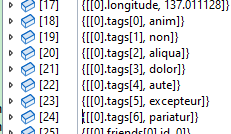
In addition, we can use Utf8JsonReader, combined with the custom configuration tutorial in Chapter 3, to parse the JSON file into IConfiguration.
var config = new ConfigurationBuilder()
	.AddInMemoryCollection(dic.ToDictionary(x => x.Key, x => x.Value.ToString()))
	.Build();
Utf8JsonReader and JsonNode JSON Parsing Performance Test
JsonNode is also one of the commonly used methods for reading JSON. In this section, the author will introduce how to write performance tests using BenchmarkDotNet to compare the performance of Utf8JsonReader and JsonNode when reading JSON.
In the Demo4.Benchmark sample project, there are three JSON files that store large arrays of objects. These files are batch-generated using a tool, and we will use these three JSON files for performance testing.

Object format:
  {
    "a_tttttttttttt": 1001,
    "b_tttttttttttt": "邱平",
    "c_tttttttttttt": "Nancy Lee",
    "d_tttttttttttt": "buqdu",
    "e_tttttttttttt": 81.26,
    "f_tttttttttttt": 60,
    "g_tttttttttttt": "1990-04-18 10:52:59",
    "h_tttttttttttt": "35812178",
    "i_tttttttttttt": "18935330000",
    "j_tttttttttttt": "w.nsliozye@mbwrxiyf.ug",
    "k_tttttttttttt": "浙江省 金华市 兰溪市"
  }
First install the BenchmarkDotNet framework, then create a performance test entry that loads the JSON files.
[SimpleJob(RuntimeMoniker.Net80)]
[SimpleJob(RuntimeMoniker.NativeAot80)]
[MemoryDiagnoser]
[ThreadingDiagnoser]
[MarkdownExporter, AsciiDocExporter, HtmlExporter, CsvExporter, RPlotExporter]
public class ParseJson
{
    private ReadOnlySequence<byte> sequence;

    [Params("100.json", "1000.json", "10000.json")]
    public string FileName;

    [GlobalSetup]
    public async Task Setup()
    {
        var text = File.ReadAllText(Path.Combine(Environment.CurrentDirectory, $"json/{FileName}"));
        var bytes = Encoding.UTF8.GetBytes(text);
        sequence = new ReadOnlySequence<byte>(bytes);
    }
}
Add related methods in ParseJson to parse JSON using Utf8JsonReader:
[Benchmark]
public void Utf8JsonReader()
{
	var reader = new Utf8JsonReader(sequence, new JsonReaderOptions());
	U8Read(ref reader);
}

private static void U8Read(ref Utf8JsonReader reader)
{
	while (reader.Read())
	{
		if (reader.TokenType is JsonTokenType.StartArray)
		{
			U8ReadArray(ref reader);
		}
		else if (reader.TokenType is JsonTokenType.EndObject) break;
		else if (reader.TokenType is JsonTokenType.PropertyName)
		{
			reader.Read();
			if (reader.TokenType is JsonTokenType.StartArray)
			{
				// Enter array processing
				U8ReadArray(ref reader);
			}
			else if (reader.TokenType is JsonTokenType.StartObject)
			{
				U8Read(ref reader);
			}
			else
			{
			}
		}
	}
}

private static void U8ReadArray(ref Utf8JsonReader reader)
{
	while (reader.Read())
	{
		if (reader.TokenType is JsonTokenType.EndArray) break;
		switch (reader.TokenType)
		{
			case JsonTokenType.StartObject:
				U8Read(ref reader);
				break;
			// [...,[],...]
			case JsonTokenType.StartArray:
				U8ReadArray(ref reader);
				break;
		}
	}
}
Add JsonNode JSON parsing code in ParseJson:
	[Benchmark]
	public void JsonNode()
	{
		var reader = new Utf8JsonReader(sequence, new JsonReaderOptions());
		var nodes = System.Text.Json.Nodes.JsonNode.Parse(ref reader, null);
		if (nodes is JsonObject o)
		{
			JNRead(o);
		}
		else if (nodes is JsonArray a)
		{
			JNArray(a);
		}
	}

	private static void JNRead(JsonObject obj)
	{
		foreach (var item in obj)
		{
			var v = item.Value;
			if (v is JsonObject o)
			{
				JNRead(o);
			}
			else if (v is JsonArray a)
			{
				JNArray(a);
			}
			else if (v is JsonValue value)
			{
				var el = value.GetValue<JsonElement>();
				JNValue(el);
			}
		}
	}

	private static void JNArray(JsonArray obj)
	{
		foreach (var v in obj)
		{
			if (v is JsonObject o)
			{
				JNRead(o);
			}
			else if (v is JsonArray a)
			{
				JNArray(a);
			}
			else if (v is JsonValue value)
			{
				var el = value.GetValue<JsonElement>();
				JNValue(el);
			}
		}
	}

	private static void JNValue(JsonElement obj){}
Then start the Benchmark framework for testing in the Main method.
		static void Main()
		{
			var summary = BenchmarkRunner.Run(typeof(Program).Assembly);
			Console.Read();
		}
After compiling the project in Release mode, run the program to perform the performance test.
Machine configuration used by the author:
AMD Ryzen 5 5600G with Radeon Graphics, 1 CPU, 12 logical and 6 physical cores
It can be seen that there is a relatively large performance difference between the two methods. Therefore, in scenarios that require high performance, using Utf8JsonReader provides better performance and can also reduce memory usage.
。
| Method | Job | FileName | Mean | Gen0 | Gen1 | Gen2 | Allocated |
| -------------- | ------------- | ---------- | -----------: | --------: | --------: | --------: | ---------: |
| Utf8JsonReader | .NET 8.0 | 100.json | 42.87 us | - | - | - | - |
| JsonNode | .NET 8.0 | 100.json | 237.57 us | 37.1094 | 24.4141 | - | 312624 B |
| Utf8JsonReader | NativeAOT 8.0 | 100.json | 49.81 us | - | - | - | - |
| JsonNode | NativeAOT 8.0 | 100.json | 301.11 us | 37.1094 | 24.4141 | - | 312624 B |
| Utf8JsonReader | .NET 8.0 | 1000.json | 427.07 us | - | - | - | - |
| JsonNode | .NET 8.0 | 1000.json | 2,699.76 us | 484.3750 | 460.9375 | 199.2188 | 3120511 B |
| Utf8JsonReader | NativeAOT 8.0 | 1000.json | 494.87 us | - | - | - | - |
| JsonNode | NativeAOT 8.0 | 1000.json | 3,652.08 us | 484.3750 | 464.8438 | 199.2188 | 3120513 B |
| Utf8JsonReader | .NET 8.0 | 10000.json | 4,306.30 us | - | - | - | 3 B |
| JsonNode | .NET 8.0 | 10000.json | 60,883.56 us | 4000.0000 | 3888.8889 | 1222.2222 | 31215842 B |
| Utf8JsonReader | NativeAOT 8.0 | 10000.json | 4,946.71 us | - | - | - | 3 B |
| JsonNode | NativeAOT 8.0 | 10000.json | 62,864.68 us | 4125.0000 | 4000.0000 | 1250.0000 | 31216863 B |

文章评论