日志还有使用技巧?直接写不就行了?这还需要学?
In fact, according to the author's observations, many .NET developers have bad habits, such as:
- Writing a large amount of logs in Chinese
- Logs have no unified format, with parameters and data concatenated everywhere
- Logs do not output in a unified format, making collection and analysis difficult
- Developers like defining custom interception logs in various middleware and modules, which leads to serious performance overhead
- Not knowing that logging in .NET has context and scope, resulting in multiple logs not being linked together and making them difficult to trace
- Lack of understanding of the logging system, resulting in logs with little value and inefficient problem analysis
Based on the author's experience leading teams, and observing the habits of many .NET developers, this article was written.
Table of contents:
- Using logging in ASP.NET Core
- Context properties and scope
- Formatted logging
- Non-intrusive logging
- Serilog log format templates
Logging Usage Techniques in .NET
Serilog is the most widely used logging framework in the .NET community. Therefore, in the logging section, the author will explain how to use Serilog and how it can meet the logging requirements of a project.
The sample project is in Demo2.Console.
Create a console application and include two packages:
Serilog.Sinks.Console
Serilog.Sinks.File
In addition, there are also
Serilog.Sinks.Elasticsearch,Serilog.Sinks.RabbitMQ, etc. Serilog provides sinks used to write log events to storage in various formats. Many of the sinks listed below are developed and supported by the broader Serilog community; https://github.com/serilog/serilog/wiki/Provided-Sinks
You can configure Serilog directly in code:
private static Serilog.ILogger GetLogger()
{
	const string LogTemplate = "{SourceContext} {Scope} {Timestamp:HH:mm} [{Level}] {Message:lj} {Properties:j} {NewLine}{Exception}";
	var logger = new LoggerConfiguration()
		.Enrich.WithMachineName()
		.Enrich.WithThreadId()
		.Enrich.FromLogContext()
#if DEBUG
		.MinimumLevel.Debug()
#else
		                .MinimumLevel.Information()
#endif
		.WriteTo.Console(outputTemplate: LogTemplate)
		.WriteTo.File("log.txt", rollingInterval: RollingInterval.Day, outputTemplate: LogTemplate)
		.CreateLogger();
	return logger;
}
If you want to load it from a configuration file, add Serilog.Settings.Configuration:
private static Serilog.ILogger GetJsonLogger()
{
	IConfiguration configuration = new ConfigurationBuilder()
							 .SetBasePath(AppContext.BaseDirectory)
							 .AddJsonFile(path: "serilog.json", optional: true, reloadOnChange: true)
							 .Build();
	if (configuration == null)
	{
		throw new ArgumentNullException($"Unable to find the serilog.json logging configuration file");
	}
	var logger = new LoggerConfiguration()
		.ReadFrom.Configuration(configuration)
		.CreateLogger();
	return logger;
}
Example serilog.json configuration file:
{
  "Serilog": {
    "Using": [ "Serilog.Sinks.Console", "Serilog.Sinks.File" ],
    "MinimumLevel": {
      "Default": "Debug"
    },
    "Enrich": [ "FromLogContext", "WithMachineName", "WithThreadId" ],
    "WriteTo": [
      {
        "Name": "Console",
        "Args": {
          "outputTemplate": "{SourceContext} {Scope} {Timestamp:HH:mm} [{Level}] {Message:lj} {Properties:j} {NewLine}{Exception}"
        }
      },
      {
        "Name": "File",
        "Args": {
          "path": "logs/log-.txt",
          "rollingInterval": "Day",
          "outputTemplate": "{SourceContext} {Scope} {Timestamp:HH:mm} [{Level}] {Message:lj} {Properties:j} {NewLine}{Exception}"
        }
      }
    ]
  }
}
Inject Serilog via dependency injection.
Add the Serilog.Extensions.Logging package.
	private static Microsoft.Extensions.Logging.ILogger InjectLogger()
	{
		var logger = GetJsonLogger();
		var ioc = new ServiceCollection();
		ioc.AddLogging(builder => builder.AddSerilog(logger: logger, dispose: true));
		var loggerProvider = ioc.BuildServiceProvider().GetRequiredService<ILoggerProvider>();
		return loggerProvider.CreateLogger("Program");
	}
Finally, configure Serilog logging in different ways and start the program to print logs.
	static void Main()
	{
		var log1 = GetLogger();
		log1.Debug("XiyuanMore, whuanle");
		var log2 = GetJsonLogger();
		log2.Debug("XiyuanMore, whuanle");
		var log3 = InjectLogger();
		log3.LogDebug("XiyuanMore, whuanle");
	}
20:50 [Debug] XiyuanMore, whuanle {"MachineName": "WIN-KQDULADM5LA", "ThreadId": 1}
20:50 [Debug] XiyuanMore, whuanle {"MachineName": "WIN-KQDULADM5LA", "ThreadId": 1}
20:50 [Debug] XiyuanMore, whuanle {"MachineName": "WIN-KQDULADM5LA", "ThreadId": 1}
Using Logging in ASP.NET Core
The sample project is in Demo2.Api.
Create a new ASP.NET Core API project and add the Serilog.AspNetCore package.
Add code in Program to inject Serilog.
var builder = WebApplication.CreateBuilder(args);

Log.Logger = new LoggerConfiguration()
	.ReadFrom.Configuration(builder.Configuration)
	.CreateLogger();
builder.Host.UseSerilog(Log.Logger);
//builder.Host.UseSerilog();
Copy the contents of the serilog.json file from the previous example into appsettings.json.
After starting the program, try accessing the API endpoint. It will print logs similar to the following:
Microsoft.AspNetCore.Hosting.Diagnostics 20:32 [Information] Request finished HTTP/1.1 GET http://localhost:5148/WeatherForecast - - - 200 - application/json;+charset=utf-8 1029.4319ms {"ElapsedMilliseconds": 1029.4319, "StatusCode": 200, "ContentType": "application/json; charset=utf-8", "ContentLength": null, "Protocol": "HTTP/1.1", "Method": "GET", "Scheme": "http", "Host": "localhost:5148", "PathBase": "", "Path": "/WeatherForecast", "QueryString": "", "EventId": {"Id": 2}, "RequestId": "0HMOONQO5ONKU:00000003", "RequestPath": "/WeatherForecast", "ConnectionId": "0HMOONQO5ONKU"}
If you need to add some property information to the request context, you can add a middleware as shown below:
app.UseSerilogRequestLogging(options =>
{
	options.EnrichDiagnosticContext = (diagnosticContext, httpContext) =>
	{
		diagnosticContext.Set("TraceId", httpContext.TraceIdentifier);
	};
});
HTTP GET /WeatherForecast responded 200 in 181.9992 ms {"TraceId": "0HMSD1OUG2DHG:00000003" ... ...
By adding property information to the request context—such as the current user's information—logs printed within the scope of that request will contain these context details. This is helpful for log analysis, as it allows you to easily identify which log entries belong to the same context. In microservice scenarios, logging storage engines such as ElasticSearch are often used to query and analyze logs. If relevant context properties are added to logs, they can be used as query conditions during analysis, making troubleshooting easier.
If you need to log HTTP request and response information, you can use the built-in ASP.NET Core HttpLoggingMiddleware.
First, register the request logging service.
builder.Services.AddHttpLogging(logging =>
{
    logging.LoggingFields = HttpLoggingFields.All;
	// Avoid printing large request and response bodies; only log 4kb
    logging.RequestBodyLogLimit = 4096;
    logging.ResponseBodyLogLimit = 4096;
});
By combining values of the HttpLoggingFields enum, you can configure the middleware to log Request, Query, HttpMethod, Header, Response, and other information.
You can place the HttpLogging middleware after Swagger and Static middleware. This avoids logging many unimportant requests and keeps only API-related logs.
app.UseHttpLogging();
The log level used by HttpLoggingMiddleware is Information. After the project goes live, logging every request can reduce system performance. Therefore, you can override the configuration in the configuration file to prevent excessive normal logs from being printed.
"Microsoft.AspNetCore.HttpLogging.HttpLoggingMiddleware": "Information"
Context Properties and Scope
The sample project is in Demo2.ScopeLog.
Notes on logging scopes
Microsoft.Extensions.Logging.Abstractions provides the BeginScope API, which can be used to add arbitrary properties to record events within a specific code region.
Explanation of its purpose.
The API has two forms:
IDisposable BeginScope<TState>(TState state)
IDisposable BeginScope(this ILogger logger, string messageFormat, params object[] args)
Use the following template:
{SourceContext} {Timestamp:HH:mm} [{Level}] (ThreadId:{ThreadId}) {Message}{NewLine}{Exception} {Scope}
Usage example:
static void Main()
{
	var logger = GetLogger();
	using (logger.BeginScope("Checking mail"))
	{
		// Scope is "Checking mail"
		logger.LogInformation("Opening SMTP connection");

		using (logger.BeginScope("Downloading messages"))
		{
			// Scope is "Checking mail" -> "Downloading messages"
			logger.LogError("Connection interrupted");
		}
	}
}

In Serilog, in addition to supporting the above interface, LogContext also provides a way to inject context properties into logs. After adding properties, logs printed within the scope will carry those context attributes.
using (LogContext.PushProperty("Test", 1))
{
	// Process request; all logged events will carry `RequestId`
	Log.Information("{Test} Adding {Item} to cart {CartId}", 1, 1);
}
A more complex nested example:
using (LogContext.PushProperty("A", 1))
{
    log.Information("Carries property A = 1");

    using (LogContext.PushProperty("A", 2))
    using (LogContext.PushProperty("B", 1))
    {
        log.Information("Carries A = 2 and B = 1");
    }

    log.Information("Carries property A = 1, again");
}
When many properties need to be set, the following approach becomes cumbersome:
using (LogContext.PushProperty("Test1", 1))
using (LogContext.PushProperty("Test2", 2))
{
}
For example, in ASP.NET Core middleware, we can add them in batches:
public async Task InvokeAsync(HttpContext context, RequestDelegate next)
{
	var enrichers = new List<ILogEventEnricher>();
	if (!string.IsNullOrEmpty(correlationId))
	{
		enrichers.Add(new PropertyEnricher(_options.EnricherPropertyNames.CorrelationId, correlationId));
	}

	using (LogContext.Push(enrichers.ToArray()))
	{
		await next(context);
	}
}
In business systems, user information can be obtained from the Token in middleware and then injected into the logging context. In this way, the printed logs will carry user information.
Formatted Logging
Add the Serilog.Formatting.Compact library.
This section mainly covers three concepts:
- Serialized types
- Output JSON-formatted logs
When printing logs, we often want to output an object to the log. Directly printing it using a parameter placeholder will not work as expected:
logger.LogWarning("Test log {0}",new MyClass { A = "1",B = "2"});
The output result:

The Serilog.Formatting.Compact package provides a way to format objects when printing them to logs. We only need to add @ at the placeholder position.
。
logger.LogWarning("Test log {@Message}",new MyClass { A = "1",B = "2"});

For dictionary types it also works:
logger.LogWarning("Test log {@Message}",new Dictionary<string, string>() { { "A","1"},{ "B","2"} });
Complete example code:
static void Main()
{
	IConfiguration configuration = new ConfigurationBuilder()
							 .SetBasePath(AppContext.BaseDirectory)
							 .AddJsonFile(path: "serilog.json", optional: true, reloadOnChange: true)
							 .Build();
	if (configuration == null)
	{
		throw new ArgumentNullException($"Failed to find the serilog.json logging configuration file");
	}

	var loggerBuilder = new LoggerConfiguration()
		.ReadFrom.Configuration(configuration)
		.WriteTo.Console(new CompactJsonFormatter())
		.CreateLogger();

	var services = new ServiceCollection();
	services.AddLogging(s =>
	{
		s.AddSerilog(loggerBuilder);
	});

	var ioc = services.BuildServiceProvider();

	var logger = ioc.GetRequiredService<ILogger<Program>>();
	logger.LogWarning("Test log {@Message}", new Dictionary<string, string>() { { "A", "1" }, { "B", "2" } });
}
However, this is still not enough. Whether the data spans one line or multiple lines, it is very inconvenient for log collection in microservice infrastructure. We need logs to be automatically generated in JSON format and printed to the console so that log systems such as ELK can collect them automatically.
In fact, this is quite simple. You only need to remove the default log template:
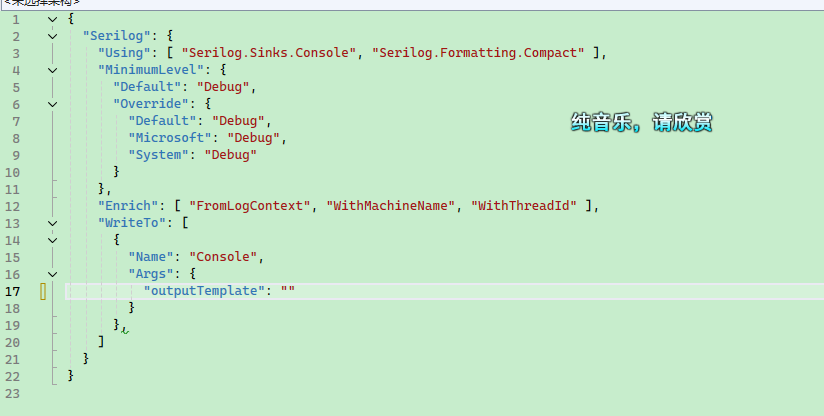

In the ES system, each field will be automatically indexed, allowing us to conveniently process the values of each field in the logging system.
It is also very simple to customize the formatted logs. For example, if we want to add [] before and after the current JSON log:
public class MyTextFormatter : ITextFormatter
{
    private readonly JsonValueFormatter _valueFormatter;

    public MyTextFormatter(JsonValueFormatter? valueFormatter = null)
    {
        _valueFormatter = valueFormatter ?? new JsonValueFormatter("$type");
    }

    /// <inheritdoc/>
    public void Format(LogEvent logEvent, TextWriter output)
    {
        output.Write('[');
        CompactJsonFormatter.FormatEvent(logEvent, output, _valueFormatter);
        output.Write(']');
        output.WriteLine();
    }
}
Non-intrusive Logging
There are many approaches for non-intrusive logging, such as using the ASP.NET Core middleware pipeline or using an AOP framework.
Here you can use the author's open-source CZGL.AOP framework, which can be found on NuGet.
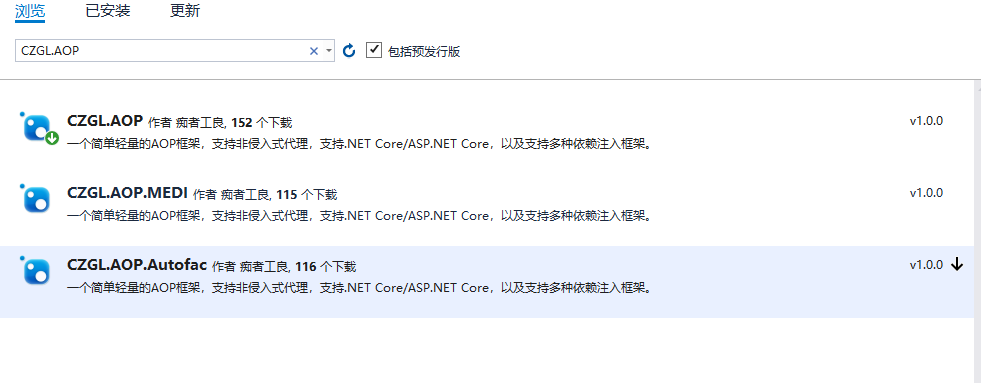
The sample project is in Demo2.AopLog.
There is a type where we want to print logs before and after executing SayHello, recording the parameters and return value.
public class Hello
{
	public virtual string SayHello(string content)
	{
		var str = $"Hello,{content}";
		return str;
	}
}
Write unified interception code. This code will run when the function is called.
Before takes effect before the proxied method executes or when a proxied property is accessed. Through the AspectContext context, you can obtain and modify the passed parameters.
After takes effect after the method execution or property access. Through the context you can obtain and modify the return value.
public class LogAttribute : ActionAttribute
{
	public override void Before(AspectContext context)
	{
		Console.WriteLine($"{context.MethodInfo.Name} function is about to execute");
		foreach (var item in context.MethodValues)
			Console.WriteLine(item.ToString());
	}

	public override object After(AspectContext context)
	{
		Console.WriteLine($"{context.MethodInfo.Name} function has finished executing");
		Console.WriteLine(context.MethodResult.ToString());
		return context.MethodResult;
	}
}
Modify the Hello class as follows:
	[Interceptor]
	public class Hello
	{
		[Log]
		public virtual string SayHello(string content)
		{
			var str = $"Hello,{content}";
			return str;
		}
	}
Then create the proxy type:
static void Main(string[] args)
{
	Hello hello = AopInterceptor.CreateProxyOfClass<Hello>();
	hello.SayHello("any one");
	Console.Read();
}
When the program starts, the output will be:
SayHello function is about to execute
any one
SayHello function has finished executing
Hello,any one
You do not need to worry that the AOP framework will introduce performance issues to your program, because the CZGL.AOP framework is implemented using EMIT and includes built-in caching. Once a type has been proxied, it does not need to be generated again.
CZGL.AOP can be used together with the built-in dependency injection framework of .NET Core and Autofac to automatically proxy services in the CI container. This way you do not need to manually call the proxy interface AopInterceptor.CreateProxyOfClass.
The CZGL.AOP code is open source. You can refer to another blog post by the author:
https://www.cnblogs.com/whuanle/p/13160139.html
Serilog Log Format Template
Below is the Serilog log format template most frequently used by the author, widely used in both personal projects and production projects.
The JSON configuration template is as follows:
{
  "Serilog": {
    "Using": [
      "Serilog.Sinks.Console"
    ],
    "MinimumLevel": {
      "Default": "Information",
      "Override": {
        "Microsoft.AspNetCore.HttpLogging": "Information",
        "ProtoBuf.Grpc.Server.ServicesExtensions.CodeFirstServiceMethodProvider": "Warning",
        "Microsoft.EntityFrameworkCore": "Information",
        "Microsoft.AspNetCore": "Warning",
        "System.Net.Http.HttpClient.TenantManagerClient.LogicalHandler": "Warning",
        "Microsoft.EntityFrameworkCore.Database.Command.CommandExecuted": "Warning",
        "System": "Information",
        "Microsoft": "Information",
        "Grpc": "Information",
        "MySqlConnector": "Information"
      }
    },
    "WriteTo": [
      {
        "Name": "Console",
        "Args": {
          "outputTemplate": "{SourceContext} {Scope} {Timestamp:HH:mm} [{Level}]{NewLine}{Properties:j}{NewLine}{Message:lj} {Exception} {NewLine}"
        }
      }
    ],
    "Enrich": [
      "FromLogContext",
      "WithMachineName",
      "WithThreadId"
    ]
  }
}
The YAML format log template is as follows:
Serilog:
  Using:
    - "Serilog.Sinks.Console"
  MinimumLevel:
    Default: Information
    Override:
      Microsoft.AspNetCore.HttpLogging: Information
      ProtoBuf.Grpc.Server.ServicesExtensions.CodeFirstServiceMethodProvider: Warning
      Microsoft.EntityFrameworkCore: Information
      Microsoft.AspNetCore: Warning
      System.Net.Http.HttpClient.TenantManagerClient.LogicalHandler: Warning
      Microsoft.EntityFrameworkCore.Database.Command.CommandExecuted: Warning
      System: Information
      Microsoft: Information
      Grpc: Information
      MySqlConnector: Information
  WriteTo:
    - Name: Console
      Args:
        outputTemplate: "{SourceContext} {Scope} {Timestamp:HH:mm} [{Level}]{NewLine}{Properties:j}{NewLine}{Message:lj} {Exception} {NewLine}"
  Enrich:
    - FromLogContext
    - WithMachineName
    - WithThreadId
Usage in code. When using it in ASP.NET Core, it is recommended to separate the logging output for Debug and for deployment.
// Configure logging.
builder.Logging.ClearProviders();

builder.Host.UseSerilog((ctx, services, configuration) =>
{
	configuration.ReadFrom.Services(services);
#if DEBUG
	// No special formatting is needed locally
	configuration.ReadFrom.Configuration(ctx.Configuration)

	// Customize part of the log format
	.Enrich.With(new MyLogEnricher());
#else
            // When collecting JSON logs, ignore the log template
            ctx.Configuration["Serilog:WriteTo:0:Args:outputTemplate"] = "";

            // Output in JSON format
            configuration.WriteTo.Console(new RenderedCompactJsonFormatter())
            .ReadFrom.Configuration(ctx.Configuration)

            // Customize part of the log format
            .Enrich.With(new MyLogEnricher());
#endif
});
By default, when using configuration.ReadFrom.Configuration(ctx.Configuration), the logs are in a human-readable format.
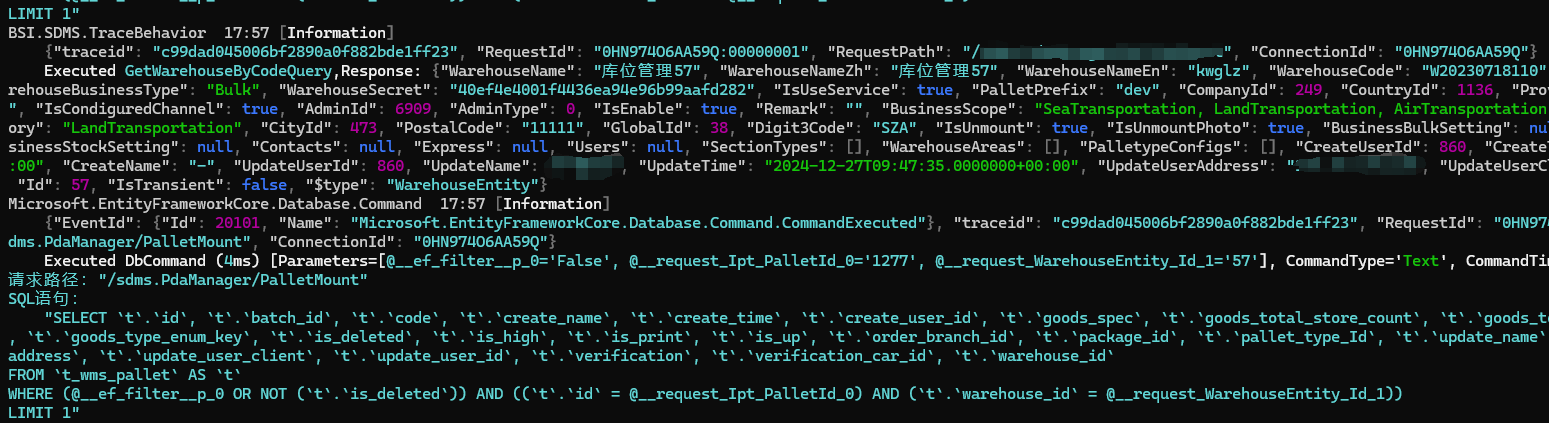
However, after the system is deployed—especially in microservice scenarios—various tools are usually used to collect logs, such as the commonly used ELK logging stack. In that case, if the project outputs logs in JSON format, collection and parsing become much easier.
Therefore, we need to redirect the output logs to JSON format, which can be done using:
.WriteTo.Console(new RenderedCompactJsonFormatter())
Comparing direct output with JSON output, the difference is as follows:
configuration
.ReadFrom.Configuration(ctx.Configuration)
↓ ↓ ↓
configuration
.WriteTo.Console(new RenderedCompactJsonFormatter())   // This line is added
.ReadFrom.Configuration(ctx.Configuration)
Serilog provides four JSON formatters.
Below is the performance test of the four formatters:
| Formatter | Median | StdDev | Scaled |
| ------------------------------------ | ---------- | --------- | ------ |
| JsonFormatter | 11.2775 µs | 0.0682 µs | 1.00 |
| CompactJsonFormatter | 6.0315 µs | 0.0429 µs | 0.53 |
| JsonFormatter(renderMessage: true) | 13.7585 µs | 0.1194 µs | 1.22 |
| RenderedCompactJsonFormatter | 7.0680 µs | 0.0605 µs | 0.63 |
It is recommended to use RenderedCompactJsonFormatter.
For JsonFormatter and CompactJsonFormatter, the difference is mainly in length. CompactJsonFormatter has better compression, but it is less convenient to read. Both of them store the parameter template and parameter values separately.
。
Take the following log as an example:
_logger.Information("Hello, {@User}, {N:x8} at {Now}", new { Name = "nblumhardt", Tags = new[] { 1, 2, 3 } }, 123, DateTime.Now);
JsonFormatter format:
{
	"Timestamp": "2016-06-07T13:44:57.8532799+10:00",
	"Level": "Information",
	"MessageTemplate": "Hello, {@User}, {N:x8} at {Now}",
	"Properties": {
		"User": {
			"Name": "nblumhardt",
			"Tags": [1, 2, 3]
		},
		"N": 123,
		"Now": "2016-06-07T13:44:57.8532799+10:00"
	},
	"Renderings": {
		"N": [{
			"Format": "x8",
			"Rendering": "0000007b"
		}]
	}
}
CompactJsonFormatter format:
{
	"@t": "2016-06-07T03:44:57.8532799Z",
	"@mt": "Hello, {@User}, {N:x8} at {Now}",
	"@r": ["0000007b"],
	"User": {
		"Name": "nblumhardt",
		"Tags": [1, 2, 3]
	},
	"N": 123,
	"Now": "2016-06-07T13:44:57.8532799+10:00"
}
Both record the original log string "Hello, {@User}, {N:x8} at {Now}", but they do not redirect the output result (formatting) inside the string. Instead, they store the values of User, N, and Now separately using other properties.
For JsonFormatter(renderMessage: true) and RenderedCompactJsonFormatter, they are the redirected (formatted) versions of the two above, and the formatting will be applied directly within the original string.
JsonFormatter(renderMessage: true) format:
{
	"Timestamp": "2024-12-30T08:54:32.2909994+08:00",
	"Level": "Information",
	"MessageTemplate": "Hello, {@User}, {N:x8} at {Now}",
	"RenderedMessage": "Hello, { Name: \"nblumhardt\", Tags: [1, 2, 3] }, 0000007b at 12/30/2024 08:54:32",
	"Properties": {
		"User": {
			"Name": "nblumhardt",
			"Tags": [1, 2, 3]
		},
		"N": 123,
		"Now": "2024-12-30T08:54:32.2886810+08:00",
		"SourceContext": "BSI.SDMS.Api.Program"
	},
	"Renderings": {
		"N": [{
			"Format": "x8",
			"Rendering": "0000007b"
		}]
	}
}
RenderedCompactJsonFormatter format:
{
	"@t": "2024-12-30T00:53:09.8507927Z",
	"@m": "Hello, { Name: \"nblumhardt\", Tags: [1, 2, 3] }, 0000007b at 12/30/2024 08:53:09",
	"@i": "4e2159b8",
	"User": {
		"Name": "nblumhardt",
		"Tags": [1, 2, 3]
	},
	"N": 123,
	"Now": "2024-12-30T08:53:09.8484345+08:00",
	"SourceContext": "BSI.SDMS.Api.Program"
}

文章评论