Maomi.I18n
As businesses expand internationally, software products need to support multiple languages to serve different customer groups. The interface should display different languages according to the user’s selected language. Frameworks such as ASP.NET Core or ABP provide multilingual solutions. Although their configuration methods differ, they all use key-value pairs. Developers must provide values for each key in different languages, and the framework automatically resolves the appropriate value for the key based on the request context.
Maomi.I18n is a simple and easy-to-use i18n multilingual framework. It can be registered in console applications, ASP.NET Core, WPF projects, and more. Developers can also easily extend and customize their own multilingual solutions.
Maomi.I18n implements its functionality using standardized interfaces, allowing developers to migrate between different multilingual solutions or switch to other multilingual frameworks with minimal cost.
Using in a Console Application
To use i18n, multilingual resources must be loaded. These resources can be stored in JSON files or loaded remotely. For most projects, there are generally two situations. Maomi.I18n has built-in support for JSON, so this section mainly discusses using JSON files to store multilingual resources.
A solution often contains multiple projects, and there are typically two scenarios when using multilingual resources:
A solution only needs one shared multilingual resource set.
Different projects in a solution need isolated multilingual resources.
Each case will be explained below.
Global Shared Multilingual Resources
If a solution only needs a single set of multilingual resources and does not require project-level isolation, the multilingual JSON files can be stored in the directory of any project. In this section, create a console project and add en-US.json and zh-CN.json files in the i18n directory with the following contents.
{
  "test": "Test"
}
{
  "test": "测试"
}
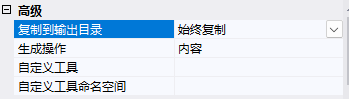
Right-click en-US.json and zh-CN.json, modify their properties, set Build Action to Content, and Copy to Output Directory to Copy Always.
Then register the i18n service through code and load the i18n resources.
var ioc = new ServiceCollection();
ioc.AddI18n("zh-CN");	// Register the i18n service and set the default language
ioc.AddI18nResource(options =>
{
	options.AddJsonDirectory("i18n");	// Recognize multilingual files
});
The AddJsonDirectory() function scans JSON files in the directory and uses the file name as the language identifier. For example, zh-CN.json represents the zh-CN language.
You can also manually add multilingual files.
ioc.AddI18nResource(options =>
{
	options.AddJsonFile("zh-CN", "i18n/zh-CN.json");
	options.AddJsonFile("en-US", "i18n/en-US.json");
});
Since console applications do not have a request context like ASP.NET Core applications, we need to manually set the current scope language to en-US.
var services = ioc.BuildServiceProvider();

// Manually set the current request language
using (var c = new I18nScope("en-US"))
{
	var i18n = services.GetRequiredService<IStringLocalizer>();
	var s1 = i18n["test"];
	Console.WriteLine(s1);
	Console.WriteLine(s1);
}
using (var c = new I18nScope("zh-CN"))
{
	var i18n = services.GetRequiredService<IStringLocalizer>();
	var s1 = i18n["test"];
	Console.WriteLine(s1);
	Console.WriteLine(s1);
}
However, for console applications, this approach can be somewhat redundant. Console programs usually do not need to dynamically switch multilingual contexts like ASP.NET Core applications. Instead, you can fix the language during startup and avoid dependency injection.
Create your own i18n context type so you can freely set the current language type.
public class MyI18nContext : I18nContext
{
	public void SetCulture(string language)
    {
        Culture = CultureInfo.CreateSpecificCulture(language);
    }
}
Set the default language to zh-CN during application startup, and then import the JSON multilingual files from the directory.
public class Program
{
	private static readonly IStringLocalizer _i18n;

    static Program()
	{
        MyI18nContext i18nContext = new MyI18nContext();
        i18nContext.SetCulture("zh-CN");

        var i18nResource = I18nHelper.CreateResourceFactory();
        i18nResource.AddJsonDirectory("i18n");

        _i18n = I18nHelper.CreateStringLocalizer(i18nContext, i18nResource);
        // 		_i18n = new I18nStringLocalizer(i18nContext, i18nResource, new ServiceCollection().BuildServiceProvider());
    }

    static void Main()
	{
        var s1 = _i18n["test"];
        Console.WriteLine(s1);
    }
}
Since console programs usually serve a single user, it is sufficient to use a global IStringLocalizer object. If the language needs to be switched during runtime, simply call i18nContext.SetCulture("en-US").
Another method is to integrate it with the current container context, allowing developers to define how the program resolves the current multilingual context.
public class MyI18nContext : I18nContext
{
    public MyI18nContext()
    {
        base.Culture = ...
    }

    public void Set(CultureInfo cultureInfo)
    {
        base.Culture = cultureInfo;
    }
}

builder.Services.AddScoped<I18nContext, MyI18nContext>();
This section demonstrated how to use multilingual functionality in console applications by registering i18n services through a container or configuring them manually. Developers can choose the appropriate method depending on the scenario.
Multi‑Project Isolation
A solution may contain multiple projects, and each project might require its own isolated multilingual resources.
For example, if the Test type belongs to project A and you want to use project A’s multilingual resources:
var l1 = services.GetRequiredService<IStringLocalizer<Program>>();
var s1 = l1["test"];
Create two projects: Demo5.Console and Demo5.Lib. The former is a console project, and the latter is a class library.
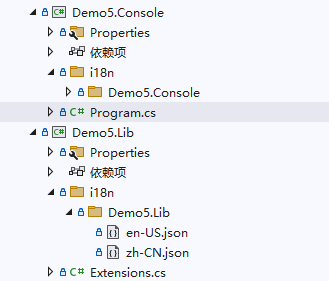
Create en-US.json and zh-CN.json files in the i18n/Demo5.Lib directory.
Set their contents as follows:
{
  "test": "lib en-US"
}
{
  "test": "lib zh-CN"
}
Right-click en-US.json and zh-CN.json, modify their properties, set Build Action to Content, and Copy to Output Directory to Copy Always.
Create an extension function to load the multilingual resources of the Demo5.Lib project into the container.
public class Test { }
public static class Extensions
{
    public static void AddLib(this IServiceCollection services)
    {
        services.AddI18nResource(options =>
        {
            options.ParseDirectory("i18n");
        });
    }
}
Then create the Demo5.Console project and reference Demo5.Lib.
Create en-US.json and zh-CN.json files in the i18n/Demo5.Console directory.
Set their contents as follows:
{
  "test": "console en-US"
}
{
  "test": "console zh-CN"
}
The final directory structure will look like this:
├─Demo5.Console
│  │  Demo5.Console.csproj
│  │  Program.cs
│  │
│  ├─i18n
│  │  └─Demo5.Console
│  │          en-US.json
│  │          zh-CN.json
│
├─Demo5.Lib
│  │  Demo5.Lib.csproj
│  │  Extensions.cs
│  │
│  ├─i18n
│  │  └─Demo5.Lib
│  │          en-US.json
│  │          zh-CN.json
In Program of Demo5.Console, use IStringLocalizer<T> to retrieve the value of a key in different languages.
static void Main()
{
	var ioc = new ServiceCollection();
	ioc.AddI18n("zh-CN");
	ioc.AddI18nResource(options =>
	{
		options.ParseDirectory("i18n");
		options.AddJsonDirectory("i18n");
	});

	ioc.AddLib();

	var services = ioc.BuildServiceProvider();

	// Manually set the current request language
	using (var c = new I18nScope("en-US"))
	{
		var l1 = services.GetRequiredService<IStringLocalizer<Program>>();
		var l2 = services.GetRequiredService<IStringLocalizer<Test>>();
		var s1 = l1["test"];
		var s2 = l2["test"];
		Console.WriteLine(s1);
		Console.WriteLine(s2);
	}

	// Manually set the current request language
	using (var c = new I18nScope("zh-CN"))
	{
		var l1 = services.GetRequiredService<IStringLocalizer<Program>>();
		var l2 = services.GetRequiredService<IStringLocalizer<Test>>();
		var s1 = l1["test"];
		var s2 = l2["test"];
		Console.WriteLine(s1);
		Console.WriteLine(s2);
	}
}
Output:
console en-US
lib en-US
console zh-CN
lib zh-CN
After compiling Demo5.Console, open the bin/Debug/net8.0 directory. In the i18n directory you will see the following file structure:
.
├── Demo5.Console
│   ├── en-US.json
│   └── zh-CN.json
└── Demo5.Lib
    ├── en-US.json
    └── zh-CN.json
The principle of Maomi.I18n is very simple. Each project defines its own multilingual files. After compilation, all files are merged into the i18n directory for unified management and loading. Each directory matches the project name for easier identification. When using IStringLocalizer<T> to read a key, the framework automatically loads the JSON file from the directory corresponding to the project where type T resides.
Packaging into a NuGet Package
Some class library projects may be packaged as NuGet packages and distributed to other developers. The library project can include multilingual files so that they are embedded in the NuGet package. This section demonstrates this process.
Create a Demo5.Nuget class library project and create the corresponding multilingual files.
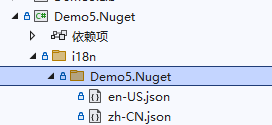
Then modify the project file to embed the multilingual files into the NuGet package.
<Project Sdk="Microsoft.NET.Sdk">

	<PropertyGroup>
		<OutputType>Library</OutputType>
		<TargetFramework>net8.0</TargetFramework>
		<ImplicitUsings>enable</ImplicitUsings>
		<Nullable>enable</Nullable>
	</PropertyGroup>

	<ItemGroup>
		<Content Include="i18n\Demo5.Nuget\en-US.json" Pack="true">
			<PackageCopyToOutput>true</PackageCopyToOutput>
			<CopyToOutputDirectory>Always</CopyToOutputDirectory>
			<PackagePath>contentFiles\any\any\i18n\Demo5.Nuget\en-US.json</PackagePath>
		</Content>

		<Content Include="i18n\Demo5.Nuget\zh-CN.json" Pack="true">
			<PackageCopyToOutput>true</PackageCopyToOutput>
			<CopyToOutputDirectory>Always</CopyToOutputDirectory>
			<PackagePath>contentFiles\any\any\i18n\Demo5.Nuget\zh-CN.json</PackagePath>
		</Content>
	</ItemGroup>
</Project>
In Web projects, the compiler automatically enables the EnableDefaultContentItems property and sets <Content></Content> for files like web.config, .json, and .cshtml. Customizing the Content property may therefore cause conflicts. To avoid this, disable the configuration in <PropertyGroup>.
<EnableDefaultContentItems>false</EnableDefaultContentItems>
After users reference the NuGet package, the corresponding files will appear in their project.
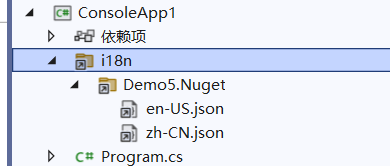
Demo5.Nuget does not need to reference the Maomi.I18n package. Users can simply parse the directory automatically and isolate multilingual resource files by project.
services.AddI18nResource(options =>
{
	options.ParseDirectory("i18n");
});
Custom Multilingual Resources
Maomi.I18n provides three ways to import multilingual resources: Dictionary, JSON, and WPF resource dictionaries. If developers have other requirements, it is easy to extend the resource import mechanism.
For example, in Maomi.I18n.WPF, the resource dictionary is converted into Dictionary<string, object> and then imported as multilingual resources using DictionaryResource.
。
services.AddI18nResource(f =>
{
	// Read each multilingual resource file
	foreach (var item in xamlFiles)
	{
		string resourceDictionaryPath = $"pack://application:,,,/{localization}/{item.Key}.xaml";
		var resourceDictionary = new ResourceDictionary
		{
			Source = new Uri(resourceDictionaryPath, UriKind.RelativeOrAbsolute)
		};

		Dictionary<string, object> dictionary = ResourceDictionaryToDictionary(resourceDictionary);
		f.Add(new DictionaryResource(new CultureInfo(item.Key), dictionary));
	}
});
Therefore, if developers can directly convert the multilingual resources to be imported into a dictionary, they can add them directly using DictionaryResource as shown in the example above.
Or you can directly implement the I18nResource interface and completely customize how multilingual resources are retrieved:
/// <summary>
/// Dictionary-based multilingual file resources.
/// </summary>
public class DictionaryResource : I18nResource
{
    /// <inheritdoc/>
    public CultureInfo SupportedCulture => _cultureInfo;

    private readonly CultureInfo _cultureInfo;
    private readonly IReadOnlyDictionary<string, LocalizedString> _kvs;

    /// <summary>
    /// Initializes a new instance of the <see cref="DictionaryResource"/> class.
    /// </summary>
    /// <param name="cultureInfo"></param>
    /// <param name="kvs"></param>
    public DictionaryResource(CultureInfo cultureInfo, IReadOnlyDictionary<string, object> kvs)
    {
        _cultureInfo = cultureInfo;
        _kvs = kvs.ToDictionary(x => x.Key, x => new LocalizedString(x.Key, x.Value.ToString()!));
    }

    /// <inheritdoc/>
    public virtual LocalizedString Get(string culture, string name)
    {
        if (culture != _cultureInfo.Name)
        {
            return new LocalizedString(name, name, resourceNotFound: true);
        }

        var value = _kvs.GetValueOrDefault(name);
        if (value == null)
        {
            return new LocalizedString(name, name, resourceNotFound: true);
        }

        return value;
    }

    /// <inheritdoc/>
    public virtual LocalizedString Get(string culture, string name, params object[] arguments)
    {
        if (culture != _cultureInfo.Name)
        {
            return new LocalizedString(name, name, resourceNotFound: true);
        }

        var value = _kvs.GetValueOrDefault(name);
        if (value == null)
        {
            return new LocalizedString(name, name, resourceNotFound: true);
        }

        return new LocalizedString(name, string.Format(value, arguments));
    }

    /// <inheritdoc/>
    public virtual IEnumerable<LocalizedString> GetAllStrings(bool includeParentCultures)
    {
        return _kvs.Values;
    }
}
Then manually add it to the multilingual resource collection.
services.AddI18nResource(f =>
{
	f.Add(myI18nResource);
});
If the multilingual resource provider cannot be instantiated in advance and needs dependency injection, that is also supported.
As shown in the code below, within the current request Maomi.I18n will automatically retrieve the MyResource instance from the container and then resolve the multilingual information.
services.AddScoped<MyResource>();
services.AddI18nResource(f =>
{
	f.Add(typeof(MyResource));
});
Using in ASP.NET Core
Create a Demo5.Api project and install the Maomi.I18n.AspNetCore package.
Create an i18n directory in the project and then create two json files.
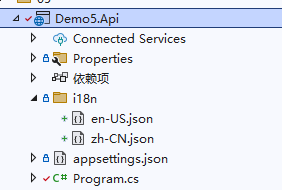
Contents of the zh-CN.json file:
{
  "购物车": {
    "商品名称": "商品名称",
    "加入时间": "加入时间",
    "清理失效商品": "清理失效商品"
  },
  "会员等级": {
    "用户名": "用户名",
    "积分": "积分:{0}",
    "等级": "等级"
  }
}
Contents of the en-US.json file:
{
  "购物车": {
    "商品名称": "Product name",
    "加入时间": "Join date",
    "清理失效商品": "Cleaning up failures"
  },
  "会员等级": {
    "用户名": "Username",
    "积分": "Member points:{0}",
    "等级": "Level"
  }
}
The Maomi.I18n framework scans the json files in the assembly directory and then parses them into key-value pairs stored in memory. The Key format is the same as the IConfiguration Key mentioned in Chapter 3. In Chapter 4 it was also explained how json files are parsed. For example, to obtain the value of Product Name, you can use ["购物车:商品名称"] to access values under nested levels. String interpolation is also supported, such as "积分": "Member points:{0}".
Using Maomi.I18n only requires two steps: inject the i18n service and import the i18n language resources.
builder.Services.AddHttpContextAccessor();

// Add i18n multilingual support
builder.Services.AddI18nAspNetCore(defaultLanguage: "zh-CN");
// Configure multilingual source - json
builder.Services.AddI18nResource(option =>
{
    var basePath = "i18n";
    option.AddJsonDirectory(basePath);
});
Next, add the i18n middleware. The middleware will parse the corresponding language from the user request context.
var app = builder.Build();
app.UseI18n();	// <- place this early in the middleware pipeline
Then add a controller or directly write middleware for testing. You only need to inject the IStringLocalizer service.
app.UseRouting();
app.Use(async (HttpContext context, RequestDelegate next) =>
{
	var localizer = context.RequestServices.GetRequiredService<IStringLocalizer>();
	await context.Response.WriteAsync(localizer["购物车:商品名称"]);
	return;
});
Start the program and open the address http://localhost:5177/test?culture=en-US. You will see the output Product name.

Carrying request language information
Maomi.I18n is essentially an extension built on top of ASP.NET Core's multilingual interfaces. Therefore, Maomi.I18n does not need to perform much language parsing itself. Instead, it relies on the built-in ASP.NET Core multilingual features to determine the language used in client requests and obtain related contextual information.
ASP.NET Core can use app.UseRequestLocalization(); to introduce the RequestLocalizationMiddleware middleware for multilingual handling. The RequestLocalizationMiddleware automatically calls IRequestCultureProvider to determine the language used by the request. We can then obtain the corresponding language through context.Features.Get<IRequestCultureFeature>();, simplifying the design of multilingual frameworks.
ASP.NET Core defines an IRequestCultureProvider interface for parsing regional information carried in client requests and determining the language used in the current request. ASP.NET Core itself provides three implementations of this interface, which means it has three built-in ways to determine the request language. Let’s look at how these three approaches parse language identifiers from the request context.
The first method is URL route parameters, parsed through QueryStringRequestCultureProvider. The URL must include two parameters: culture and ui-culture, for example:
?culture=en-US&ui-culture=en-US
The second method is Cookie, using CookieRequestCultureProvider. The cookie must include a key named .AspNetCore.Culture, with the following format:
c=en-US|uic=en-US
Example:
.AspNetCore.Culture=c=en-US|uic=en-US
The third method is through Headers, which is also the most commonly used approach. The provider is AcceptLanguageHeaderRequestCultureProvider, with the following format:
Accept-Language: zh-CN,zh;q=0.9
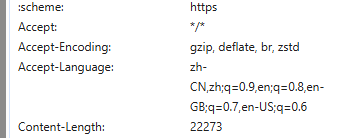
Of course, developers can modify the configuration of these three providers according to their needs in order to parse the culture name from different request locations or parameter names.
new QueryStringRequestCultureProvider()
{
	QueryStringKey = "lan",
	UIQueryStringKey = "ui"
}
Since ASP.NET Core automatically parses the request language, we only need to obtain the language information from the IRequestCultureFeature service instead of parsing it manually.
var requestCultureFeature = context.Features.Get<IRequestCultureFeature>();
var requestCulture = requestCultureFeature?.RequestCulture;
When a client sends a request, ASP.NET Core automatically retrieves the IRequestCultureProvider service list from RequestLocalizationOptions and calls them one by one until the request language can be determined. By default, ASP.NET Core executes QueryStringRequestCultureProvider, CookieRequestCultureProvider, and AcceptLanguageHeaderRequestCultureProvider in order. If the first provider cannot determine the language, the next provider will be used. If none of the three default providers can determine the language, user-defined providers will be called. Once a provider successfully determines the language, the remaining providers will not be executed. The order of these components can also be customized, but this will not be discussed further here.
Developers need to parse the language used in the current request from the request parameters in HttpContext. If parsing fails, NullProviderCultureResult should be returned so that the framework can continue to the next IRequestCultureProvider. If the language is found, ProviderCultureResult should be returned.
It should be noted that services implementing the IRequestCultureProvider interface cannot be injected via the container, but must instead be configured in RequestLocalizationOptions.
			services.Configure<RequestLocalizationOptions>(options =>
			{
				// By default, there are three built-in request language providers
				// that will be used first to determine the language.
				// QueryStringRequestCultureProvider
				// CookieRequestCultureProvider
				// AcceptLanguageHeaderRequestCultureProvider
				// Custom request language provider
				options.RequestCultureProviders.Add(new I18nRequestCultureProvider(defaultLanguage));
			});
If you want to adjust the order of providers, you only need to modify the IRequestCultureProvider collection in options.RequestCultureProviders.
Recommended multilingual solution
This section introduces the multilingual solution recommended by the author, which helps developers design a robust multilingual application for services.
Create a Demo5.HttpApi ASP.NET Core project.
{
  "用户未填写手机号": "The user did not enter the mobile phone number",
  "邮箱格式错误{0}": "Mailbox format error{0}"
}
{
  "用户未填写手机号": "用户未填写手机号",
  "邮箱格式错误{0}": "邮箱格式错误{0}"
}
Create a business exception type BusinessException. When exceptions occur in the project, always throw business exceptions uniformly. Do not throw exceptions arbitrarily and do not use model classes to store status codes and pass them layer by layer. Logical business errors and predictable abnormal situations should all be thrown as BusinessException, and then intercepted and handled through middleware.
。
/// <summary>
/// Business exception type.
/// </summary>
public class BusinessException : Exception
{
    /// <summary>
    /// Exception code.
    /// </summary>
    public int? Code { get; set; }

    /// <summary>
    /// Exception details.
    /// </summary>
    public string? Details { get; set; }

    /// <summary>
    /// Parameters.
    /// </summary>
    public object[]? Paramters { get; set; }

    /// <summary>
    /// Exception level.
    /// </summary>
    public LogLevel LogLevel { get; set; } = LogLevel.Error;

    /// <summary>
    /// Initializes a new instance of the <see cref="BusinessException"/> class.
    /// </summary>
    /// <param name="code"></param>
    /// <param name="message"></param>
    /// <param name="paramters"></param>
    public BusinessException(
    int? code = null,
    string? message = null,
    params object[] paramters)
    : base(message)
    {
        Code = code;
        Paramters = paramters;
    }

    /// <summary>
    /// Record additional exception information.
    /// </summary>
    /// <param name="name"></param>
    /// <param name="value"></param>
    /// <returns><see cref="BusinessException"/>.</returns>
    public BusinessException WithData(string name, object value)
    {
        Data[name] = value;
        return this;
    }
}
Design an exception filter for HTTP requests that intercepts BusinessException. The message inside the exception should be converted into multiple languages, while other exceptions should directly return the original exception message.
/// <summary>
/// Unified exception handling.
/// </summary>
public class BusinessExceptionFilter : IAsyncExceptionFilter
{
    private readonly ILogger<BusinessExceptionFilter> _logger;
    private readonly IStringLocalizer _stringLocalizer;

    /// <summary>
    /// Initializes a new instance of the <see cref="BusinessExceptionFilter"/> class.
    /// </summary>
    /// <param name="logger"></param>
    /// <param name="stringLocalizer"></param>
    public BusinessExceptionFilter(ILogger<BusinessExceptionFilter> logger, IStringLocalizer stringLocalizer)
    {
        _logger = logger;
        _stringLocalizer = stringLocalizer;
    }

    /// <inheritdoc/>
    public async Task OnExceptionAsync(ExceptionContext context)
    {
        // Unhandled exception
        if (!context.ExceptionHandled)
        {
            object? response = default;

            // If a business exception is thrown, convert and return the corresponding message
            if (context.Exception is BusinessException ex)
            {
                string message = string.Empty;
                if (ex.Paramters != null && ex.Paramters.Length != 0)
                {
                    message = _stringLocalizer[ex.Message, ex.Paramters];
                }
                else
                {
                    message = _stringLocalizer[ex.Message];
                }

                response = new
                {
                    Code = 500,
                    Message = message
                };

                // ... record exception log ...
            }
            else
            {

                response = new
                {
                    Code = 500,
                    Message = context.Exception.Message
                };

                // ... record exception log ...
            }

            context.Result = new ObjectResult(response)
            {
                StatusCode = 500,
            };

            context.ExceptionHandled = true;
        }

        await Task.CompletedTask;
    }
}
Configure i18n and the exception interceptor when starting the project.
var builder = WebApplication.CreateBuilder(args);

builder.Services.AddControllers(o =>
{
    o.Filters.Add<BusinessExceptionFilter>();
});

builder.Services.AddEndpointsApiExplorer();
builder.Services.AddSwaggerGen();

builder.Services.AddHttpContextAccessor();

// Add i18n multilingual support
builder.Services.AddI18nAspNetCore(defaultLanguage: "zh-CN");
// Set multilingual source - json
builder.Services.AddI18nResource(option =>
{
    var basePath = "i18n";
    option.AddJsonDirectory(basePath);
});

var app = builder.Build();

app.UseI18n();

if (app.Environment.IsDevelopment())
{
    app.UseSwagger();
    app.UseSwaggerUI();
}

app.UseAuthorization();

app.MapControllers();

app.Run();
Create an API endpoint to test the business exception interception result.
[HttpPost("create_user")]
public string CreateUser(string? userName, string email)
{
	if (string.IsNullOrEmpty(userName))
	{
		throw new BusinessException(500, "用户未填写手机号");
	}

	if (!email.Contains("@"))
	{
		throw new BusinessException(500, "邮箱格式错误{0}", email);
	}

	return "创建成功";
}
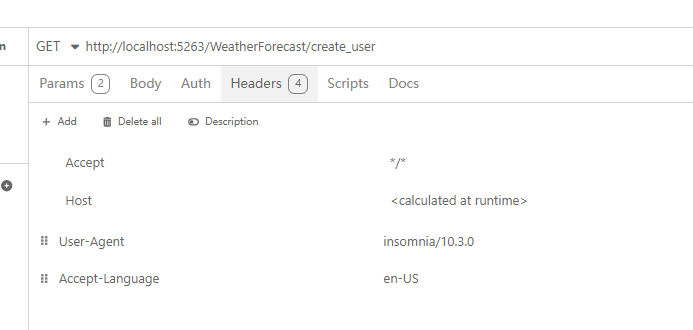
Set the request language to English and leave userName empty. After sending the request, you will find that the thrown business exception message "用户未填写手机号" has been translated into "The user did not enter the mobile phone number".
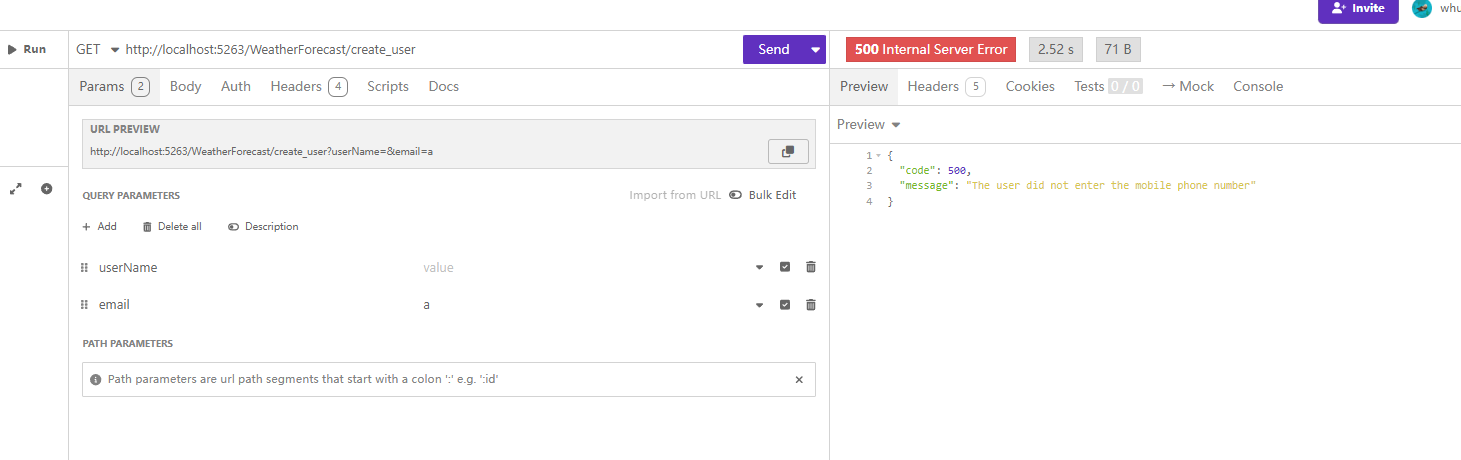
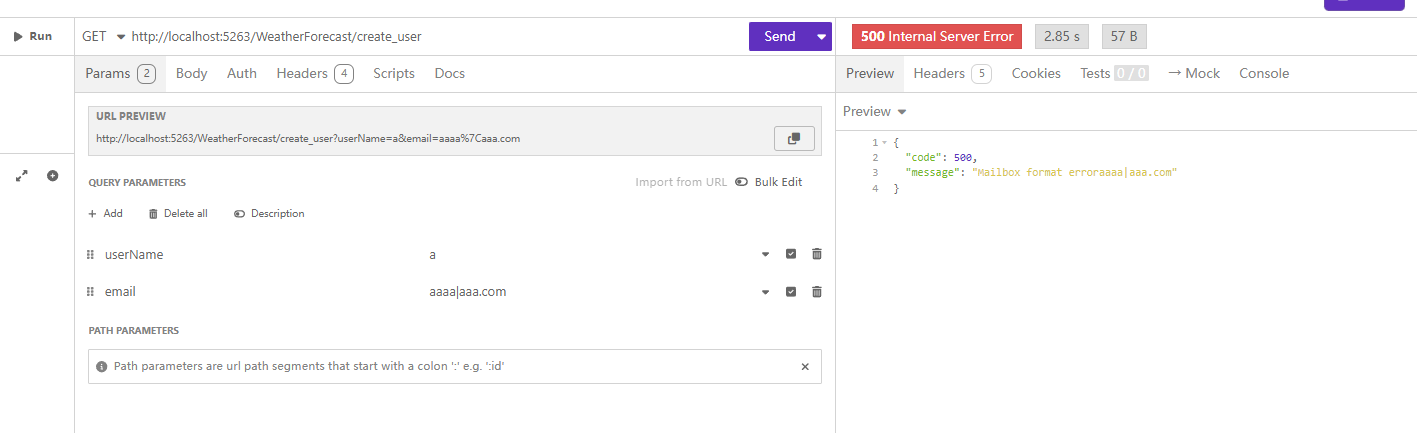
Continue modifying the request by setting the email field to aaaa|aaa.com, which will produce the following related error:
grpc
For a gRPC project, the approach is largely similar.
Create a BusinessInterceptor exception interceptor.
/// <summary>
/// Business exception interceptor.
/// </summary>
public class BusinessInterceptor : Interceptor
{
    private readonly ILogger<BusinessInterceptor> _logger;
    private readonly IStringLocalizer _stringLocalizer;

    /// <summary>
    /// Initializes a new instance of the <see cref="BusinessInterceptor"/> class.
    /// </summary>
    /// <param name="logger"></param>
    /// <param name="stringLocalizer"></param>
    public BusinessInterceptor(ILogger<BusinessInterceptor> logger, IStringLocalizer stringLocalizer)
    {
        _logger = logger;
        _stringLocalizer = stringLocalizer;
    }

    /// <inheritdoc/>
    public override async Task<TResponse> UnaryServerHandler<TRequest, TResponse>(TRequest request, ServerCallContext context, UnaryServerMethod<TRequest, TResponse> continuation)
        where TRequest : class
        where TResponse : class
    {
        try
        {
            var response = await continuation(request, context);
            return response;
        }
        catch (BusinessException ex)
        {
            // ... print log ...

            string message = string.Empty;
            if (ex.Paramters != null)
            {
                message = _stringLocalizer[ex.Message, ex.Paramters];
            }
            else
            {
                message = _stringLocalizer[ex.Message];
            }

            throw new RpcException(new Status(StatusCode.Internal, message));
        }
        catch (Exception ex)
        {
            // ... print log ...

            if (ex is RpcException)
            {
                throw;
            }

            throw new RpcException(new Status(StatusCode.Internal, ex.Message));
        }
    }
}
Startup configuration:
var builder = WebApplication.CreateBuilder(args);

builder.Services.AddHttpContextAccessor();

// Add i18n multilingual support
builder.Services.AddI18nAspNetCore(defaultLanguage: "zh-CN");

// Set multilingual source - json
builder.Services.AddI18nResource(option =>
{
    var basePath = "i18n";
    option.AddJsonDirectory(basePath);
});

builder.Services.AddGrpc(o =>
{
    o.Interceptors.Add<BusinessInterceptor>();
});

var app = builder.Build();

app.UseI18n();

app.MapGrpcService<GreeterService>();
app.MapGet("/", () => "Communication with gRPC endpoints must be made through a gRPC client. To learn how to create a client, visit: https://go.microsoft.com/fwlink/?linkid=2086909");

app.Run();
Modify the GreeterService service.
public override Task<HelloReply> SayHello(HelloRequest request, ServerCallContext context)
{
	if (request.Name == "error")
	{
		throw new BusinessException(500, "用户未填写手机号");
	}
	return Task.FromResult(new HelloReply
	{
		Message = "Hello " + request.Name
	});
}
Model validation localization
There are many components for model validation. Common ones include the FluentValidation framework, or you can directly use the built-in approach. The usage methods for HTTP and gRPC are largely similar. Due to space limitations, details are not expanded here. If using the default model validator in an HTTP approach, simply add the AddI18nDataAnnotation() extension method.
// Add controllers
context.Services.AddControllers()
.AddI18nDataAnnotation();
For the FluentValidation framework, the official documentation also provides examples:
Localization — FluentValidation documentation
public class PersonValidator : AbstractValidator<Person>
{
	public PersonValidator(IStringLocalizer localizer)
	{
		RuleFor(x => x.Surname).NotNull().WithMessage(x => localizer["Surname is required"]);
	}
}
}
Another approach is to intercept model validation error messages uniformly through ActionFilterAttribute in HTTP APIs and then convert them into localized output. For gRPC, this can be handled by implementing an Interceptor interceptor.
Export multilingual files
Configuring multilingual files can be quite troublesome. When developers write code and want to support multiple languages, they usually need to manually modify JSON files and then copy and paste keys into the code. When there are many keys, the coding experience becomes inconvenient.
Therefore, the author provides another method: first write the multilingual text directly in the code, such as throw new BusinessException(500, "用户未填写手机号") or .WithMessage("用户未填写手机号"). Then create a Roslyn tool to analyze the code files, extract the strings that meet certain conditions, and generate multilingual resource files.
In this way, developers can write code comfortably, and after finishing, export everything at once and translate it later.
Refer to the exporti18n project.
。
public class Program
{
    static async Task Main(string[] args)
    {
        var filters = new string[] { "bin", "obj", "Properties" };

        var i18nDic = new Dictionary<string, string>();

        var slnPath = "";
        var jsonDir = "";

        var dllPath = typeof(Program).Assembly.Location;

        // If the running path is in bin\Debug\net8.0
        if (Directory.GetParent(dllPath)!.FullName.Contains("bin\\Debug"))
        {
            slnPath = Directory.GetParent(dllPath)!.Parent!.Parent!.Parent!.Parent!.Parent!.FullName;
            jsonDir = Directory.GetParent(dllPath)!.Parent!.Parent!.Parent!.FullName;
        }
        else
        {
            slnPath = Directory.GetParent(dllPath)!.Parent!.Parent!.FullName;
            jsonDir = Directory.GetParent(dllPath)!.FullName;
        }

        // All project directories are under src
        var projPath = slnPath;

        // All project directories
        var projects = Directory.GetDirectories(projPath);

        // Use a queue to search directories one by one instead of loading everything at once
        foreach (string project in projects)
        {
            // Subdirectory list
            Queue<string> itemDirs = new();

            itemDirs.Enqueue(project);

            while (itemDirs.Count > 0)
            {
                var curDir = itemDirs.Dequeue();
                var csFiles = Directory.GetFiles(curDir, "*.cs", SearchOption.TopDirectoryOnly);
                foreach (var csFile in csFiles)
                {
                    Console.WriteLine(csFile);
                    string fileContent = await File.ReadAllTextAsync(csFile);

                    // Read the file and parse the syntax tree
                    SyntaxTree tree = CSharpSyntaxTree.ParseText(fileContent);
                    var root = tree.GetRoot();

                    // Find all new BusinessException statements and new BsiRpcException statements
                    var objectCreations = root.DescendantNodes()
                                             .OfType<ObjectCreationExpressionSyntax>()
                                             .Where(node => node.Type.ToString() == "BusinessException");

                    foreach (var objectCreation in objectCreations)
                    {
                        if (objectCreation.ArgumentList == null)
                        {
                            continue;
                        }

                        // Extract strings from the argument list of objectCreation
                        var arguments = objectCreation.ArgumentList.Arguments;

                        foreach (var argument in arguments)
                        {
                            if (argument.Expression is LiteralExpressionSyntax literal &&
                                literal.IsKind(SyntaxKind.StringLiteralExpression))
                            {
                                string str = literal.Token.ValueText;
                                if (!i18nDic.ContainsKey(str))
                                {
                                    i18nDic[str] = str;
                                }
                            }
                        }
                    }


                    // Find all WithMessage method calls
                    var invocationExpressions = root.DescendantNodes()
                                                    .OfType<InvocationExpressionSyntax>()
                                                    .Where(node => node.Expression is MemberAccessExpressionSyntax memberAccess &&
                                                                   memberAccess.Name.ToString() == "WithMessage");

                    foreach (var invocation in invocationExpressions)
                    {
                        var arguments = invocation.ArgumentList.Arguments;

                        foreach (var argument in arguments)
                        {
                            if (argument.Expression is LiteralExpressionSyntax literal &&
                                literal.IsKind(SyntaxKind.StringLiteralExpression))
                            {
                                string str = literal.Token.ValueText;
                                if (!i18nDic.ContainsKey(str))
                                {
                                    i18nDic[str] = str;
                                }
                            }
                        }
                    }
                }

                var newDirs = Directory.GetDirectories(curDir).Where(x => !filters.Contains(x)).ToArray();
                foreach (var itemDir in newDirs)
                {
                    itemDirs.Enqueue(itemDir);
                }
            }
        }

        string jsonOutput = System.Text.Json.JsonSerializer.Serialize(i18nDic, new System.Text.Json.JsonSerializerOptions
        {
            WriteIndented = true,
            Encoder = System.Text.Encodings.Web.JavaScriptEncoder.UnsafeRelaxedJsonEscaping
        });
        File.WriteAllText(Path.Combine(jsonDir, "zh-CN.json"), jsonOutput);

        Console.WriteLine("The i18n file has been generated automatically");
    }
}
Using in WPF
The effect is shown below. Only the main page implements multilingual support; the title bar and menu are not included.
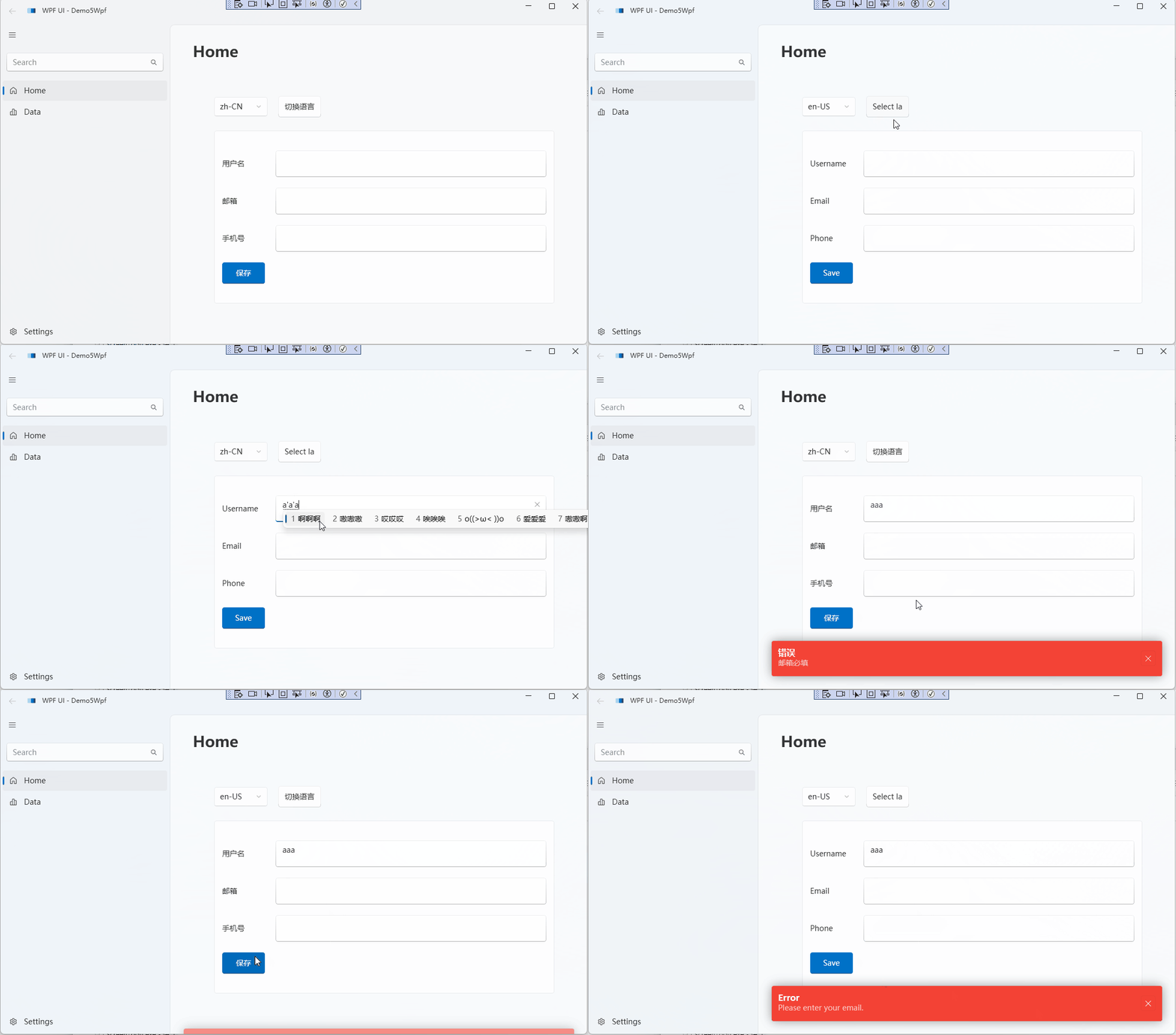
Since the WPF sample project contains a large amount of code, only the core details are explained here. For the complete code, please refer to
https://github.com/whuanle/maomi/tree/main/demo/5/Demo5Wpf
The WPF project uses the WPF-UI framework. Readers can also directly use native WPF or other third-party frameworks. WPF only needs to be started using the Host approach.
Install the Maomi.I18n.Wpf package, then create a Localization directory in the project.
├─Localization
│      en-US.xaml
│      zh-CN.xaml
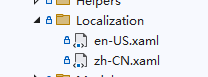
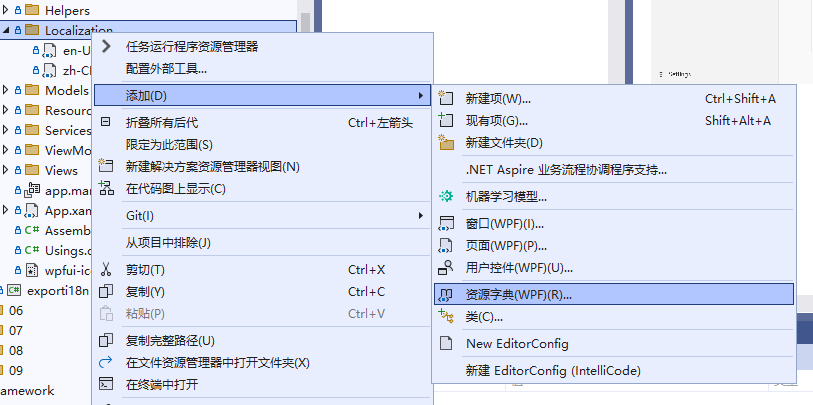
Right-click to add a Resource Dictionary, and create the files en-US.xaml and zh-CN.xaml.
Example content:
<ResourceDictionary xmlns="http://schemas.microsoft.com/winfx/2006/xaml/presentation"
                    xmlns:x="http://schemas.microsoft.com/winfx/2006/xaml"
                    xmlns:sys="clr-namespace:System;assembly=mscorlib">

    <sys:String x:Key="错误">错误</sys:String>
    <sys:String x:Key="用户名">用户名</sys:String>
    <sys:String x:Key="邮箱">邮箱</sys:String>
    <sys:String x:Key="手机号">手机号</sys:String>
    <sys:String x:Key="切换语言">切换语言</sys:String>
    <sys:String x:Key="手机号必填">手机号必填</sys:String>
    <sys:String x:Key="邮箱必填">邮箱必填</sys:String>
    <sys:String x:Key="用户名必填">用户名必填</sys:String>
    <sys:String x:Key="成功">成功</sys:String>
    <sys:String x:Key="已保存信息">已保存信息</sys:String>
    <sys:String x:Key="保存">保存</sys:String>

</ResourceDictionary>
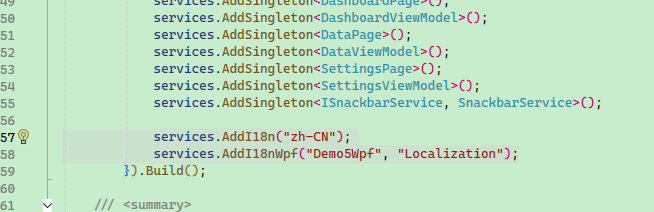
Inject the i18n service in App.xaml.cs.
services.AddI18n("zh-CN");

// Main project name: Demo5Wpf
// Resource dictionary location: Localization
services.AddI18nWpf("Demo5Wpf", "Localization");

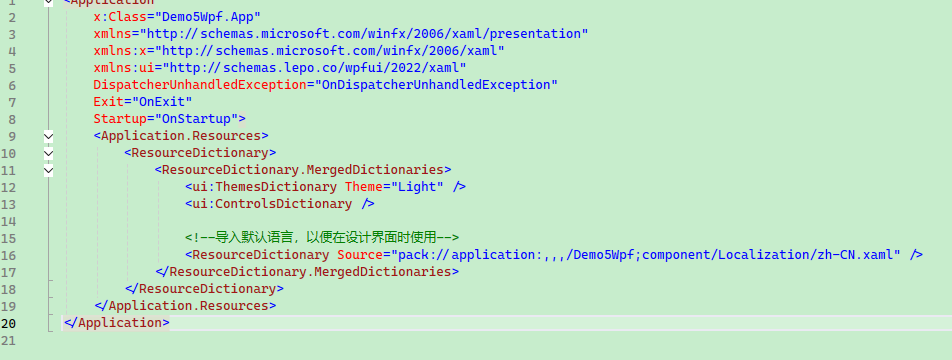
Add the imported multilingual resource file in App.xaml.
<!-- Import the default language so it can be used in the design view -->
<ResourceDictionary Source="pack://application:,,,/Demo5Wpf;component/Localization/zh-CN.xaml" />
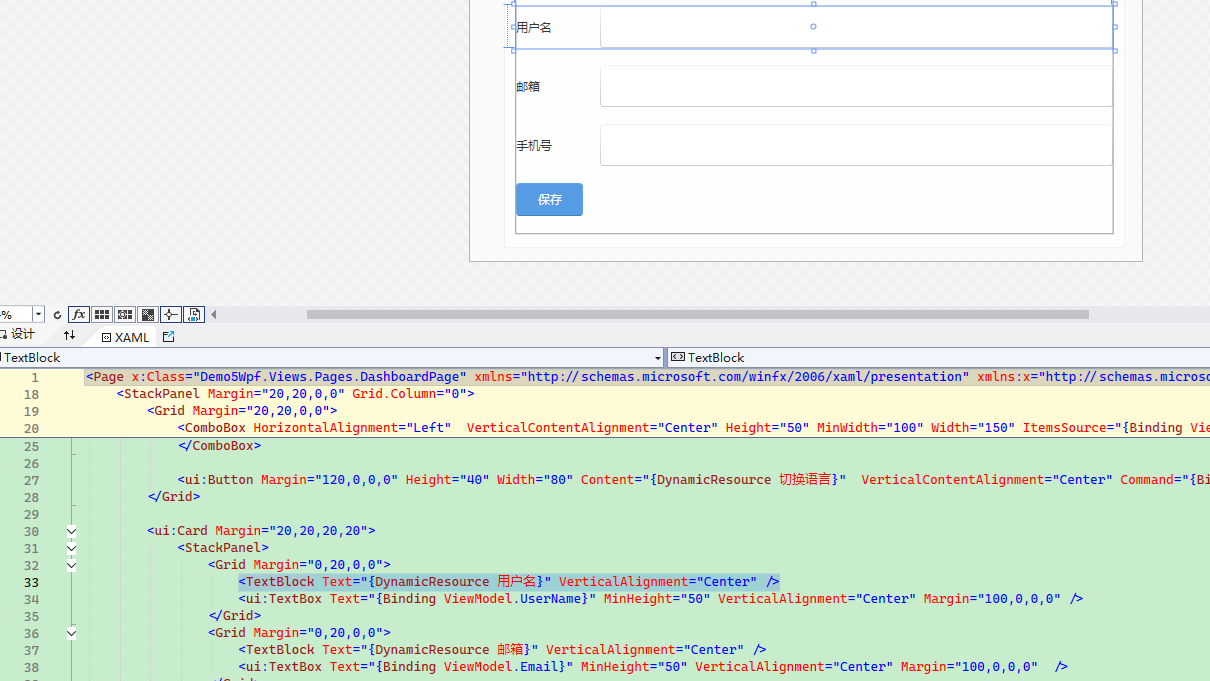
When writing the UI, directly use {DynamicResource 用户名} to bind the corresponding Key, and it will automatically translate to the corresponding language.
Example:
<TextBlock Text="{DynamicResource 用户名}" VerticalAlignment="Center" />
When you need to switch the project language, inject the WpfI18nContext interface and directly set the corresponding language.
_i18nContext.SetLanguage(SelectedLanguage);
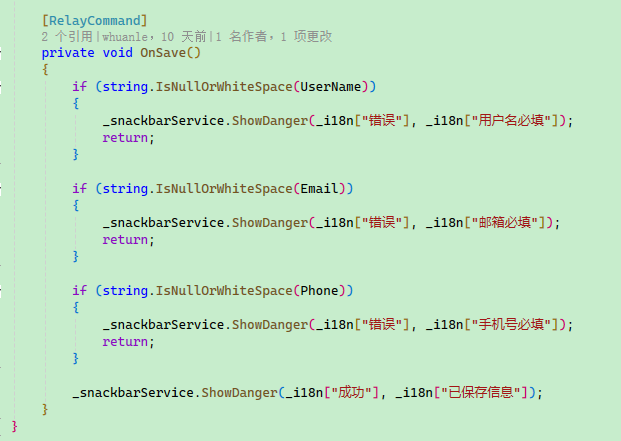
To use multilingual text in non-UI code, simply inject IStringLocalizer and use it directly, for example:


文章评论