项目地址: https://github.com/whuanle/maomi
文档地址: https://docs.whuanle.cn/zh/maomi_framework/start/1.module
Maomi.Core
Maomi.Core is a modularization and automatic service registration package that enables project modularization and service configuration in a simple and convenient way. Maomi.Core is a very lightweight package that can be used in console applications, Web projects, WPF projects, and more. When combined with MVVM in WPF projects, it can significantly reduce code complexity and make the code clearer and easier to maintain.
Among Web frameworks developed based on ASP.NET Core, the most well-known is ABP. One of the main features of ABP is that when developing different projects (assemblies), a module class is created in each project. When the program loads each assembly, it scans and identifies all module classes, then uses these module classes as entry points to initialize the assemblies.
Using modular development means developers do not need to worry about how assemblies are loaded and configured. When developing an assembly, developers configure initialization logic and configuration loading inside the module class. Users only need to reference the module class, and the framework will automatically start it.
All module classes are initialized sequentially according to the startup order.
First, the framework scans the types where modules are located. After collecting all module types, when scanning each type, the type filter of the module will be triggered.
Quick Start
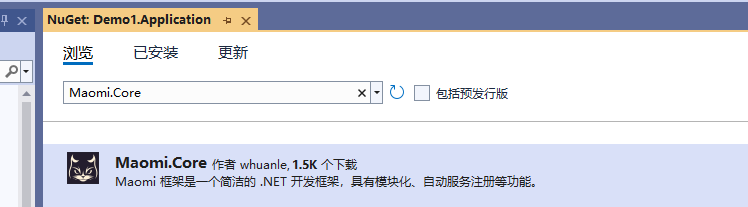
Create two projects: Demo1.Api and Demo1.Application. In Demo1.Application, install the latest Maomi.Core package.
Each project should have a module class. Create ApplicationModule.cs and ApiModule.cs respectively. The module class needs to implement the IModule interface.
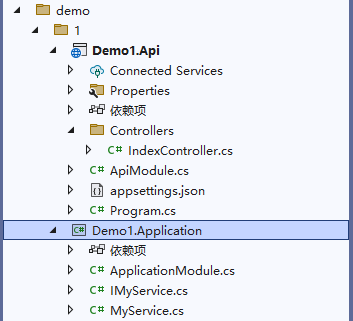
The content of the ApplicationModule.cs file in the Demo1.Application project is as follows. Its constructor injects IConfiguration. Dependency injection can be used inside module classes, allowing injection of services that are registered by default in WebApplicationBuilder.
public class ApplicationModule : IModule
{
    // Dependency injection can be used in module classes
    private readonly IConfiguration _configuration;
    public ApplicationModule(IConfiguration configuration)
    {
        _configuration = configuration;
    }

    public void ConfigureServices(ServiceContext services)
    {
        // Write module initialization code here
    }
}
Or inject nothing:
public class ApplicationModule : IModule
{
    public void ConfigureServices(ServiceContext services)
    {
        // Write module initialization code here
    }
}
In the Demo1.Application project, if you need to register MyService into the container, simply add the [InjectOnScoped] attribute to the type.
public interface IMyService
{
    int Sum(int a, int b);
}

[InjectOnScoped] // marker for automatic registration
public class MyService : IMyService
{
    public int Sum(int a, int b)
    {
        return a + b;
    }
}
Equivalent to:
service.AddScoped<IMyService, MyService>();
The upper-level module ApiModule.cs in Demo1.Api can reference the lower-level module through attribute annotations.
using System.Reflection;

[InjectModule<ApplicationModule>]    // indicates dependency on ApplicationModule
public class ApiModule : IModule
{
    public void ConfigureServices(ServiceContext services)
    {
        // Write module initialization code here
    }
}
Finally, configure the module entry point during application startup and initialize it.
var builder = WebApplication.CreateBuilder(args);
builder.Services.AddControllers();
builder.Services.AddEndpointsApiExplorer();
builder.Services.AddSwaggerGen();

// Register modular services and set ApiModule as the entry
builder.Services.AddModule<ApiModule>();

var app = builder.Build();
Modules
Maomi.Core also supports weakly referencing module classes from assemblies, meaning module classes are not directly referenced but dynamically discovered through scanning.
Using Dependency Injection in Modules
Each module must implement the IModule interface, defined as follows:
If the assembly only contains model classes or pure interface abstractions, it is unnecessary to add a module for that assembly.
/// <summary>
/// Module interface.
/// </summary>
public interface IModule
{
    /// <summary>
    /// Dependency injection within the module.
    /// </summary>
    /// <param name="context">Module service context.</param>
    void ConfigureServices(ServiceContext context);
}
When configuring the Host in ASP.NET Core, some framework-dependent services such as IConfiguration are automatically injected. Therefore, when module services begin initialization, the module class constructor can obtain already-registered services.
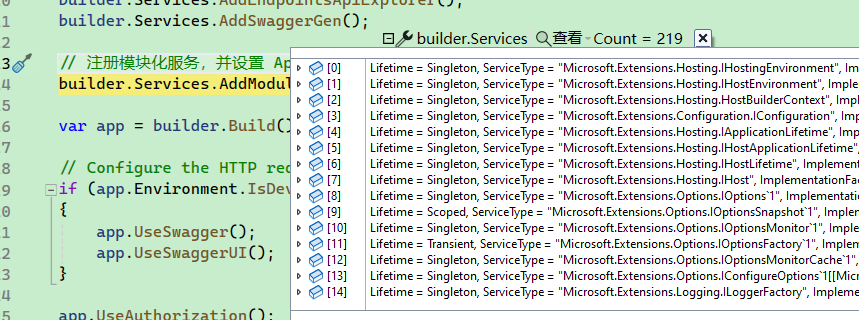
You can inject the services you need in the module class constructor.
[InjectModule<ApplicationModule>]
public class ApiModule : IModule
{
    private readonly IConfiguration _configuration;
    private readonly IHostEnvironment _hostEnvironment;
    public ApiModule(IConfiguration configuration, IHostEnvironment hostEnvironment)
    {
        _configuration = configuration;
        _hostEnvironment = hostEnvironment;
    }

    public void ConfigureServices(ServiceContext context)
    {
        var configuration = context.Configuration;
        context.Services.AddCors();
    }
}
Besides injecting services directly into the module constructor, you can also obtain services and configuration through ServiceContext context.
/// <summary>
/// Module context.
/// </summary>
public abstract class ServiceContext
{
    protected readonly IServiceCollection _serviceCollection;
    protected readonly IConfiguration _configuration;
    protected readonly List<ModuleRecord> _modules;

    /// <summary>
    /// Initializes a new instance of the <see cref="ServiceContext"/> class.
    /// </summary>
    /// <param name="serviceCollection"></param>
    /// <param name="configuration"></param>
    internal ServiceContext(IServiceCollection serviceCollection, IConfiguration configuration)
    {
        _serviceCollection = serviceCollection;
        _configuration = configuration;
        _modules = new List<ModuleRecord>();
    }

    /// <summary>
    /// Container service collection.
    /// </summary>
    public IServiceCollection Services => _serviceCollection;

    /// <summary>
    /// Configuration.
    /// </summary>
    public IConfiguration Configuration => _configuration;

    /// <summary>
    /// List of discovered modules.
    /// </summary>
    public IReadOnlyList<ModuleRecord> Modules => _modules;
}
For example, using context.Services allows manual registration of services into the container, and context.Modules can be used to obtain information about modules and assemblies.
context.Modules only records assemblies that contain module classes related to the current project. This avoids scanning all assemblies repeatedly when using multiple frameworks.
public void ConfigureServices(ServiceContext context)
{
    var configuration = context.Configuration;
    context.Services.AddCors();

    context.Services.AddScoped<IMyService, MyService>();

    // Register CQRS services.
    context.Services.AddMediatR(cfg =>
    {
        cfg.MaxTypesClosing = 500;
        cfg.AddOpenBehavior(typeof(TraceBehavior<,>));
        cfg.RegisterServicesFromAssemblies(context.Modules.Select(x => x.Assembly).ToArray());
    });
}
For example, frameworks like MediatR require assemblies to be added, and AutoMapper also requires assemblies. Using AppDomain.CurrentDomain.GetAssemblies() may include a large number of assemblies. Since frameworks like MediatR and AutoMapper reflectively scan all assemblies, this can slow down application startup.
Using context.Modules ensures that only assemblies containing useful module classes are registered. For example, in the Demo1 solution above, context.Modules only contains Demo1.Application and Demo1.Api, avoiding unnecessary assemblies and focusing only on those relevant to the project.
ModuleCore Abstract Class
ModuleCore is an abstract class that implements the IModule interface. It mainly adds a TypeFilter method, which is called when scanning types in assemblies. Developers can flexibly process certain types through this method.
/// <summary>
/// Module filter interface.
/// </summary>
public abstract class ModuleCore : IModule
{
    /// <inheritdoc/>
    public abstract void ConfigureServices(ServiceContext context);

    /// <summary>
    /// Called when each type is scanned.
    /// </summary>
    /// <param name="type"></param>
    public abstract void TypeFilter(Type type);
}
As shown below, when the framework scans a type, the TypeFilter function is triggered. Developers can recognize the type and perform corresponding processing.
public void TypeFilter(IServiceCollection services, Type type)
{
    if (type.IsClass && !type.IsAbstract)
    {
        if (type.IsGenericType && type.GetGenericTypeDefinition() == typeof(ITypeConverter<,>))
        {
            services.AddScoped(type);
        }
    }
}
Projects may contain many third-party frameworks and self-developed components. If every framework scans all types in all assemblies, it increases startup time and repeats the same process multiple times. Using TypeFilter can reduce this repeated scanning.
Module classes can freely inherit from ModuleCore or implement IModule directly.
For example, suppose a developer implements an event bus framework component and an automatic object mapping framework component. These two components can be packaged as two modules. Since they focus on different types of objects, each module processes scanned types differently, such as recognizing attribute annotations or interfaces and applying corresponding logic.
As shown in the code below, different logic resides in different module classes:
public class EventBusModule : ModuleCore
{
    public override void ConfigureServices(ServiceContext context)
    {
    }

    public override void TypeFilter(IServiceCollection services, Type type)
    {
        //
    }
}
public class AutoMapperModule : ModuleCore
{
    public override void ConfigureServices(IServiceCollection services, ServiceContext context)
    {
    }

    public override void TypeFilter(Type type)
    {
    }
}
Custom Module Configuration
When using AddModule(), you can inject ModuleOptions configuration to influence modular behavior. ModuleOptions is defined as follows:
/// <summary>
/// Initialization configuration.
/// </summary>
public class ModuleOptions
{
    /// <summary>
    /// Types or interfaces that should be filtered when registering services.
    /// These types will not be registered into the container.
    /// </summary>
    public ICollection<Type> FilterServiceTypes { get;  }
    {
        typeof(IDisposable),
        typeof(ICloneable),
        typeof(IComparable),
        typeof(object)
    };

    /// <summary>
    /// Custom assemblies to register.
    /// </summary>
    public ICollection<Assembly> CustomAssembies { get;  }
}
During automatic service registration, the framework automatically ignores interfaces such as IDisposable and ICloneable that are meaningless to register into the container. Developers can also add more filtered interfaces.
For example, the MyService service implements both IMyService and IDisposable.
public interface IMyService
{
    int Sum(int a, int b);
}

[InjectOnScoped]
public class MyService : IMyService, IDisposable
{
    public int Sum(int a, int b)
    {
        return a + b;
    }

    public void Dispose()
    {
        throw new NotImplementedException();
    }
}
Due to the default filtering rules, the final registration will only be:
context.Services.AddScoped<IMyService, MyService>();
Instead of:
context.Services.AddScoped<IMyService, MyService>();
context.Services.AddScoped<IDisposable, MyService>();
If developers need to dynamically introduce assemblies without strongly referencing module classes, CustomAssembies can be used.
builder.Services.AddModule<ApiModule>(options =>
{
    options.CustomAssembies.Add(Assembly.Load("./aaa.dll"));
});
aaa.dll must contain a module class.
Module Loading
When the project starts, the module loading process is as follows:
- Identify the module dependency tree.
- Initialize each module class according to the module dependency tree.
- Initialize module classes from custom assemblies.
- Scan types in assemblies according to the module dependency tree and call the
TypeFilterfunction of each module class. - Sequentially scan types in custom assembly modules and call the
TypeFilterfunction of each module class.
If module B depends on module A, or module A must be initialized before module B, then [InjectModule] can be used on module B to reference module A. This rule is called the module dependency tree.
As shown below, since B depends on module A, module A will be initialized before module B.
class A:IModule

[InjectModule<A>()]
class B:IModule
The rules of module dependency will be explained in more detail in later sections.
。
For modules referenced by assemblies, even if [InjectModule] is used, the framework will ignore the dependency relationships. It will only directly load the current module class and will not build a module dependency tree.
As shown below, even if the module class in aaa.dll introduces other module classes using [InjectModule], the framework will ignore this relationship.
builder.Services.AddModule<ApiModule>(options =>
{
    options.CustomAssembies.Add(Assembly.Load("./aaa.dll"));
});
Circular Dependency Detection
Because there are dependency relationships between modules, in order to identify these dependencies, Maomi.Core uses a tree structure to represent them. When starting module services, Maomi.Core scans all module classes, stores the module dependency relationships in a module tree, and then initializes modules one by one using a preorder traversal algorithm, which means initialization starts from the lowest-level modules.
Maomi.Core can detect circular dependencies between modules. For example, if the following modules and dependencies form a cycle, an error will be thrown.
[InjectModule<A>()]
[InjectModule<B>()]
class C:IModule

[InjectModule<A>()]
class B:IModule

// A circular dependency appears here
[InjectModule<C>()]
class A:IModule

// C is the entry module
services.AddModule<C>();
Because module C depends on modules A and B, A and B are child nodes of node C, while the parent node of A and B is C. After scanning the three modules A, B, and C along with their dependency relationships, the following module dependency tree will be produced.
As shown in the figure below, each module has a subscript representing different dependency relationships. A module may appear multiple times. C1 -> A0 means that C depends on A.
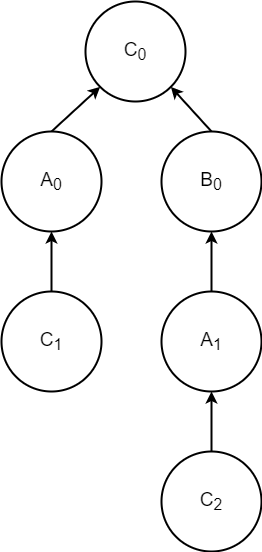
Starting from C0, since it has no parent node, there is no circular dependency.
Starting from A0, A0 -> C0. In this chain, no duplicate A module appears.
Starting from C1, C1 -> A0 -> C0. In this chain, the C module appears repeatedly, indicating a circular dependency.
Starting from C2, C2 -> A1 -> B0 -> C0. In this chain, the C module appears repeatedly, indicating a circular dependency.
Module Initialization Order
After generating the module tree, performing a post-order traversal on the module tree ensures the correct module initialization order.
For example, consider the following modules and dependencies.
[InjectModule<C>()]
[InjectModule<D>()]
class E:IModule

[InjectModule<A>()]
[InjectModule<B>()]
class C:IModule

[InjectModule<B>()]
class D:IModule

[InjectModule<A>()]
class B:IModule

class A:IModule

// E is the entry module
services.AddModule<E>();
The generated module dependency tree is shown below:
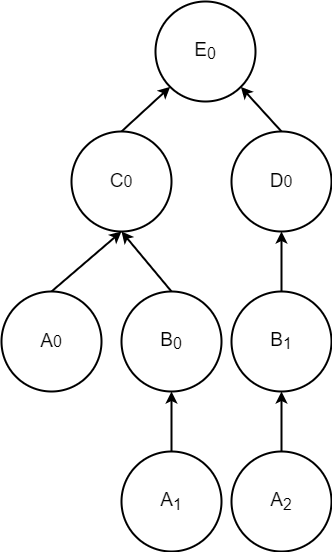
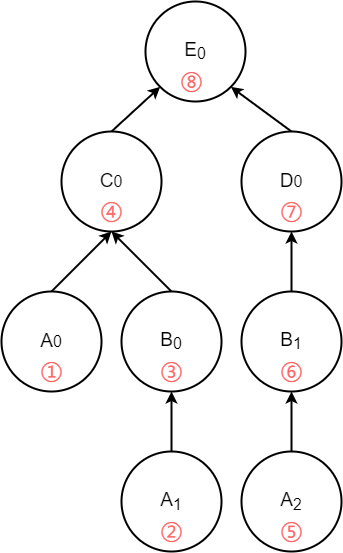
First, scanning starts from E0. Since E0 has child nodes C0 and D0, the scan continues along C0. When it reaches A0, because A0 has no child nodes, the module A corresponding to A0 will be initialized. According to the module dependency tree above and using post-order traversal, the initialization order of the modules is as follows (modules that have already been initialized will be skipped):
Automatic Service Registration
Maomi.Core identifies how services should be registered into the container through the [InjectOn] attribute. Its definition is as follows:
/// <summary>
/// Automatically register the current type into the container.
/// </summary>
[AttributeUsage(AttributeTargets.Class, AllowMultiple = false, Inherited = false)]
public class InjectOnAttribute : Attribute
{
    /// <summary>
    /// The service types to be registered.
    /// </summary>
    public Type[]? ServiceTypes { get; set; } = Array.Empty<Type>();

    /// <summary>
    /// The service lifetime.
    /// </summary>
    public ServiceLifetime Lifetime { get; set; } = ServiceLifetime.Scoped;

    /// <summary>
    /// Service registration scheme.
    /// </summary>
    public InjectScheme Scheme { get; set; }

    /// <summary>
    /// Also register itself into the container.
    /// </summary>
    public bool Own { get; set; } = false;

    /// <summary>
    /// ServiceKey.
    /// </summary>
    public object? ServiceKey { get; set; }

    /// <summary>
    /// Initializes a new instance of the <see cref="InjectOnAttribute"/> class.
    /// </summary>
    /// <param name="lifetime">Service lifetime.</param>
    /// <param name="scheme">Service registration scheme.</param>
    public InjectOnAttribute(ServiceLifetime lifetime = ServiceLifetime.Scoped, InjectScheme scheme = InjectScheme.OnlyInterfaces)
    {
        Lifetime = lifetime;
        Scheme = scheme;
    }
}
A total of four registration approaches are provided. [InjectOn] is the most basic registration method, while the other three attribute classes differ only in lifecycle. Their usage is otherwise the same.
InjectOn
InjectOnScoped
InjectOnSingleton
InjectOnTransient
When using [InjectOn], the service is registered with a Scoped lifetime by default, and all interfaces are registered.
Interfaces such as IDisposable and ICloneable will be automatically filtered out. See Custom Module Configuration for details.
[InjectOn]
public class MyService : IAService, IBService
Or use:
[InjectOnScoped]
public class MyService : IAService, IBService
Equivalent to:
services.AddScoped<IAService, MyService>();
services.AddScoped<IBService, MyService>();
If you only want to register IAService, you can set the registration mode to InjectScheme.Some and then customize the types to register:
[InjectOn(
	Scheme = InjectScheme.Some,
	ServicesType = new Type[] { typeof(IAService) }
	)]
public class MyService : IAService, IBService
For example, if you only want to register SomeB:
public class Some { }
public interface SomeA { }
public interface SomeB { }
public interface SomeC { }

[InjectOn(scheme: InjectScheme.Some, ServiceTypes = new Type[] { typeof(SomeB) })]
public class Service_Some : Some, SomeA, SomeB, SomeC { }
You can also register the type itself into the container:
[InjectOn(Own = true)]
public class MyService : IMyService
Equivalent to:
services.AddScoped<IAService, MyService>();
services.AddScoped<MyService>();
Another example:
public class Some { }
public interface SomeA { }
public interface SomeB { }
public interface SomeC { }

[InjectOn(scheme: InjectScheme.Some, Own = true, ServiceTypes = new Type[] { typeof(SomeB) })]
public class Service_Some : Some, SomeA, SomeB, SomeC { }
Equivalent to:
services.AddScoped<SomeB, Service_Some>();
services.AddScoped<Service_Some>();
In the Service_Some example, if the service inherits both classes and interfaces but you only want to register the interfaces, you can write it like this:
public class Some { }
public interface SomeA { }
public interface SomeB { }
public interface SomeC { }

[InjectOn(scheme: InjectScheme.OnlyInterfaces)]
public class Service_Some : Some, SomeA, SomeB, SomeC { }
Equivalent to:
services.AddScoped<SomeA, Service_Some>();
services.AddScoped<SomeB, Service_Some>();
services.AddScoped<SomeC, Service_Some>();
If you only want to register the type itself and ignore interfaces, you can use InjectScheme.None:
[InjectOn(ServiceLifetime.Scoped, Scheme = InjectScheme.None, Own = true)]
In .NET 8, a Keyed Service registration approach was introduced, making it easier to implement the factory pattern.
Different Keys can be assigned to the same service. A simple use case is providing multiple implementations for the same interface and injecting the corresponding implementation using a Key.
[InjectOnScoped(ServiceKey = "A")]
public class AService : IMyService
{
    public int Sum(int a, int b)
    {
        return a + b;
    }
}

[InjectOnScoped(ServiceKey = "B")]
public class BService : IMyService
{
    public int Sum(int a, int b)
    {
        return a + b;
    }
}

[InjectOnScoped(ServiceKey = "C")]
public class CService : IMyService
{
    public int Sum(int a, int b)
    {
        return a + b;
    }
}
When injecting the service, you can write it like this:
private readonly IMyService _service;

public IndexController([FromKeyedServices("A")] IMyService service)
{
	_service = service;
}
private readonly IMyService _service;

public IndexController(IServiceProvider serviceProvider)
{
	_service = serviceProvider.GetKeyedService<IMyService>("A");
}
In addition, based on the TypeFilter of module classes, readers can also implement their own automatic service registration and discovery components. Interested readers can try implementing them themselves.

文章评论