This article mainly discusses Common C# namespaces using static directive && calling static methods Nested namespaces && scope Alias Main() method Common C# namespaces Namespace Function System Defaults for file creation, handling mathematical…
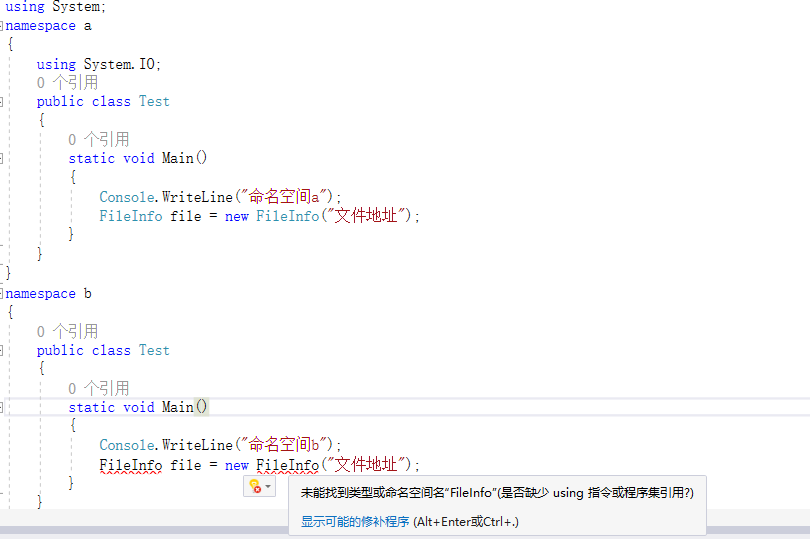
本文主要讲 C# 常见命名空间 using static 指令 && 调用静态方法 嵌套命名空间&&作用域 别名 Main() 方法 C# 常见命名空间 命名空间 作用 System 创建文件是默认引入,处理数学计算、、环境变量、输出控制台、垃圾回收器及一些常见的异常和特征。 System.Collections 同:都是处理对象集合(列表和字典等) 异:后者是使用 泛型的强类型集合 System.Collections.Generic Syste…

编程语言
Building a Web E-commerce Mall with ShopSN + iOS + Android + API Client: An Introduction to ShopSN
Build a Multi-Platform E-Commerce Solution with ShopSn! Please note: This article only introduces the features of ShopSN and explains the related source code. For specific installation instructions, please refer to the official documentation. Introductio…
利用ShopSn 打造多终端电子商城解决方案! 注意:本文只介绍ShopSN的特点,和相关源码的讲解,具体如果安装,请参考官方文档。 Shopsn 开源电商系统 介绍 项目源码下载地址 在下载源码、进行程序搭建前,请确保你有一台 Centos 或 Windows 服务器,当然,你也可以在本地搭建。 https://pan.baidu.com/s/1c3L1kfm#list/path=%2F 推荐使用 宝塔一键 安装。 &nb…

There are significant differences between Bootstrap 3 and 4, including their directory structure and the contents they include. This article discusses the files, web templates, and compatibility issues involved in integrating Bootstrap. This website has just b…
Bootstrap 3 与 4 差别很大,目录文件结构、所引入的内容也不同,这里说说一下 Bootstrap 引入的文件、网页模板和兼容性问题。本网站刚刚搭建好,正好发一下文章原来测试网站。 Bootstrap 4 目录结构如下 bootstrap/ ├── css/ │ ├── bootstrap.css │ ├── bootstrap.css.map │ ├── bootstrap.min.css │ ├── bootstrap.min.css.map │ ├── bootstrap-grid.css │ ├─…

.NET
ASP.NET Core Project Practice: News Website + Backend Source Code, Design Principles, Video Tutorial
First, I would like to clarify that the video tutorial and source code are not my original works. I have split the project and written some explanations. The video tutorial can be found at https://study.163.com/course/courseMain.htm?courseId=1005955…
首先说明,视频教程、源码并非本人原创 本人将项目分割开,并写了一些说明。 该视频教程 地址 https://study.163.com/course/courseMain.htm?courseId=1005955006 原作者 笔者正在学 ASP.NET Core ,发现这位作者的视频教程非常好,按教程做了一遍,所以专门写一篇文章进行介绍,并对项目进行分析。 项目源码下载地址 链接:https://pan.baidu.com/s/11sg-6IUKad35Q2RKl-DKXg 提取…

C# provides two types of type conversion: explicit conversion and implicit conversion. Explicit conversion: This type of conversion may cause exceptions, precision loss, and other issues. It requires intervention for the conversion operation. Implicit conversi…
C# 的类型转换有 显式转型 和 隐式转型 两种方式。 显式转型:有可能引发异常、精确度丢失及其他问题的转换方式。需要使用手段进行转换操作。 隐式转型:不会改变原有数据精确度、引发异常,不会发生任何问题的转换方式。由系统自动转换。 不同类型的数据进行操作(加减乘除赋值等等),是需要进行 类型转换 后,才能继续操作。所以需要“类型转换”。 隐式转型 隐式转型容易理解,当两种或多种数据类型进行某种操作时,不需要干预,系统会自动进行隐式转换。 如 int i =…
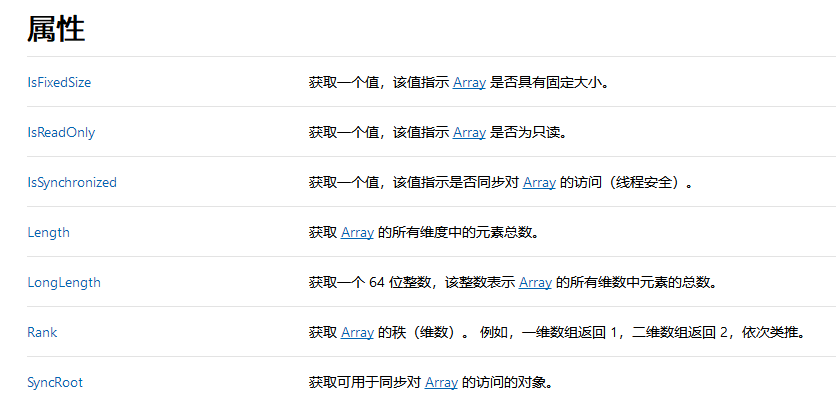
.NET
Difference Between C# Multidimensional Arrays and Jagged Arrays, i.e., the Difference Between [,] and [][]
Declaration of Multidimensional Arrays When declaring, the length of the array must be specified, in the format of type [length, length, length, ... ] int [,] test1 = new int [3,3]; Alternatively, you can assign values during declaration, allowing the system t…
多维数组的声明 在声明时,必须指定数组的长度,格式为 type [lenght ,lenght ,lengh, ... ] int [,] test1 = new int [3,3]; 或声明时即赋值,由系统推断长度 int [,] test1 = { {1,2,3}, {1,2,3}, {1,2,3}, }; 交错数组的声明 声明时,至少需要指定第一维的长度,格式为 type [ ] [ ] [ ] ... int [][] test1 = new int[5][]; int [][] t[......]继续…
The general usage format is int pagesize = page size (size of each page)int pageindex = the page number (this variable generally increments with each loop) Usage.Skip(pagesize*pageindex).Take(pagesize) .Skip() ignores numbers, indicating where to…
一般使用格式为 int pagesize = 分页大小(每一页大小)int pageindex = 第几页(一般这个变量是随循环递增的) 使用方法.Skip(pagesize*pageindex).Take(pagesize) .Skip() 忽略数,表示从哪里开始分页 .Take() 表示每一页截取多少个记录 注意 ,数列是从0开始的,也就是说,第一个是 0,第二个是 1 ... ... 以上方法结合,截取的只是一页,需要在循环中使用,不断截取下一页 例如 {1,2,3,4,5…
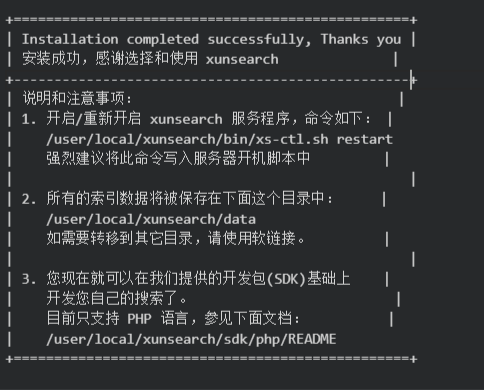
Xunsearch is an open-source, free, high-performance, multifunctional, and easy-to-use professional full-text search technology solution. It is currently a well-known open-source search engine. After installing Xunsearch, it is necessary to install the PHP SDK …
Xunsearch 是开源免费、高性能、多功能,简单易用的专业全文检索技术方案,是目前非常知名的开源搜索引擎。 安装完Xunserach,还需要安装PHP SDK,才能进行搜索。 本人已在腾讯云实验室建立了实验,可以直接上机操作。当然,你也可以用自己的服务器进行测试。 实验室地址 https://cloud.tencent.com/developer/labs/lab/10424 软件环境: Centos 7 目录 1.安装 GCC 依赖 2.安装xunsearch 3.安装环境…
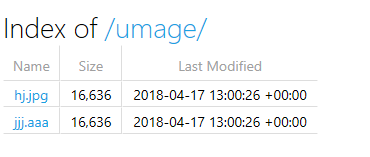
Using app.UseFileServer In public void Configure(){} modify or add 1 app.UseFileServer(new FileServerOptions() 2 { 3 FileProvider =new PhysicalFileProvider 4 ( 5 Path.Combine(Directory.GetCurrentDirectory(),@"StaticF[......]继续阅读
使用app.UseFileServer 在 public void Configure(){}中,修改或添加 1 app.UseFileServer(new FileServerOptions() 2 { 3 FileProvider =new PhysicalFileProvider 4 ( 5 Path.Combine(Directory.GetCurrentDirectory(),@"StaticFile/Image")), //实际目录地址6[......]继续阅读
I tested it on my computer. Let’s take a look at my computer's configuration. I'm running Windows 10 with a mechanical hard drive. Here, I want to talk about optimizing the computer for faster boot times. Of course, this varies with computer configuration; my …
我是用我的电脑测试的。看看我电脑的配置 我的是windows10,机械硬盘。 在这里要说的是给电脑优化,让其开机更快。当然,因电脑配置而异,我的最快是11秒。标题可能有点夸张了,结果因电脑配置而异,高手路过,小白往下看。 晒一下我的电脑装了啥。我是计算机系学生,所以电脑的软件比较多,装了好多系统插件。 看看我的开机时间 以前都是11,12秒的 开学后,装了许多东东。时间如下图 时间在16/17秒徘徊。 好了,现在我们说正题。 要优化,就要用软件。我用的是360卫士,其他的软件功能差不多也是可以用的。 首先要弄开机启…

站长简介
有趣的博主,小小程序员,业余摄影师,主要研究微服务架构、人工智能、kubernetes、istio、Devops、AI 等,主要语言是 C#、Go、Python。日常喜欢看书、写博客、摄影、运动、看风景。