作者:whuanle
作者博客地址:
https://www.whuanle.cn
https://www.cnblogs.com/whuanle
教程地址:
https://docs.whuanle.cn/zh/maomi_mq
项目开源地址:
https://github.com/whuanle/Maomi.MQ
Quick Start
In this tutorial, we will introduce how to use Maomi.MQ.RabbitMQ so that readers can quickly understand the usage and characteristics of this framework.
Maomi.MQ.RabbitMQ is a message queue wrapper framework based on RabbitMQ. It provides many out-of-the-box features and simplifies the message transmission process in a simple and flexible way. It also offers a series of reliable message delivery mechanisms, reducing the difficulty for developers and shortening development time.
Main features:
- Simplified message definition and consumers, allowing you to get started without complex configuration.
- Rich and flexible configuration that unleashes the power of RabbitMQ, including automatic creation of queues, dead-letter queues, broadcast mode, QoS concurrency control, dynamic routing, and dynamic consumers.
- Custom serializers supporting Json, Protobuf, Thrift, and MessagePack binary message transmission. High-performance compression reduces memory usage, improves concurrency, and supports cross-microservice communication.
- Supports automatic and custom message publishing to exchanges, including RabbitMQ transactional publishing mode.
- Simplified consumer mode, event bus mode, broadcast mode, and dynamic consumers. It also supports integration with MeditaR and FastEndpoints frameworks to further reduce usage complexity and code intrusion.
- Custom retry strategies to gracefully handle service errors, strong-consistency messages, and high-concurrency traffic.
- Supports the local message table pattern to guarantee strong consistency and prevent business message loss, solving asynchronous message issues such as dangling messages and duplicate processing.
- Flexible consumer modes. In addition to MeditaR and FastEndpoints, other frameworks can be integrated freely to take advantage of third-party capabilities.
Quick Configuration
Create a Web project (you can refer to the WebDemo project), add the Maomi.MQ.RabbitMQ package, and register the service in the Web configuration:
// using Maomi.MQ;
// using RabbitMQ.Client;

builder.Services.AddMaomiMQ((MqOptionsBuilder options) =>
{
    options.WorkId = 1;
    options.AppName = "myapp";
    options.Rabbit = (ConnectionFactory options) =>
    {
        options.HostName = Environment.GetEnvironmentVariable("RABBITMQ")!;
        options.Port = 5672;
    };
}, [typeof(Program).Assembly]);

var app = builder.Build();
-
WorkId: Specifies the node ID used to generate distributed Snowflake IDs. The default is 0.
Each message generates a unique ID for easier tracing. If the Snowflake ID is not configured, identical IDs may be generated when multiple instances run concurrently in distributed services.
-
AppName: Used to identify the producer or consumer of messages in logs and tracing systems.
-
Rabbit: RabbitMQ client configuration. See ConnectionFactory.
Define a message model class. The model class is the foundation of MQ communication messages. This model will be serialized into binary content and transmitted to the RabbitMQ server.
public class TestEvent
{
    public int Id { get; set; }

    public override string ToString()
    {
        return Id.ToString();
    }
}
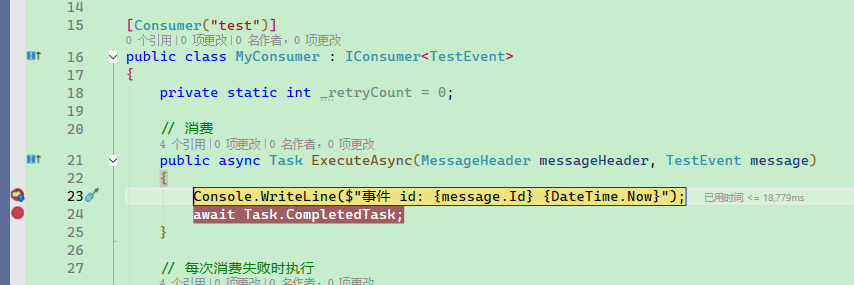
Define a consumer. The consumer must implement the IConsumer<TEvent> interface and use the [Consumer] attribute to configure consumer properties. As shown below, [Consumer("test")] indicates that the consumer subscribes to a queue named test.
The IConsumer<TEvent> interface has three methods. The ExecuteAsync method handles message processing. FaildAsync is executed immediately if ExecuteAsync throws an exception. If the code continues to fail, the FallbackAsync method will eventually be called. The Maomi.MQ framework determines whether to return the message to the queue for reprocessing or perform other actions based on the ConsumerState value.
[Consumer("test")]
public class MyConsumer : IConsumer<TestEvent>
{
    // Consume
    public async Task ExecuteAsync(MessageHeader messageHeader, TestEvent message)
    {
        Console.WriteLine($"Event id: {message.Id} {DateTime.Now}");
        await Task.CompletedTask;
    }

    // Executed each time consumption fails
    public Task FaildAsync(MessageHeader messageHeader, Exception ex, int retryCount, TestEvent message)
        => Task.CompletedTask;

    // Compensation
    public Task<ConsumerState> FallbackAsync(MessageHeader messageHeader, TestEvent? message, Exception? ex)
        => Task.FromResult( ConsumerState.Ack);
}
Maomi.MQ also supports multiple consumer patterns with different coding styles, which will be explained in detail later.
If you want to publish a message, simply inject the IMessagePublisher service.
private readonly IMessagePublisher _messagePublisher;

public IndexController(IMessagePublisher messagePublisher)
{
	_messagePublisher = messagePublisher;
}

[HttpGet("publish")]
public async Task<string> Publisher()
{
	// Publish message
	await _messagePublisher.PublishAsync(exchange: string.Empty, routingKey: "test", message: new TestEvent
	{
		Id = 123
	});
	return "ok";
}
Start the Web service and request the API endpoint from the Swagger page. The MyConsumer service will immediately receive the published message.
That's all it takes. It's that simple and convenient.
How to Publish Messages
Automatic Publishing
Although publishers and consumers share the same model class, how the model class is configured in one project will not affect the consumer. Separating publishers and consumers simplifies framework design and microservice decoupling, allowing services written in different programming languages to communicate and complete business logic together.
For example, to simplify message publishing, we can specify the bound routing key in the model class.
[RouterKey("scenario.quickstart")]
public sealed class QuickStartMessage
{
}
When publishing, the [RouterKey] in the model class is used to automatically determine the exchange and routing key, simplifying the publishing parameters.
await _publisher.AutoPublishAsync(message);
Of course, manual configuration is also possible:
await _publisher.PublishAsync(string.Empty, request.Queue, message);
Consumers can freely configure the queue they want to consume. Even with the same model class, different queue names can be assigned without interference.
[Consumer("scenario.quickstart")]
public sealed class QuickStartConsumer : IConsumer<QuickStartMessage>
{
}
Manual Publishing
This is suitable when you need fine-grained control over exchange/routingKey or message properties (TTL, Header, priority, etc.).
[HttpPost("publish-manual")]
public async Task<IResult> PublishManual()
{
    var message = new OrderCreatedMessage
    {
        OrderNo = "SO-20260211-002",
        Amount = 299.00m
    };

    await _publisher.PublishAsync(
        exchange: "biz.order.exchange",
        routingKey: "order.created.v1",
        message: message,
        properties: p =>
        {
            p.Expiration = "60000";
            p.Headers ??= new Dictionary<string, object?>();
            p.Headers["tenant"] = "tenant-a";
        });

    return Results.Ok(message);
}
However, Maomi.MQ.RabbitMQ provides a simpler and more user-friendly way to automatically handle queue attributes.
For example, if you want to design a dead-letter queue, you only need to set attributes on the consumer:
[Consumer(
    "example.retry.main",
    RetryFaildRequeue = false,
    DeadExchange = "",
    DeadRoutingKey = "example.retry.dead")]
public sealed class RetryConsumer : IConsumer<RetryMessage>
{
}
RetryFaildRequeueindicates that failed messages will not be returned to the original queue.DeadExchangeis the dead-letter exchange name.DeadRoutingKeyis the routing key of the dead-letter queue.
Therefore, when publishing messages, you only need these two lines of code:
await _publisher.PublishAsync(string.Empty, request.Queue, message);
await _publisher.AutoPublishAsync(message);
Normal Consumers, Dynamic Consumers, Event Bus
Maomi.MQ supports multiple ways to create consumers. A single project can use multiple consumer patterns simultaneously without conflict.
These three modes are not mutually exclusive; they simply approach problems differently:
- Normal consumer: The most basic consumption pattern. Simply implement
IConsumer<TMessage>. You can also extend it to different types of consumer patterns, such as MediatR. - Dynamic consumer: Also implements
IConsumer<TMessage>, but subscriptions can be created or stopped dynamically at runtime. - Event bus: A single message triggers multiple ordered processing steps, generating an execution chain and a rollback chain.
Normal Consumer Mode
Simply implement the IConsumer<TMessage> interface. You can customize consumption, retry, and rollback logic. This mode is easy to use and can gracefully handle message errors and rollbacks.
Normally, ExecuteAsync is called to process messages. If it fails, FaildAsync is called. When retries are exhausted, it enters FallbackAsync.
[Consumer("biz.order.created.v1", Qos = 10, RetryFaildRequeue = false)]
public sealed class NormalOrderConsumer : IConsumer<OrderCreatedMessage>
{
    public Task ExecuteAsync(MessageHeader messageHeader, OrderCreatedMessage message)
    {
        Console.WriteLine($"normal consume => {message.OrderNo}");
        return Task.CompletedTask;
    }

    public Task FaildAsync(MessageHeader messageHeader, Exception ex, int retryCount, OrderCreatedMessage message)
        => Task.CompletedTask;

    public Task<ConsumerState> FallbackAsync(MessageHeader messageHeader, OrderCreatedMessage? message, Exception? ex)
        => Task.FromResult(ConsumerState.Ack);
}
Dynamic Consumer Mode
You can dynamically register the message queues that your business needs to subscribe to at runtime. For example, after creating a new tenant in a SaaS platform, you may need to dynamically consume topics with tenant-specific prefixes. You can also cancel subscriptions yourself.
public sealed class DynamicDemoService
{
    private readonly IDynamicConsumer _dynamicConsumer;

    public DynamicDemoService(IDynamicConsumer dynamicConsumer)
    {
        _dynamicConsumer = dynamicConsumer;
    }

    public async Task<string> StartAsync(string queue)
    {
        var options = new ConsumerAttribute(queue) { Qos = 5 };

        var consumerTag = await _dynamicConsumer.ConsumerAsync<OrderCreatedMessage>(
            options,
            execute: (header, message) =>
            {
                Console.WriteLine($"dynamic consume => {message.OrderNo}");
                return Task.CompletedTask;
            },
            faild: (header, ex, retryCount, message) => Task.CompletedTask,
            fallback: (header, message, ex) => Task.FromResult(ConsumerState.Ack));

        return consumerTag;
    }

    public Task StopByQueueAsync(string queue)
        => _dynamicConsumer.StopConsumerAsync(queue);
}
Event Bus Mode
The event bus mode allows you to freely orchestrate the event execution pipeline. The framework will automatically execute the chain and run the rollback chain if execution fails.
IEventMiddleware<T> is responsible for building the execution pipeline, and [EventOrder] controls the order of steps. This is suitable when one event is split into multiple business steps, providing strong decoupling.
using Maomi.MQ.EventBus;

[RouterKey("biz.order.pipeline.v1")]
public sealed class OrderPipelineEvent
{
    public Guid OrderId { get; set; } = Guid.NewGuid();

    public decimal Amount { get; set; }
}

[Consumer("biz.order.pipeline.v1")]
public sealed class OrderPipelineMiddleware : IEventMiddleware<OrderPipelineEvent>
{
    public Task ExecuteAsync(MessageHeader messageHeader, OrderPipelineEvent message, EventHandlerDelegate<OrderPipelineEvent> next)
    {
        return next(messageHeader, message, CancellationToken.None);
    }

    public Task FaildAsync(MessageHeader messageHeader, Exception ex, int retryCount, OrderPipelineEvent? message)
        => Task.CompletedTask;

    public Task<ConsumerState> FallbackAsync(MessageHeader messageHeader, OrderPipelineEvent? message, Exception? ex)
        => Task.FromResult(ConsumerState.Ack);
}

[EventOrder(1)]
public sealed class ReserveInventoryHandler : IEventHandler<OrderPipelineEvent>
{
    public Task ExecuteAsync(OrderPipelineEvent message, CancellationToken cancellationToken)
        => Task.CompletedTask;

    public Task CancelAsync(OrderPipelineEvent message, CancellationToken cancellationToken)
        => Task.CompletedTask;
}

[EventOrder(2)]
public sealed class CreateBillHandler : IEventHandler<OrderPipelineEvent>
{
    public Task ExecuteAsync(OrderPipelineEvent message, CancellationToken cancellationToken)
        => Task.CompletedTask;

    public Task CancelAsync(OrderPipelineEvent message, CancellationToken cancellationToken)
        => Task.CompletedTask;
}
Broadcast Mode
For example, to reduce latency and improve performance, after caching data in Redis you may also want to maintain a local cache. But when the data changes, how do you refresh the local cache?
You can use broadcast mode. When multiple instances of the same service use broadcast mode, each instance can receive the message instead of it being randomly assigned to only one instance.
.
The code is very simple—just set IsBroadcast = true. In this way, even different instances of the same service will receive the broadcast notification. When an instance goes offline, it will automatically unsubscribe and will not consume server resources.
[Consumer("scenario.quickstart", IsBroadcast = true)]
public sealed class QuickStartConsumer : IConsumer<QuickStartMessage>
{
}
High-Performance Serializer
Maomi.MQ uses JSON by default for serialized data transmission. You can also introduce other serializers to improve message compression performance.
Currently, four binary serialization protocols are supported: System.Text.Json, Protobuf, Thrift, and MessagePack. You can freely combine and use different serializers in your project so that messages can be transmitted between different microservices with high performance.
For example, using the protobuf-net framework to recognize model classes marked with [ProtoContract]. Such types will use the Protobuf protocol to compress messages, while other messages will still use JSON.
using ProtoBuf;

builder.Services.AddMaomiMQ(options =>
{
    options.MessageSerializers = serializers =>
    {
        // Add Protobuf serializer
        serializers.Insert(0, new ProtobufMessageSerializer());
    };
}, [typeof(Program).Assembly]);

[ProtoContract]
public sealed class PersonMessage
{
    [ProtoMember(1)]
    public Guid Id { get; set; } = Guid.NewGuid();

    [ProtoMember(2)]
    public string Name { get; set; } = string.Empty;

    [ProtoMember(3)]
    public int Age { get; set; }
}
Strong Consistency Transaction Mode
Inspired by the local message table pattern used in frameworks such as CAP, MQ and a local message table are used to implement a simple strongly consistent distributed transaction. In enterprise projects where business logic is not overly complex, this can simplify the difficulty of writing transactions. Different microservices can integrate in a lightweight, simple, and non-complex manner, reducing both development and maintenance complexity.
Configuration (using MySQL as an example):
using Maomi.MQ.Transaction.Mysql;
using MySqlConnector;

builder.Services.AddMaomiMQTransactionMySql();
builder.Services.AddMaomiMQTransaction(options =>
{
    options.ProviderName = TransactionProviderNames.MySql;
    options.Connection = _ => new MySqlConnection(builder.Configuration.GetConnectionString("Default"));
    options.AutoCreateTable = true;
});
Business code publishing a message:
public sealed class OrderAppService
{
    private readonly IMessagePublisher _publisher;
    private readonly string _connectionString;

    public OrderAppService(IMessagePublisher publisher, IConfiguration configuration)
    {
        _publisher = publisher;
        _connectionString = configuration.GetConnectionString("Default")!;
    }

    public async Task CreateOrderAsync(CancellationToken cancellationToken)
    {
        await using var connection = new MySqlConnection(_connectionString);
        await connection.OpenAsync(cancellationToken);
        await using var transaction = await connection.BeginTransactionAsync(cancellationToken);

        // 1) Execute business SQL
        // await SaveOrderAsync(connection, transaction, ...);
        await transaction.CommitAsync(cancellationToken);

        // 2) Send the message (outside the transaction)
        await _publisher.AutoPublishAsync(new OrderCreatedMessage
        {
            OrderNo = "SO-TX-001",
            Amount = 520m
        }, cancellationToken: cancellationToken);

    }
}
Note: The local transaction pattern is not a global distributed transaction coordinator. It solves the consistency between “a single database and message publishing”.
If the transaction is committed but the final message publishing fails, a BackgroundService will periodically scan the database and push those unsent messages to RabbitMQ.
Integrating with MediatR
If your business logic already uses MediatR, you can directly treat MQ as the input channel for MediatR commands. That means your existing code does not need to be modified—just add [MediatRConsumer] to the Command.
using Maomi.MQ.MediatR;
using MediatR;

[MediatRConsumer("biz.mediatr.order", Qos = 1)]
public sealed class SyncOrderCommand : IRequest
{
    public string OrderNo { get; set; } = string.Empty;
}

public sealed class SyncOrderCommandHandler : IRequestHandler<SyncOrderCommand>
{
    public Task Handle(SyncOrderCommand request, CancellationToken cancellationToken)
        => Task.CompletedTask;
}

// Trigger MQ publishing through MediatR
await mediator.Send(new MediatRMqCommand<SyncOrderCommand>
{
    Message = new SyncOrderCommand { OrderNo = "SO-MED-001" }
});
Principle: MediatRTypeFilter maps command types decorated with MediatRConsumer into MQ consumers. After consumption, they are forwarded to IMediator.Send(...).
Alternatively, you can continue to use IMessagePublisher to publish messages.
await _publisher.PublishAsync(string.Empty, request.Queue, message);
If your project already uses MediatR, there is no need to introduce another consumer pattern just for RabbitMQ. With Maomi.MQ, you can simplify RabbitMQ integration and continue implementing asynchronous consumption using the MediatR pattern.
Integrating with FastEndpoints
If you are using FastEndpoints, you can also connect IEvent/ICommand to MQ through a type filter.
using Maomi.MQ.Filters;

app.Services.RegisterGenericCommand(typeof(FastEndpointsMqCommand<>), typeof(FastEndpointsMqCommandHandler<>));
app.UseFastEndpoints();

[FastEndpointsConsumer("biz.fast.order.paid", Qos = 1)]
public sealed class OrderPaidEvent : FastEndpoints.IEvent
{
    public string OrderNo { get; set; } = string.Empty;
}
await _messagePublisher.AutoPublishAsync(new OrderPaidEvent
{
    OrderNo = "SO-FE-001"
});
Other Capabilities
The following capabilities are briefly described here; you can explore them in depth as needed later:
- Dynamic routing configuration: Implement
IRoutingProviderto uniformly rewriteExchange/RoutingKey/Queue. - Custom retry mechanism: Implement
IRetryPolicyFactoryto customize retry strategies by queue or message type. - Flexible and customizable consumer patterns: Implement
ITypeFilterto map types from third-party frameworks into Maomi.MQ consumers.

文章评论