package main import ( "fmt" "os" "os/signal" ) func main() { // Set up channel on which to send signal notificatio[......]继续阅读
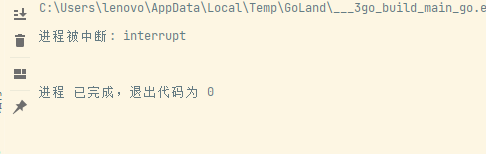
使用示例: package main import ( "fmt" "os" "os/signal" ) func main() { // Set up channel on which to send signal notifications. // W[......]继续阅读
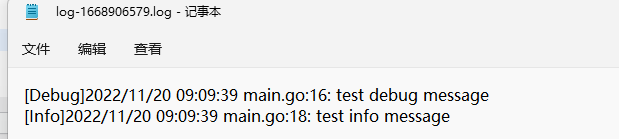
Usage Common log methods in Go: Print/Printf/Println : Print log information Panic/Panicf/Panicln : Print log information and call Panic with the form[......]继续阅读
使用 Go 中常用的 log 方法: Print/Printf/Println : 打印日志信息 Panic/Panicf/Panicln : 打印日志信息后,以拼装好的字符串为参数调用 Panic Fatal/Fatalf/Fatalln : 打印日志信息后,os.Exit(1) 退出程序 New[......] 继续阅读

首先在要被执行的类型加上参数: [Option(Description = "CloudEvents 'source' (default: urn:example-com:mysource:abc)", LongName = "source",[......]继续阅读
首先在要被执行的 类型 加上参数: [Option(Description = "CloudEvents 'source' (default: urn:example-com:mysource:abc)", LongName = "source", ShortName = "s")][......]继续阅读
Introduce this library: YamlDotNet Configuration example: services.AddYamlDotNetSerializer( serializer => serializer[......]继续阅读
引入这个库: YamlDotNet 配置示例: services.AddYamlDotNetSerializer( serializer => serializer .IncludeNonPubli[......]继续阅读
From ServerlessWorkflow, I learned an interesting configuration for NewtonsoftJson. var newtonsoftJsonDefaultConfig = (JsonSerializerSetti[......]继续阅读
从 ServerlessWorkflow 中学习到一个有趣的 NewtonsoftJson 配置。 var newtonsoftJsonDefaultConfig = (JsonSerializerSettings settings) => {[......]继续阅读
ISO 8601 specifies the time format. In Go language, Duration implements this time format. package main import ( "fmt" "time&q[......]继续阅读
ISO8601 规定了时间格式。 在 Go 语言中,Duration 就实现了这种时间格式。 package main import ( "fmt" "time" ) func main() { t := time.Now() fmt.Println(t) } 输[......] 继续阅读
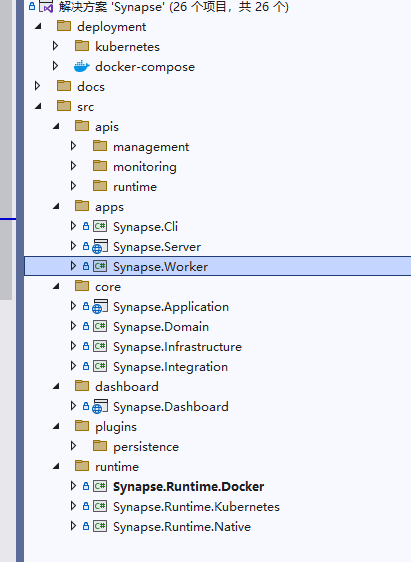
Background I suddenly learned about a project called ServerlessWorkflow. https://github.com/serverlessworkflow The specific utility of this project[......] 继续阅读
背景 突然了解到有个项目叫 ServerlessWorkflow 。 https://github.com/serverlessworkflow 这个项目有什么用,并不重要,重要的是可以从这里了解到云原生中间件开发的一些现状和需要学习的知识。 因为这个项目是 CNCF 项目,里面使用到的规范、思[......] 继续阅读

首先打开 /etc/kubernetes/pki 目录,里面会有很多证书。 执行命令查看当前证书允许通过哪些地址访问 APIServer: openssl x509 -in apiserver.crt -noout -text | grep -A 2 'Alternative' 可以看到证书[......] 继续阅读
首先打开 /etc/kubernetes/pki 目录,里面会有很多证书。 执行命令查看当前证书允许通过哪些地址访问 APIServer: openssl x509 -in apiserver.crt -noout -text|grep -A 2 'Alternative' 可以看到证书允许的[......] 继续阅读
示例代码如下: void Main() { string pName = "程序的名称"; Process[] temp = Process.GetProcessesByName(pName); if (temp.Length > 0) { IntPtr han[......]继续阅读
示例代码如下: void Main() { string pName = "程序的名称"; Process[] temp = Process.GetProcessesByName(pName); if (temp.Length > 0) { In[......]继续阅读
创建一个元素: <Label x:Name="Label1" Text="111" VerticalOptions="Center"[......]继续阅读
创建一个元素: <Label x:Name="Label1" Text="111" VerticalOptions="Center" HorizontalOptions="Ce[......]继续阅读

站长简介
有趣的博主,小小程序员,业余摄影师,主要研究微服务架构、人工智能、kubernetes、istio、Devops、AI 等,主要语言是 C#、Go、Python。日常喜欢看书、写博客、摄影、运动、看风景。