ASP.NET Core 定制
Web 开发是 .NET 最广泛使用的场景之一,现在越来越多的企业 Web 开发业务系统采用 ASP.NET Core 或第三方框架如 ABP 等进行开发,这些第三方框架绝大多数是基于 ASP.NET Core 进行开发的,当然每个企业或每个开发者对框架的需求都不一样,有的人觉得 ABP 满足了大多数需求,有的人觉得 ABP 太重了,也有很多人选择自己基于 ASP.NET Core 开发新的 Web 开发框架。由于 ASP.NET Core 是 .NET 日常开发中最常是使用的框架,因此本章主要讲解如何定制 Web,以便满足不同的需求。
创建 Maomi.Web.Core 项目,添加对 Maomi.Core 的引用,接着创建模块类 MaomiWebModule.cs。
    public class MaomiWebModule : IModule
    {
        public void ConfigureServices(ServiceContext context)
        {
        }
    }
定制统一响应模型
无论是报错还是模型验证失败、请求成功等,都要设置一定的响应体格式,方便前端或客户端使用。
在编程中,常见 return 缩写为 ret,result 缩写为 res,不过在 C# 中并不提倡缩写,不过考虑到响应模型类使用太频繁,为了便于使用,可以将响应模型类设置为 Res。
// 响应模型类
public class Res<T>
{
    // 当前请求是否有错误
    public virtual bool IsSuccess => Code == 200;

    // 业务代码
    public virtual int Code { get; set; }

    // 响应消息
    public virtual string Msg { get; set; }

    // 返回数据
    public virtual T? Data { get; set; }
}

// 响应模型类
public partial class Res : Res<object?>
{
    // 创建 Res
    public static Res<T> Create<T>(int code, string message, T data)
    {
        return new Res<T>
        {
            Code = code,
            Msg = message,
            Data = data
        };
    }

    /// 创建 Res
    /// </summary>
    public static Res<T> Create<T>(HttpStatusCode code, string message, T data) => Create((int)code, message, data);
}

// 分页结果模型类
public class PageRes<T>
{
    /// 当前页
    public virtual int PageNo { get; set; }

    /// 页大小
    public virtual int PageSize { get; set; }

    public virtual T? List { get; set; }
}

// 分页结果模型类
public partial class PageListRes<T> : Res<PageRes<IEnumerable<T>>>
{
}

/// 分页结果模型类
/// <typeparam name="T"></typeparam>
public partial class PageArrayRes<T> : Res<PageRes<T[]>>
{
}
模型验证
在本节中,我们将来学习如何在控制台使用模型验证以及 ASP.NET Core 中的模型验证是怎么实现的。
标记的特性注解称为 DataAnnotations 数据注释。在使用 ASP.NET Core 时,我们可以通过对模型类设置 [EmailAddress]、[Required] 等特性注解,用户的数据请求便会被 ASP.NET Core 拦截并验证其模型是否正确。
模型验证是如何实现的
实际上,模型验证也可以脱离 ASP.NET Core 使用,我们可以新建控制台。
示例项目在 Demo10.ConsoleDataAnnotations 中。
首先定义一个模型类:
public class UserInfo
{
    [Required]
    [EmailAddress]
    public string Email { get; set; }
}
然后创建一个验证器方法:
private static (bool IsValid, IReadOnlyList<ValidationResult> ValidationResult) VerifyModel(object o)
{
    var result = new List<ValidationResult>();
    var validationContext = new ValidationContext(o);
    var isValid = Validator.TryValidateObject(o, validationContext, result, validateAllProperties: true);
    return (isValid, result);
}
ValidationContext:模型验证检查上下文。
Validator.TryValidateObject:使用验证上下文和验证结果集合确定指定对象是否有效。
然后,使用它:
static void Main()
{
    var json = """
            {
              "Email":"aaa#qq.com"
            }
            """;
    var userInfo = System.Text.Json.JsonSerializer.Deserialize<UserInfo>(json);

    var (isValid, result) = VerifyModel(userInfo);
    if (!isValid)
    {
        foreach (var item in result)
        {
            Console.WriteLine($"{item.MemberNames.First()}:{item.ErrorMessage}");
        }
    }
}
这段代码运行之后,会输出:
Email:The Email field is not a valid e-mail address.其实可以看到,模型验证最核心的是使用 ValidationContext 和 Validator.TryValidateObject 对模型的属性字段进行检查,然后获取检查结果。
ASP.NET Core 本质也是控制台,API 接口的模型类进行模型验证时的机制也差不多如此,例如当用户发起一个 application/json 请求时,首先从 Body 中取出 json 反序列化为对象,此过程可以配置是否忽略大小写、字符串和枚举或数字互转等,在反序列化时,如果有报错,则会抛出异常。接着会对模型类进行验证,如果验证失败,则会返回 400 状态码。
-
下面是一些内置的验证属性:
[ValidateNever]:不验证此属性。[CreditCard]:是否为信用卡格式。[Compare]: 对比模型中两个字段值是否一致。[EmailAddress]:属性为电子邮件格式 。[Phone]:属性为电话号码格式。[Range]:属性在值范围之内。[RegularExpression]:使用正则表达式验证属性。[Required]:该属性必填。[StringLength]:限制字符串的最大长度。[Url]:属性为 url 地址格式。
所有的模型验证类都继承了 ValidationAttribute,所以也可以直接通过模型验证类的 IsValid 方法获取验证结果。
示例:
bool isValid = new EmailAddressAttribute().IsValid(userInfo);自定义模型验证器
处理 .NET 自带的模型验证特性外,我们也可以自定义特性类。在本小节中,笔者将会介绍如何实现一个模型验证特性。
示例项目在 Demo10.ConsoleDataAnnotations 中。
假设的场景如下,我们需要在邮件地址字段中,检查邮件后缀是否为 @maomi.com。
自定义模型验证器主要是重写两个 IsValid,示例代码如下:
public class MaomiEmailAttribute : ValidationAttribute
{
    public override bool IsValid(object? value)
    {
        if (value is string email)
        {
            return email.EndsWith("@maomi.com");
        }
        return false;
    }

    protected override ValidationResult? IsValid(object? value, ValidationContext validationContext)
    {
        // 成员名称
        var memberName = validationContext.MemberName;
        // [DisplayName] 定义的名称
        var displayName = validationContext.DisplayName;
        // 实例对象
        var obj = validationContext.ObjectInstance;
        if (this.IsValid(value))
        {
            return ValidationResult.Success;
        }
        string[] memberNames = memberName != null ? new string[] { memberName } : null;
        return new ValidationResult(this.FormatErrorMessage(validationContext.DisplayName), memberNames);
    }
    public override string FormatErrorMessage(string name)
    {
        return $"{name} 不是 @maomi.com 邮箱后缀!";
    }
}
然后新建 UserInfoMaomi 模型类:
public class UserInfoMaomi
{
    [Required]
    [EmailAddress]
    [MaomiEmail]
    public string Email { get; set; }
}
将 json 字符串改成:
var json = """
            {
              "Email":"aaa@qq.com"
            }
            """;
var userInfoMaomi = System.Text.Json.JsonSerializer.Deserialize<UserInfoMaomi>(json);
var (isValid2, result2) = VerifyModel(userInfoMaomi);由于我们使用 VerifyModel 方法,验证模型使用的是 Validator.TryValidateObject,因此调用模型验证特性类,会使用 IsValid(object?, ValidationContext) 重载。
而 IsValid(object? value) 重载,我们可以单独针对一个值来使用:
new MaomiEmailAttribute().IsValid("aaa@qq.com")模型验证器使用 i18n
ASP.NET Core 中模型验证器打印的字符串默认都是英文,我们在业务中往往需要多语言以及自定义模型验证特性,因此有必要让模型验证也支持 i18n。
在 Maomi.Web.Core 中添加 Maomi.I18n 引用。
我们在 Maomi.I18n 中添加一个扩展类型,用来为 API 注入 I18n 扩展服务。
public static class DataAnnotationsExtensions
{
    // 为 API 模型验证注入 i18n 服务
    public static IMvcBuilder AddI18nDataAnnotation(this IMvcBuilder builder)
    {
        builder.Services.AddTransient<IStringLocalizerFactory, I18nStringLocalizerFactory>();
        builder
            .AddDataAnnotationsLocalization(options =>
            {
                options.DataAnnotationLocalizerProvider = (modelType, stringLocalizerFactory) =>
                stringLocalizerFactory.Create(modelType);
            });
        return builder;
    }
}
注入模型验证本地化服务之后,框架会从此模型类所在的程序集中取出本地化语言字符串。
在 MaomiWebModule 中添加 i18n 服务,以及为 API 注入模型验证服务。
public class MaomiWebModule : IModule
{
    public void ConfigureServices(ServiceContext context)
    {
        // i18n 服务
        context.Services.AddI18n("zh-CN");
        context.Services.AddI18nResource(options =>
        {
            options.AddJson<MaomiWebModule>("i18n");
        });

        // 添加控制器
        context.Services.AddControllers()
            .AddI18nDataAnnotation();
    }
}
然后创建名为 Demo10.ApiDataAnnotations 的 API 服务,添加对 Maomi.Web.Core 的引用,项目结构如下。
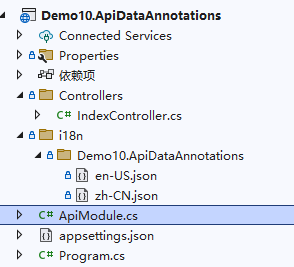
我们将 Demo10.ApiDataAnnotations 模块化后,只需要在该项目中注入 json 多语言资源服务即可。
[InjectModule<MaomiWebModule>()]
public class ApiModule : IModule
{
    public void ConfigureServices(ServiceContext context)
    {
        context.Services.AddI18nResource(options =>
        {
            options.AddJson<ApiModule>("i18n");
        });
    }
}
然后我们在该项目中创建一个模型类:
public class UserInfo
{
    [EmailAddress(ErrorMessage = "邮箱地址格式不正确")]
    public string Email { get; set; }
}
因为 UserInfo 模型类在 Demo10.ApiDataAnnotations 项目中,因此我们需要在 Demo10.ApiDataAnnotations 中创建 json 多语言资源文件,目录在 i18n/Demo10.ApiDataAnnotations 下。
json 文件示例如下:
zh-CN.json
{
  "邮箱地址格式不正确": "邮箱地址格式不正确"
}
en-US.json
{
  "邮箱地址格式不正确": "The email address format is incorrect"
}
然后创建一个简单的 API 接口进行测试:
    [ApiController]
    [Route("[controller]")]
    public class IndexController : ControllerBase
    {
        [HttpPost("user")]
        public string GetUserName([FromBody] UserInfo info)
        {
            return info.Email.Split("@").FirstOrDefault();
        }
    }
然后对 API 发出请求,分别在 email 字段输入不同的内容。
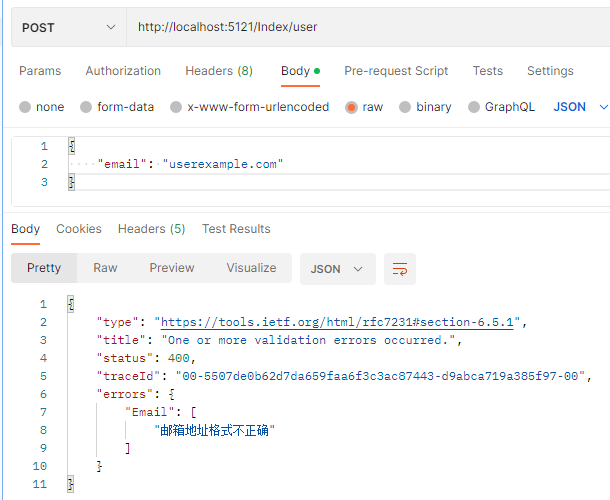
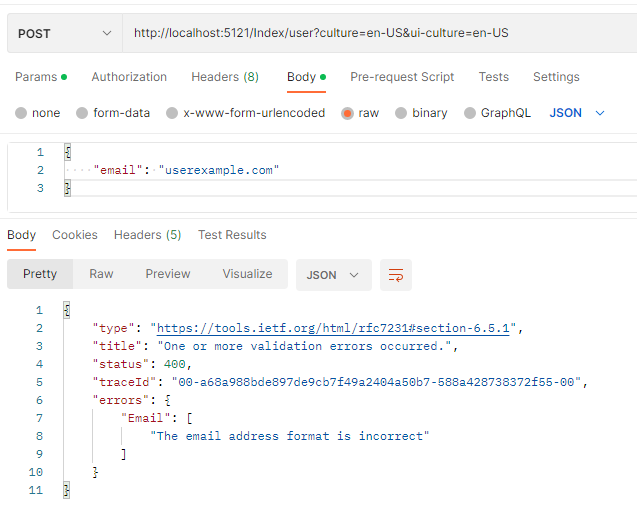
使用 i18n 服务之后,模型验证错误会随着语言标识而变化。
筛选器
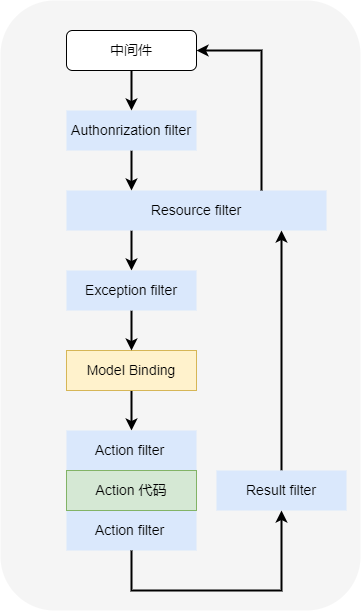
我们知道,ASP.NET Core 的功能是由一系列中间件管道提供的,当 API 接收一个 http 请求时,请求上下文会经过管道中各种中间件的处理,最后到达 Action 中。
ASP.NET Core 管道中默认中间件的排序顺序如下图所示:
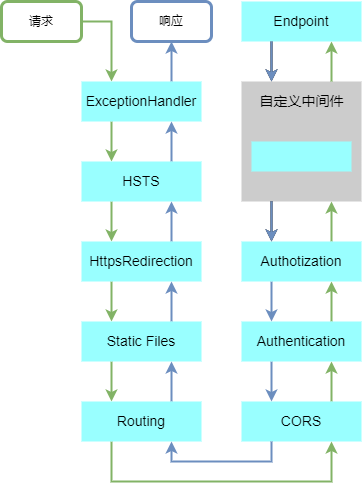
ASP.NET Core 中提供了筛选器,可以帮助我们在部分中间件的前后执行一系列的操作。
Action 筛选器
在 ASP.NET Core 中,当模型验证失败时,会返回如下格式的内容。
{
    "type": "https://tools.ietf.org/html/rfc7231#section-6.5.1",
    "title": "One or more validation errors occurred.",
    "status": 400,
    "traceId": "00-4fcae233f0ff7c4de765680f5ee8b8b8-67b2c0d9a41224c6-00",
    "errors": {
        "Email": [
            "The email address format is incorrect"
        ]
    }
}
但是在项目开发中,我们往往需要固定一种格式,比如本章开头就设置了统一的响应模型类 Res、Res<T>。
在 Maomi.Web.Core 中,依次创建 i18n、Maomi.Web.Core 目录,添加 zh-CN.json、en-US.json 两个文件,内容分别如下:
zh-CN.json
{
  "400": "发生了一个或多个验证错误"
}
en-US.json
{
  "400": "One or more validation errors occurred."
}
设置两个文件的生成属性为 “始终复制”。

为了通过项目引用、nuget 包引用时,文件会自动复制到启动项目运行目录中,需要手动配置多语言文件属性:
    <ItemGroup>
        <None Update="i18n\Maomi.Web.Core\en-US.json" Pack="true" PackagePath="contentFiles\any\any;">
            <PackageCopyToOutput>true</PackageCopyToOutput>
        </None>
    </ItemGroup>
    <ItemGroup>
        <None Update="i18n\Maomi.Web.Core\zh-CN.json" Pack="true" PackagePath="contentFiles\any\any;">
            <PackageCopyToOutput>true</PackageCopyToOutput>
        </None>
    </ItemGroup>
由于 Microsoft.NET.Sdk.Web SDK 在编译 Web 项目时,会自动配置 json 文件属性,这样一来会导致与手动配置的多语言文件属性配置冲突,因此需要关掉该功能。
<EnableDefaultContentItems>false</EnableDefaultContentItems>Action 筛选器在执行 Action 之前或之后被框架自动调用,用来拦截请求或处理 Action 返回的结果。Action 筛选器有两种实现方法,第一种是实现 IActionFilter 接口,然后依赖注入配置控制器时通过 .AddControllers() 扩展方法配置全局。第二种使用特性注解,单独给 Controller 或 Action 使用。
使用特性注解配置 Action,需要继承 ActionFilterAttribute 特性,简化我们编写筛选器的代码。
ActionFilterAttribute 的定义如下:
[AttributeUsage(AttributeTargets.Class | AttributeTargets.Method, AllowMultiple = true, Inherited = true)]
public abstract class ActionFilterAttribute :
    Attribute,
    IActionFilter,
    IFilterMetadata,
    IAsyncActionFilter,
    IResultFilter,
    IAsyncResultFilter,
    IOrderedFilter
{
    protected ActionFilterAttribute();

    public int Order { get; set; }

    public virtual void OnActionExecuted(ActionExecutedContext context);
    public virtual void OnActionExecuting(ActionExecutingContext context);
    public virtual Task OnActionExecutionAsync(ActionExecutingContext context, ActionExecutionDelegate next);
    public virtual void OnResultExecuted(ResultExecutedContext context);
    public virtual void OnResultExecuting(ResultExecutingContext context);
    public virtual Task OnResultExecutionAsync(ResultExecutingContext context, ResultExecutionDelegate next);
}
在 Maomi.Web.Core 中创建一个名为 MaomiActionFilter 的筛选器,同时继承 ActionFilterAttribute、IActionFilter,MaomiActionFilter 筛选器使用时需要注入相关的依赖。
// Action 过滤器
[InjectOn(Scheme = InjectScheme.None, Own = true)]
[AttributeUsage(AttributeTargets.Class | AttributeTargets.Method, AllowMultiple = false, Inherited = true)]
public class MaomiActionFilter : ActionFilterAttribute
{
    private readonly IStringLocalizer<ActionFilter> _localizer;
    public ActionFilter(IStringLocalizer<ActionFilter> stringLocalizer)
    {
        _localizer = stringLocalizer;
    }

    public override void OnResultExecuting(ResultExecutingContext context)
    {
        if (!context.ModelState.IsValid)
        {
            Dictionary<string, List<string>> errors = new();
            foreach (var item in context.ModelState)
            {
                List<string> list = new();
                foreach (var error in item.Value.Errors)
                {
                    list.Add(error.ErrorMessage);
                }
                errors.Add(item.Key, list);
            }
            context.Result = new BadRequestObjectResult(R.Create(400, _localizer["400"], errors));
        }
    }
}
MaomiActionFilter 使用了自动注册特性,我们只注册 MaomiActionFilter,而不包含 ActionFilterAttribute、IActionFilter。
然后在 Demo10.ApiDataAnnotations 项目中的 IndexController 中加上 MaomiActionFilter 特性。
[ApiController]
[Route("[controller]")]
public class IndexController : ControllerBase
{
    [ServiceFilter(typeof(MaomiActionFilter))]
    [HttpPost("user")]
    public string GetUserName([FromBody] UserInfo info)
    {
        return info.Email.Split("@").FirstOrDefault();
    }
}
启动 Web 程序,请求该接口,模型验证错误的结果使用固定格式响应。
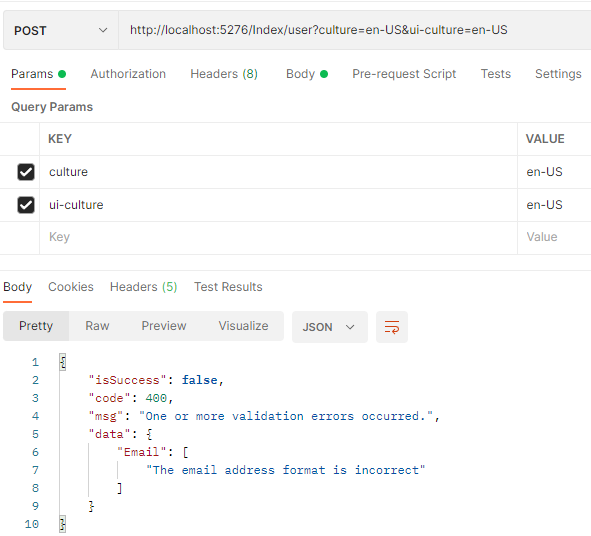
ActionFilterAttribute 可以用在 Action 上,也可以用在 Controller 上,在 Controller 配置时,对所有 Action 起效。
[ServiceFilter(typeof(MaomiActionFilter))]
[ApiController]
[Route("[controller]")]
public class IndexController : ControllerBase
{
}
因为 MaomiActionFilter 需要进行依赖注入,需要使用 ServiceFilter 配置筛选器,如果自定义的 ActionFilterAttribute 并不需要使用依赖注入,那么可以直接使用。
[MyActionFilter]
[HttpPost("user")]
public string GetUserName([FromBody] UserInfo info)
{
    return info.Email.Split("@").FirstOrDefault();
}
我们也可以使用全局配置:
            context.Services.AddControllers(options =>
            {
                // 不需要依赖注入的筛选器
                // options.Filters.Add<MyActionFilter>();
                // 需要依赖注入的筛选器
                options.Filters.AddService<MaomiActionFilter>();
            })
我们将 Maomi.Web.Core.MaomiWebModule 改造一下。
    public class MaomiWebModule : IModule
    {
        public void ConfigureServices(ServiceContext context)
        {
            // i18n 服务
            context.Services.AddI18n("zh-CN");
            context.Services.AddI18nResource(options =>
            {
                options.AddJson<MaomiWebModule>("i18n");
            });

            // 添加控制器
            context.Services.AddControllers(options =>
            {
                options.Filters.Add<MaomiActionFilter>();
                options.Filters.AddService<MaomiActionFilter>();
            })
                .AddI18nDataAnnotation();
        }
    }
现在,Maomi.Web.Core 已经具备了本地化多语言、模型验证信息多语言、统一模型验证输出三个功能了。
资源筛选器
资源筛选器有 IResourceFilter 或 IAsyncResourceFilter 两种接口,接口定义如下:
public interface IResourceFilter : IFilterMetadata
{
    void OnResourceExecuted(ResourceExecutedContext context);
    void OnResourceExecuting(ResourceExecutingContext context);
}
public interface IAsyncResourceFilter : IFilterMetadata
{
    Task OnResourceExecutionAsync(ResourceExecutingContext context, ResourceExecutionDelegate next);
}
资源筛选器发生在模型绑定、Action 之前,因此可以提前做预检查提前拦截非正常请求等。对于某些情况下 API 要求携带 header 或者其他参数时,在资源筛选器处理会比在 API 中处理好,减少了一些过程,节约了资源。
假设有这么一个场景,我们需要将 API 的结果缓存到 Redis 中,当用户请求时,如果 Redis 中有缓存则直接返回,不需要再进入 Controller、Action 中。如果换成不存在,则执行 Action 并返回结果,然后自动加入到 Redis 缓存中。
新建名为 Demo10.ResourceFilter 的 Web项目,并新建 CacheResourceFilter 类型,引入 Maomi.Web.Core、FreeRedis 两个依赖。
新建 CacheResourceFilter 筛选器,CacheResourceFilter 使用 ControllerName}:{ActionName 作为 key 名称,从 redis 中获取数据,然后直接写入到响应中,不需要再执行 Action 中代码。
[InjectOn(Scheme = InjectScheme.None, Own = true)]
[AttributeUsage(AttributeTargets.Class | AttributeTargets.Method, AllowMultiple = false, Inherited = true)]
public class CacheResourceFilter : Attribute, IAsyncResourceFilter
{
    private readonly IStringLocalizer<CacheResourceFilter> _localizer;
    private readonly IRedisClient _redisClient;
    public CacheResourceFilter(IStringLocalizer<CacheResourceFilter> stringLocalizer, IRedisClient redisClient)
    {
        _localizer = stringLocalizer;
        _redisClient = redisClient;
    }

    public async Task OnResourceExecutionAsync(ResourceExecutingContext context, ResourceExecutionDelegate next)
    {
        var action = context.ActionDescriptor as Microsoft.AspNetCore.Mvc.Controllers.ControllerActionDescriptor;
        ArgumentNullException.ThrowIfNull(action);
        var key = $"{action.ControllerName}:{action.ActionName}";
        var methodInfo = action.MethodInfo;
        var returnResult = methodInfo.ReturnType;
        if (returnResult.GetGenericTypeDefinition() == typeof(Task<>))
        {
            returnResult = returnResult.GetGenericArguments()[0];
        }

        // 如果有缓存
        var text = await _redisClient.GetAsync<string>(key);
        if (!string.IsNullOrEmpty(text))
        {
            var value = System.Text.Json.JsonSerializer.Deserialize(text, returnResult);
            context.Result = new JsonResult(value);
            return;
        }

        var newContext = await next();

        // 记录到缓存中,下次直接从缓存中取出
        var result = newContext.Result as ObjectResult;
        if (result != null)
        {
            await _redisClient.SetAsync(key, result.Value, timeoutSeconds: 10);
        }
    }
}
然后编写一个 API 进行测试:
[ApiController]
[Route("[controller]")]
public class TestController : ControllerBase
{
    [HttpGet(Name = "get")]
    public IEnumerable<TestModel> Get()
    {
        var data = new List<TestModel>()
            {
                new TestModel(){ Name = "1"},
                new TestModel(){ Name = "2"}
            };
        return data;
    }
}

public class TestModel
{
    public string Name { get; set; }
}
然后配置 API 模块:
[InjectModule<MaomiWebModule>()]
public class ApiModule : IModule
{
    public void ConfigureServices(ServiceContext context)
    {
        context.Services.AddControllers(options =>
        {
            // 这里不会跟 MaomiWebModule 中的筛选器冲突,两者的筛选器会被合起来一起使用
            options.Filters.AddService<CacheResourceFilter>();
        });

        // 配置 FreeRedis
        RedisClient redis = new RedisClient("127.0.0.1:6379,defaultDatabase=0");
        redis.Serialize = obj => System.Text.Json.JsonSerializer.Serialize(obj);
        redis.Deserialize = (json, type) => System.Text.Json.JsonSerializer.Deserialize(json, type);

        context.Services.AddSingleton<IRedisClient, RedisClient>(s => redis);
    }
}
你可以在 CacheResourceFilter 中进行断点调试,你会发现在第一次请求之后,会直接在 Redis 中取得数据,而不需要执行 await next()。
为什么笔者不把 CacheResourceFilter 放到 Maomo.Web.Core 中。
因为 ResourceFilter 通用的场景比较少,不必要在模块化框架中混入太多组件,比如上一小节的 ActionFilter 中也仅仅是为了通用返回的模型验证错误的格式。
每个公司可能在过滤器中有不一样的需求,甚至每个项目都有不同的需求,这些很可能在开发中定制需求,那么正在框架之外,编写扩展完善补充即可。
Maomi.Web.Core 框架应当保持简洁,支持基础功能即可。
异常筛选器
异常筛选器主要用于捕获发生在 Action 中的异常。
当 API 出现异常时,我们需要屏蔽异常信息以免泄露敏感信息,以及统一响应模型。
我们在 Maomi.Web.Core 中定义一个异常筛选器 MaomiExceptionFilter,我们需要将异常信息输出到日志中,统一响应结果,并且显示的信息使用 i18n 进行多语言支持。
// 统一异常处理
[InjectOn(Scheme = InjectScheme.None, Own = true)]
public class MaomiExceptionFilter : IAsyncExceptionFilter
{
    private readonly ILogger<MaomiExceptionFilter> _logger;
    private readonly IStringLocalizer<MaomiExceptionFilter> _stringLocalizer;

    // 统一异常处理
    public MaomiExceptionFilter(ILogger<MaomiExceptionFilter> logger, IStringLocalizer<MaomiExceptionFilter> stringLocalizer)
    {
        _logger = logger;
        _stringLocalizer = stringLocalizer;
    }

    /// 异常处理
    public async Task OnExceptionAsync(ExceptionContext context)
    {
        // 未经处理的异常
        if (!context.ExceptionHandled)
        {
            var action = context.ActionDescriptor as Microsoft.AspNetCore.Mvc.Controllers.ControllerActionDescriptor;

            _logger.LogCritical(context.Exception,
                """
                    RequestId: {0}
                    ControllerName: {1}
                    ActionName: {2}
                    """,
                context.HttpContext.TraceIdentifier,
                action?.ControllerName,
                action?.ActionName
                );
            var response = new R()
            {
                Code = 500,
                Msg = _stringLocalizer["500", context.HttpContext.TraceIdentifier],
            };

            context.Result = new ObjectResult(response)
            {
                StatusCode = 500,
            };

            context.ExceptionHandled = true;
        }

        await Task.CompletedTask;
    }
}
然后给 zh-CN.json、en-US.json 文件分别添加以下内容:
"500": "服务出现故障,请求 Id:{0}" "500": "Service error,Request Id:{0}"最后在 MaomiWebModule 中添加异常处理筛选器:
// 添加控制器
context.Services.AddControllers(options =>
{
    options.Filters.Add<MaomiActionFilter>();
    options.Filters.AddService<MaomiActionFilter>();
    options.Filters.AddService<MaomiExceptionFilter>();
})
    .AddI18nDataAnnotation();
然后创建一个简单的示例项目 Demo10.ExceptionFilter,引用 MaomiWebModule ,只需要创建一个简单的 API 即可。
[ApiController]
[Route("[controller]")]
public class TestController : ControllerBase
{
    [HttpGet(Name = "get")]
    public IEnumerable<TestModel> Get()
    {
        throw new Exception("test");
    }
}

public class TestModel
{
    public string Name { get; set; }
}
直接请求 http://localhost:5242/Test,响应:
{
    "isSuccess": false,
    "code": 500,
    "msg": "服务出现故障,请求 Id:0HMT8H2RIMEQ7:00000001",
    "data": null
}
使用多语言请求 http://localhost:5242/Test?culture=en-US&ui-culture=en-US ,响应:
{
    "isSuccess": false,
    "code": 500,
    "msg": "Service error,Request Id:0HMT8H2RIMEQ7:00000002",
    "data": null
}
Swagger 定制
MaomiSwaggerOptions.cs
MaomiSwaggerSchemaFilter.cs
SwaggerExtensions.cs
模型类属性类型处理
在示例项目 Demo9.Swagger 中,有一个模型类:
public class Test
{
    [JsonConverter(typeof(string))]
    public Boolean Value1 { get; set; }
    ...
    [JsonConverter(typeof(string))]
    public Int32 Value7 { get; set; }

    [JsonConverter(typeof(string))]
    public UInt32 Value8 { get; set; }

    [JsonConverter(typeof(string))]
    public Int64 Value9 { get; set; }
    ...
}
Test 模型类中包含了多种类型,打开 swagger 后,如下所示:
{
  "value1": true,
  "value2": "string",
  "value3": 0,
  "value4": 0,
  "value5": 0,
  "value6": 0,
  "value7": 0,
  "value8": 0,
  "value9": 0,
  "value": 0,
  "value10": 0,
  "value11": 0,
  "value12": 0,
  "value13": "2024-02-15T03:50:35.891Z",
  "value14": "string"
}
我们希望 swagger 中显示时,能够显示 JsonConverter 中指定的格式。
在 Maomi.Web.Core 中创建 MaomiSwaggerSchemaFilter 类型,继承 ISchemaFilter。
// Swagger 模型类过滤器
public class MaomiSwaggerSchemaFilter : ISchemaFilter
{
    // schema: Swagger 中的属性
    // context: 模型类上下文
    public void Apply(OpenApiSchema schema, SchemaFilterContext context)
    {
        // 模型类的类型
        var type = context.Type;

        // 如果 API 参数不是对象
        if (type.IsPrimitive || TypeInfo.GetTypeCode(type) != TypeCode.Object)
        {
            return;
        }

        // 如果 API 参数是对象类型

        // 获取类型的所有属性
        PropertyInfo[] ps = context.Type.GetProperties();

        // 获取 swagger 文件显示的所有属性
        // 注意文档属性是已经已经生成的,这里进行后期转换,替换为需要显示的类型
        foreach (var property in schema.Properties)
        {
            var p = ps.FirstOrDefault(x => x.Name.ToLower() == property.Key.ToLower());
            if (p == null) continue;
            var t = property.Value.Type;
            var converter = p.GetCustomAttribute<JsonConverterAttribute>();
            if (converter == null || converter.ConverterType == null) continue;

            var targetType = TypeInfo.GetTypeCode(converter.ConverterType);

            // 如果是基元类型或 Decimal、DateTime
            if (targetType != TypeCode.Empty &&
                targetType != TypeCode.DBNull &&
                targetType != TypeCode.Object)
            {
                if (GetValueType(targetType, out var valueType))
                {
                    property.Value.Type = valueType;
                }
            }
        }

        static bool GetValueType(TypeCode targetType, out string? valueType)
        {
            valueType = null;
            switch (targetType)
            {
                case TypeCode.Boolean: valueType = "boolean"; break;
                case TypeCode.Char: valueType = "string"; break;
                case TypeCode.SByte: valueType = "integer"; break;
                case TypeCode.Byte: valueType = "integer"; break;
                case TypeCode.Int16: valueType = "integer"; break;
                case TypeCode.UInt16: valueType = "integer"; break;
                case TypeCode.Int32: valueType = "integer"; break;
                case TypeCode.UInt32: valueType = "integer"; break;
                case TypeCode.Int64: valueType = "integer"; break;
                case TypeCode.UInt64: valueType = "integer"; break;
                case TypeCode.Single: valueType = "number"; break;
                case TypeCode.Double: valueType = "number"; break;
                case TypeCode.Decimal: valueType = "number"; break;
                case TypeCode.DateTime: valueType = "string"; break;
                case TypeCode.String: valueType = "string"; break;
                // 一般不需要处理对象
                // case TypeCode.Object: valueType = p.PropertyType.Name; break;
                default: return false;
            }
            return true;
        }
    }
}
在使用
services.AddSwaggerGen(options =>
{
    // 模型类过滤器
    options.SchemaFilter<MaomiSwaggerSchemaFilter>();
});
重新打开 swagger 。
{
  "value1": "string",
  "value2": "string",
  "value3": "string",
  "value4": "string",
  "value5": "string",
  "value6": "string",
  "value7": "string",
  "value8": "string",
  "value9": "string",
  "value": "string",
  "value10": "string",
  "value11": "string",
  "value12": "string",
  "value13": "2024-02-15T03:54:45.440Z",
  "value14": "string"
}
接口分组
在 ASP.NET Core 中使用 swagger 时,默认配置如下:
builder.Services.AddSwaggerGen(options =>
{
});
var app = builder.Build();

if (app.Environment.IsDevelopment())
{
    app.UseSwagger();
    app.UseSwaggerUI();
}
使用 swagger 分为两个部分,一个是服务注册,一个是中间件,本节从两个步骤出发讲解如何定制 swagger 去解决业务开发中的一些问题。
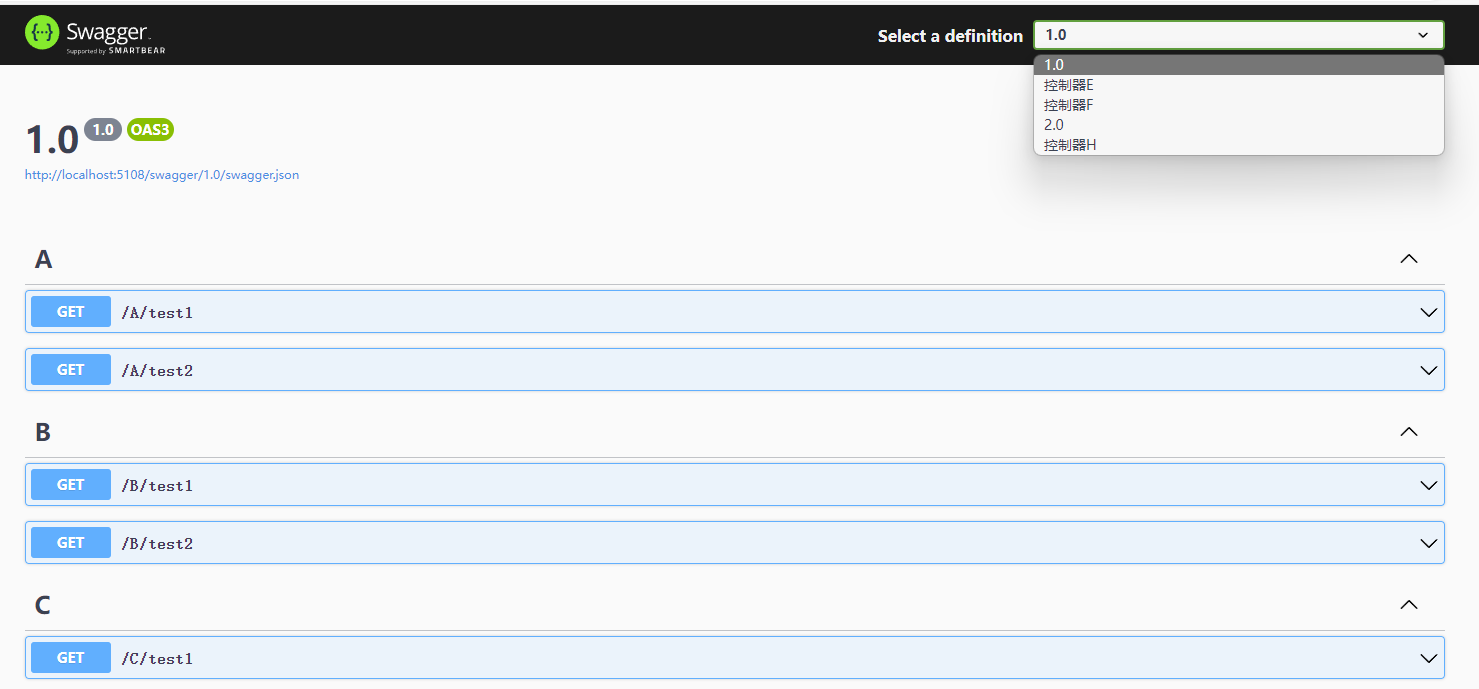
由于项目逐渐庞大,API 接口越来越多,所有接口都在一个 swagger 中,导致 swagger.json 文件庞大。第六章中提到过可以使用工具将 swagger.json 生成代码文件,可是如果只需要使用其中一部分接口,却需要生成全部接口代码文件,以及不同模块中可能会有相同名称的接口,这样会导致混乱。因此,需要将 swagger 中的接口进行分组。
[ApiController]
[Route("[controller]")]
[ApiExplorerSettings(GroupName = "控制器E")]
public class EController : ControllerBase
{
}
效果如下:
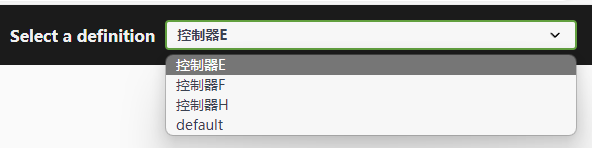
本节示例代码请参考 Demo9.Swagger 项目。主要原理是通过注入 swagger 服务,将已经扫描的接口整理出来,对每个接口进行分组划分,如果接口没有设置 [ApiExplorerSettings] 特性,则放到默认分组中。
创建模型类保存分组信息。
// swagger 配置
public class MaomiSwaggerOptions
{
    /// 默认分组名称
    public string DefaultGroupName { get; set; } = "default";

    /// 默认标题
    public string DefaultGroupTitle { get; set; } = "default";
}
分组管理的代码较为复杂,作用是对接口进行分组,分组后 swagger 框架会给每个分组生成一个单独的 swagger.json 文件,其示例代码如下:
// 配置每个分组中有哪些 Action
void BuildGroupApis(SwaggerGenOptions swaggerGenOptions, MaomiSwaggerOptions maomiSwaggerOptions)
{
    // docname == GroupName
    swaggerGenOptions.DocInclusionPredicate((string docname, ApiDescription apiDescription) =>
    {
        if (!apiDescription.TryGetMethodInfo(out MethodInfo methodInfo)) return false;
        // 属于默认分组
        if (docname == maomiSwaggerOptions.DefaultGroupName && apiDescription.GroupName == null)
        {
            return true;
        }

        return apiDescription.GroupName == docname;
    });
}

// 1,这里注入
builder.Services.AddSwaggerGen(options =>
{
    var ioc = builder.Services.BuildServiceProvider();
    // IApiDescriptionGroupCollectionProvider 提供对程序中所有 ApiDescriptionGroup 对象的访问,
    // ApiDescriptionGroup 记录 Controller 的分组描述信息
    var descriptionProvider = ioc.GetRequiredService<IApiDescriptionGroupCollectionProvider>();
    var apiVersionoptions = ioc.GetRequiredService<IOptions<ApiVersioningOptions>>();
    var maomiSwaggerOptions = ioc.GetRequiredService<IOptions<MaomiSwaggerOptions>>();

    HashSet<Assembly> ApiAssemblies = new();
    // 配置分组信息
    // Items 是根据 ApiExplorerSettings.GroupName 进行分组的
    foreach (var description in descriptionProvider.ApiDescriptionGroups.Items)
    {
        // 如果 Controller 没有配置分组,则放到默认分组中
        if (description.GroupName == null)
        {
            options.SwaggerDoc(maomiSwaggerOptions.Value.DefaultGroupName, new OpenApiInfo
            {
                // 分组默认的 Api 版本号
                Version = apiVersionoptions.Value.DefaultApiVersion.ToString(),
                Title = maomiSwaggerOptions.Value.DefaultGroupTitle
            });

            // 保存每个 Action 反射的 MethodInfo
            foreach (var item in description.Items)
            {
                if (item.TryGetMethodInfo(out var methodInfo))
                {
                    var assembly = methodInfo.DeclaringType?.Assembly;
                    if (assembly != null) ApiAssemblies.Add(assembly);
                }
            }
        }
        else
        {
            options.SwaggerDoc(description.GroupName, new OpenApiInfo
            {
                Version = apiVersionoptions.Value.DefaultApiVersion.ToString(),
                Title = description.GroupName,
            });
        }
    }

    // 加载所有控制器对应程序集的文档
    var dir = new DirectoryInfo(AppContext.BaseDirectory);
    var files = dir.GetFiles().Where(x => x.Name.EndsWith(".xml")).ToArray();
    foreach (var item in files)
    {
        // 如果 Controller 程序集的 xml 文件存在,则加载
        if (ApiAssemblies.Any(x => item.Name.Equals(x.GetName().Name + ".xml", StringComparison.CurrentCultureIgnoreCase)))
            options.IncludeXmlComments(item.FullName);
    }

    // 构建分组信息
    BuildGroupApis(options, maomiSwaggerOptions.Value);
});
最后还需要配置中间件,指定每个分组指向的 swagger.json 位于何处。
public static IApplicationBuilder UseMaomiSwagger(this IApplicationBuilder app)
{
    var ioc = app.ApplicationServices;
    var descriptionProvider = ioc.GetRequiredService<IApiDescriptionGroupCollectionProvider>();
    var maomiSwaggerOptions = ioc.GetRequiredService<IOptions<MaomiSwaggerOptions>>();

    app.UseSwagger();

    app.UseSwaggerUI(options =>
    {
        // 是否将该接口放到默认分组中
        bool haveDefault = false;

        // 配置页面显示和使用哪些位置的 swagger.json 文件
        foreach (var description in descriptionProvider.ApiDescriptionGroups.Items)
        {
            if (description.GroupName == null)
            {
                haveDefault = true;
                continue;
            }
            options.SwaggerEndpoint($"{description.GroupName}/swagger.json", description.GroupName);
        }

        // 有默认不带分组的
        if (haveDefault)
        {
            options.SwaggerEndpoint($"{maomiSwaggerOptions.Value.DefaultGroupName}/swagger.json", maomiSwaggerOptions.Value.DefaultGroupName);
        }
    });

    return app;
}
接口版本号
随着项目迭代,接口越来越多,为了不影响已经对接的项目,同一个接口就会出现多个版本号。
只需要在 Controller 或 Action 上添加 [ApiVersion("1.0")] 特性注解即可。
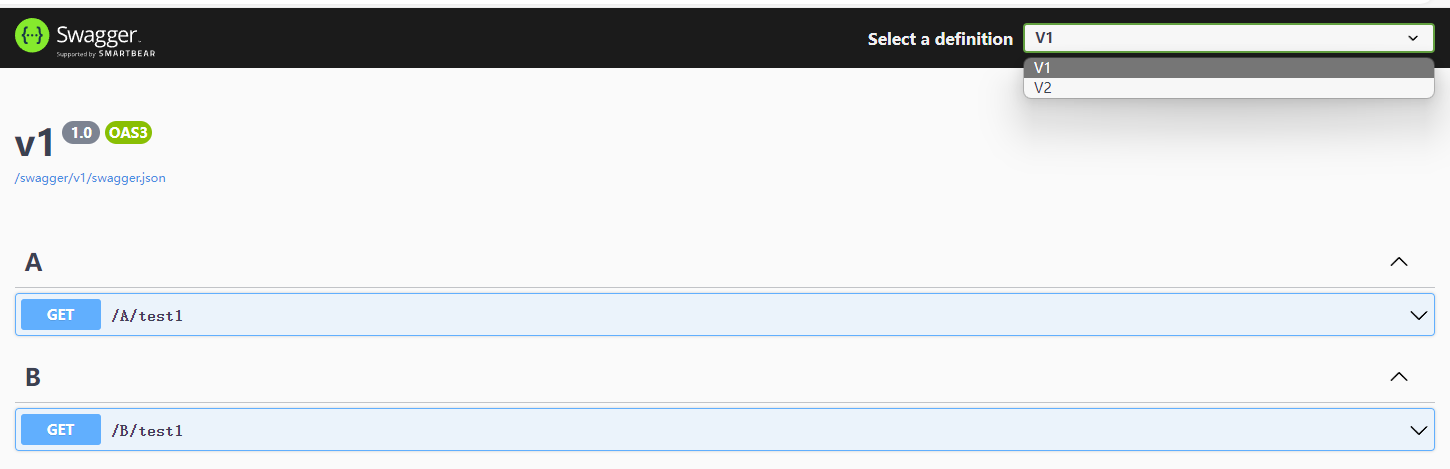
第一步,配置 ASP.NET Core 中关于接口版本号和 [ApiVersion] 的处理。
// 配置 Api 版本信息
builder.Services.AddApiVersioning(setup =>
{
    // 全局默认 api 版本号
    setup.DefaultApiVersion = new ApiVersion(1, 0);
    // 用户请求未指定版本号时,使用默认版本号
    setup.AssumeDefaultVersionWhenUnspecified = true;
    // 响应时,在 header 中返回版本号
    setup.ReportApiVersions = true;
    // 从哪里读取版本号信息
    setup.ApiVersionReader =
    ApiVersionReader.Combine(
       new HeaderApiVersionReader("X-Api-Version"),
       new QueryStringApiVersionReader("version"));
});

// 在 swagger 中显示版本信息,
// 进一步使用版本号进行隔分
builder.Services.AddVersionedApiExplorer(o =>
{
    // 获取或设置版本参数到 url 地址中
    o.SubstituteApiVersionInUrl = true;
    // swagger 页面默认填入的版本号
    o.DefaultApiVersion = new ApiVersion(1, 0);
    // 显示的版本分组格式
    o.GroupNameFormat = "'v'VVV";
});
第二步,配置 swagger 生成对应版本号文档。
builder.Services.AddSwaggerGen(options =>
{
    var ioc = builder.Services.BuildServiceProvider();
    var apiVersionDescriptionProvider = ioc.GetRequiredService<IApiVersionDescriptionProvider>();
    var apiVersionoptions = ioc.GetRequiredService<IOptions<ApiVersioningOptions>>();
    foreach (var item in apiVersionDescriptionProvider.ApiVersionDescriptions)
    {
        // 给每个版本号创建 swagger.json
        options.SwaggerDoc(item.GroupName, new OpenApiInfo
        {
            Version = apiVersionoptions.Value.DefaultApiVersion.ToString(),
            Title = item.GroupName,
        });
    }
});
第三步,配置 swagger 生成对应下拉框选项列表。
// 配置 ui
app.UseSwaggerUI(options =>
{
    var ioc = app.Services;
    var apiVersionDescriptionProvider = ioc.GetRequiredService<IApiVersionDescriptionProvider>();
    var descriptions = apiVersionDescriptionProvider.ApiVersionDescriptions;

    foreach (var description in apiVersionDescriptionProvider.ApiVersionDescriptions)
    {
        var url = $"/swagger/{description.GroupName}/swagger.json";
        var name = description.GroupName.ToUpperInvariant();
        options.SwaggerEndpoint(url, name);
    }
});
由于 swagger 定制起来比较复杂,因此需要将其封装到框架中的 SwaggerExtensions.cs 文件中,使用时只需要很简单的代码即可,示例项目可参考 Demo9.MaomiSwagger。
var builder = WebApplication.CreateBuilder(args);

// Add services to the container.

builder.Services.AddControllers();
builder.Services.AddEndpointsApiExplorer();
// 1,这里注入
builder.Services.AddMaomiSwaggerGen();

var app = builder.Build();

if (app.Environment.IsDevelopment())
{
    // 2,这里配置中间件
    app.UseMaomiSwagger();
    });
}
路由后缀
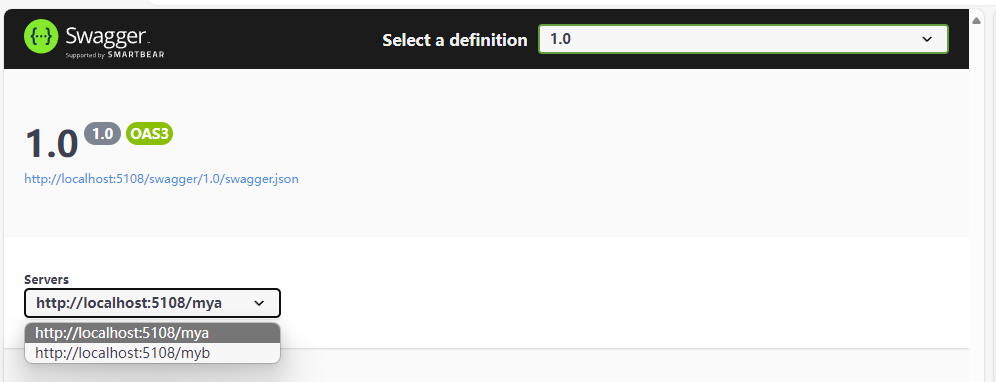
在微服务场景下,许多服务会共用一个域名,然后使用不同的路由后缀指向对应的服务,比如 https://localhost/a、 https://localhost/b ,不过默认 swagger ui 中请求时,使用了绝对路径,因此不会自动使用这些路由后缀参数。为了能够让 swagger ui 在微服务下能够支持不同路由后缀请求,需要对此进行配置。
// 2,这里配置中间件
app.UseMaomiSwagger(setupAction: setup =>
{
    setup.PreSerializeFilters.Add((swagger, httpReq) =>
    {
        swagger.Servers = new List<OpenApiServer>
        {
            new  (){ Url = $"{httpReq.Scheme}://{httpReq.Host.Value}/mya" },
            new  (){ Url = $"{httpReq.Scheme}://{httpReq.Host.Value}/myb" }
        };
    });
});

文章评论