Machine Performance
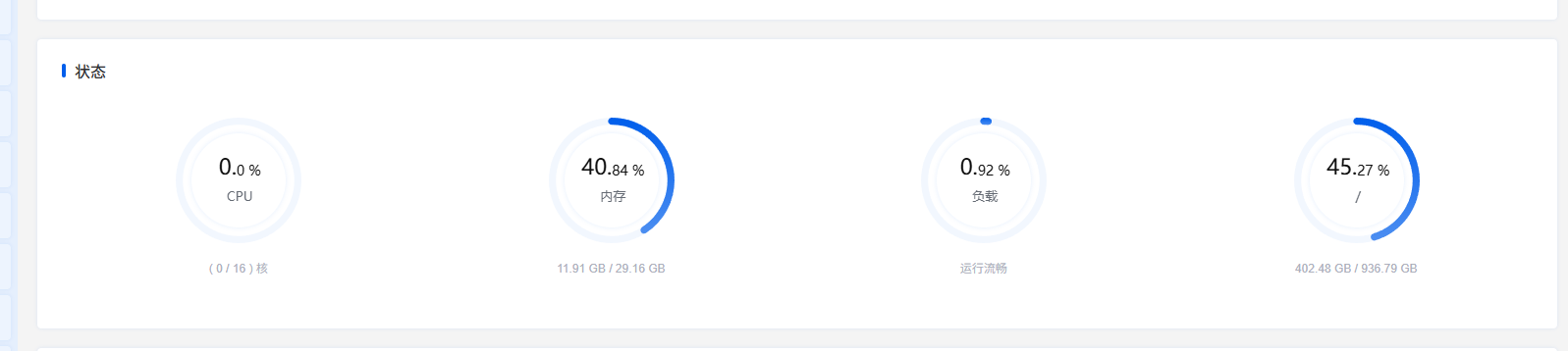
The server hardware configuration used in this test is shown below. Besides MySQL and StarRocks, this machine also runs many other Docker services.
CPU:
AMD Ryzen™ 7 8745H w/ Radeon™ 780M Graphics × 16Memory:
DDR5 5600 MT/S 32G(16G*2)Disk performance:
 Timing cached reads:   64174 MB in  1.99 seconds = 32256.62 MB/sec
 Timing buffered disk reads: 3562 MB in  3.00 seconds = 1186.39 MB/sec
Initialize the Database Environment
Mysql:
CREATE TABLE <code>users</code> (
  <code>id</code> bigint(20) unsigned NOT NULL AUTO_INCREMENT,
  <code>username</code> varchar(32) NOT NULL,
  <code>phone</code> char(11) NOT NULL,
  <code>email</code> varchar(64) NOT NULL,
  <code>gender</code> tinyint(3) unsigned NOT NULL DEFAULT 0 COMMENT '0 unknown 1 male 2 female',
  <code>age</code> tinyint(3) unsigned NOT NULL DEFAULT 0,
  <code>status</code> tinyint(3) unsigned NOT NULL DEFAULT 1 COMMENT '1 normal 2 disabled 3 deleted',
  <code>province_id</code> smallint(5) unsigned NOT NULL DEFAULT 0,
  <code>city_id</code> mediumint(8) unsigned NOT NULL DEFAULT 0,
  <code>register_source</code> tinyint(3) unsigned NOT NULL DEFAULT 1 COMMENT '1 web 2 ios 3 android 4 api',
  <code>score</code> int(10) unsigned NOT NULL DEFAULT 0,
  <code>created_at</code> datetime NOT NULL,
  <code>updated_at</code> datetime NOT NULL,
  <code>last_login_at</code> datetime DEFAULT NULL,
  PRIMARY KEY (<code>id</code>),
  UNIQUE KEY <code>uk_phone</code> (<code>phone</code>),
  KEY <code>idx_status_created_id</code> (<code>status</code>,<code>created_at</code>,<code>id</code>),
  KEY <code>idx_created_at_id</code> (<code>created_at</code>,<code>id</code>),
  KEY <code>idx_email</code> (<code>email</code>),
  KEY <code>users_created_at_index</code> (<code>created_at</code>)
) ENGINE=InnoDB AUTO_INCREMENT=935300001 DEFAULT CHARSET=utf8mb4 ROW_FORMAT=DYNAMIC
StarRocks:
CREATE TABLE <code>users</code> (
  <code>id</code> bigint NOT NULL COMMENT "",
  <code>created_at</code> datetime NOT NULL COMMENT "",
  <code>username</code> varchar(32) NOT NULL COMMENT "",
  <code>phone</code> varchar(11) NOT NULL COMMENT "",
  <code>email</code> varchar(64) NOT NULL COMMENT "",
  <code>gender</code> tinyint NOT NULL DEFAULT "0" COMMENT "",
  <code>age</code> tinyint NOT NULL DEFAULT "0" COMMENT "",
  <code>status</code> tinyint NOT NULL DEFAULT "1" COMMENT "",
  <code>province_id</code> smallint NOT NULL DEFAULT "0" COMMENT "",
  <code>city_id</code> int NOT NULL DEFAULT "0" COMMENT "",
  <code>register_source</code> tinyint NOT NULL DEFAULT "1" COMMENT "",
  <code>score</code> int NOT NULL DEFAULT "0" COMMENT "",
  <code>updated_at</code> datetime NOT NULL COMMENT "",
  <code>last_login_at</code> datetime NULL COMMENT ""
)
ENGINE=OLAP
PRIMARY KEY(<code>id</code>, <code>created_at</code>)
PARTITION BY RANGE(<code>created_at</code>) (
  START ("2020-01-01") END ("2026-12-31") EVERY (INTERVAL 1 MONTH)
)
DISTRIBUTED BY HASH(<code>id</code>) BUCKETS 8
PROPERTIES (
"replication_num" = "1"
);
Python script for writing data:
from concurrent.futures import ThreadPoolExecutor, as_completed
from datetime import datetime, timedelta
import pymysql

HOST = "192.168.1.1"
PORT = 3306   // or 9030
USER = "root"
PASSWORD = "123456"
DATABASE = "testdata"

START_ID = 1
TOTAL_ROWS = 500_000_000
WORKERS = 8
BATCH_SIZE = 10_000

BASE_TIME = datetime(2024, 1, 1, 0, 0, 0)

INSERT_SQL = """
INSERT INTO users (
    id, username, phone, email, gender, age, status,
    province_id, city_id, register_source, score,
    created_at, updated_at, last_login_at
) VALUES (
    %s, %s, %s, %s, %s, %s, %s,
    %s, %s, %s, %s,
    %s, %s, %s
)
"""

def make_conn():
    return pymysql.connect(
        host=HOST,
        port=PORT,
        user=USER,
        password=PASSWORD,
        database=DATABASE,
        charset="utf8mb4",
        autocommit=False,
        read_timeout=300,
        write_timeout=300,
        connect_timeout=30,
    )

def build_rows(start_id: int, end_id: int):
    rows = []
    for n in range(start_id, end_id):
        created_at = BASE_TIME + timedelta(seconds=n % 31_536_000)
        updated_at = created_at
        last_login_at = created_at + timedelta(days=n % 30)

        rows.append((
            n,
            f"user_{n}",
            f"1{n:010d}",
            f"user_{n}@test.local",
            n % 3,
            18 + (n % 43),
            2 if n % 20 == 0 else 1,
            (n % 34) + 1,
            (n % 340) + 1,
            (n % 4) + 1,
            n % 100000,
            created_at.strftime("%Y-%m-%d %H:%M:%S"),
            updated_at.strftime("%Y-%m-%d %H:%M:%S"),
            last_login_at.strftime("%Y-%m-%d %H:%M:%S"),
        ))
    return rows

def worker(worker_no: int, start_id: int, end_id: int):
    conn = make_conn()
    inserted = 0
    try:
        with conn.cursor() as cur:
            current = start_id
            while current <= end_id:
                next_id = min(current + BATCH_SIZE, end_id + 1)
                rows = build_rows(current, next_id)
                cur.executemany(INSERT_SQL, rows)
                conn.commit()

                inserted += len(rows)
                current = next_id

                if inserted % 100000 == 0 or current > end_id:
                    print(f"worker={worker_no} inserted={inserted} range={start_id}-{end_id}")
    finally:
        conn.close()

def split_ranges(start_id: int, total_rows: int, workers: int):
    base = total_rows // workers
    remain = total_rows % workers
    current = start_id
    result = []

    for i in range(workers):
        size = base + (1 if i < remain else 0)
        s = current
        e = current + size - 1
        result.append((i + 1, s, e))
        current = e + 1

    return result

def main():
    ranges = split_ranges(START_ID, TOTAL_ROWS, WORKERS)
    print("ranges:", ranges)

    with ThreadPoolExecutor(max_workers=WORKERS) as pool:
        futures = [pool.submit(worker, worker_no, s, e) for worker_no, s, e in ranges]
        for future in as_completed(futures):
            future.result()

    print("done")

if __name__ == "__main__":
    main()
How Much Space Do 500 Million Rows Take?
In this test, MySQL actually wrote 460 million rows of data (because the test did not complete the full 500 million rows), while StarRocks successfully wrote the planned 500 million rows. Below are the storage usage details for both.
For Mysql:
8.0K    ./testdata/users.frm
136G    ./testdata/users.ibd
4.0K    ./testdata/db.opt
136G    ./testdata
StarRocks uses 256G.
Mysql created quite a few indexes on the table. The following SQL can be used to obtain the index size and data size of the table:
SELECT
    TABLE_NAME AS table_name,
    CONCAT(ROUND((INDEX_LENGTH / 1024 / 1024), 2), ' MB') AS index_size,
    CONCAT(ROUND((DATA_LENGTH / 1024 / 1024), 2), ' MB') AS data_size,
    CONCAT(ROUND(((INDEX_LENGTH + DATA_LENGTH) / 1024 / 1024), 2), ' MB') AS total_size
FROM information_schema.TABLES
WHERE TABLE_SCHEMA = 'testdata'
AND TABLE_NAME = 'users';| Metric | Value | Converted |
|---|---|---|
| Index size | 79943.56 MB | ≈ 78.07 GB |
| Data size | 51887.00 MB | ≈ 50.67 GB |
| Total size | 131830.56 MB | ≈ 128.74 GB |

This machine runs many services, so in practice MySQL and StarRocks together probably do not require even 10 GB of memory for normal operation.
Counting Data Volume
In large-scale datasets, counting all rows in a table (select count(*)) is a common scenario in business systems. Below is the performance comparison between MySQL and StarRocks. Each test group was repeated three times, and the average value was taken to reduce random error.
select count(*) from users;In Mysql, counting the number of rows is a major pitfall and takes 1–2 minutes.
[2026-04-11 14:21:22] Retrieved 1 row starting from 1 in 1 m 11 s 165 ms (execution: 1 m 11 s 153 ms, fetching: 12 ms)StarRocks only needs 260 ms.
[2026-04-11 14:20:29] Retrieved 1 row starting from 1 in 261 ms (execution: 254 ms, fetching: 7 ms)Therefore, counting records in a business system can be quite troublesome. If you only need the total number of rows in the table, there are many possible solutions, such as designing a separate statistics table or recording the count in Redis. However, when displaying the data count on a page together with pagination, search, and filtering, the query time can become very long with large datasets.
Therefore, read-write separation becomes very necessary at large scale. Operations such as counting rows, determining pagination size, and join conditions can be handled by StarRocks.
Indexes Can Significantly Improve Speed
The database currently has the following indexes:
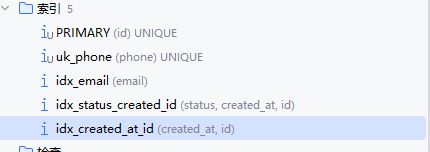
When AI initially generated the table for me, I wondered why some indexes only contained certain fields while others also included id. After researching, I found that InnoDB secondary indexes implicitly include the primary key. Therefore (created_at, id) and (created_at) are essentially the same in terms of index coverage, but they differ in sorting behavior because index data itself is ordered.
Explicitly defining (col, id) has clear benefits in the following scenarios:
- Queries containing
ORDER BY col, id; - Queries that paginate by
col(for exampleWHERE col > x ORDER BY col, id LIMIT n), whereidcan provide a stable pagination order; - When
colhas very low cardinality (many duplicate values), addingidincreases the index “distinctness” and improves lookup efficiency.
Back to the main topic: when using the primary key, Mysql reads 1000 rows as follows:
select *
from users
where id in (...);
[2026-04-12 08:52:56] Retrieved 64 rows starting from 1 in 113 ms (execution: 79 ms, fetching: 34 ms)Therefore, when the table contains a very large amount of data, it is entirely feasible to perform certain query operations in StarRocks, obtain a set of IDs, and then query the actual data from the Mysql business database for further processing.
For string fields such as phone numbers, if an index is created, various queries will still be fast.
select *
from users
where phone like '1000%'
order by phone desc
limit 100 offset 10;

select *
from users
where phone like '%1000%'
order by phone desc
limit 100 offset 10;
Mysql:
[2026-04-11 14:23:05] Retrieved 100 rows starting from 1 in 48 ms (execution: 13 ms, fetching: 35 ms)

[2026-04-12 09:11:44] Retrieved 100 rows starting from 1 in 375 ms (execution: 347 ms, fetching: 28 ms)
StarRocks:
[2026-04-12 09:08:09] Retrieved 100 rows starting from 1 in 576 ms (execution: 546 ms, fetching: 30 ms)

[2026-04-12 09:11:36] Retrieved 100 rows starting from 1 in 822 ms (execution: 789 ms, fetching: 33 ms)
The above tests illustrate several points.
For string fields, when using prefix matching such as like 'xxx%', the performance can still be excellent. With 460 million rows of data, the execution time is only 13 ms.
.
Only prefix matching like 'xxx%' can truly use an index for a range scan. A B+ tree can directly locate the starting position of the prefix match and only scan index nodes within the range. Therefore, patterns like %xxx% cannot use indexes and will trigger a full scan. As a result, the MySQL execution time jumps from 13 ms to 347 ms, a 26× performance drop.
However, for StarRocks, which is an OLAP engine, the default prefix index is completely ineffective for like '%x%', so queries are usually slower than MySQL.
For string-related scenarios, if the query design can use indexes, then even with very large datasets there is usually no need to worry about query latency.
Optimizing Filtering Queries
For a user table alone, business requirements often require fuzzy searches on phone numbers, usernames, emails, etc. Queries like like %xxx% are unavoidable. We cannot realistically ask product managers to change requirements, but whether using MySQL or StarRocks, like %xxx% becomes slower as the data volume increases.
Therefore we need a solution that both supports fuzzy searching across multiple dynamic fields such as orders and users, while also keeping the query fast.
select *
from users
where phone like '%1000%' or email like '%user_10%' or username like '%user_11%'
order by phone desc
limit 100 offset 100;
Mysql:
[2026-04-12 09:31:37] Retrieved 100 rows starting from 1 in 912 ms (execution: 880 ms, fetching: 32 ms)StarRocks:
[2026-04-12 09:32:24] Retrieved 100 rows starting from 1 in 1 s 588 ms (execution: 1 s 557 ms, fetching: 31 ms)StarRocks/Doris support ngram tokenization inverted indexes, which work similarly to ES, but are integrated directly into the data warehouse engine to avoid the complexity of data synchronization. This is suitable for analytical scenarios.
However, according to the author's tests, queries like
where phone like '%1000%' or email like '%user_10%' or username like '%user_11%' still cannot use the index and remain quite slow.
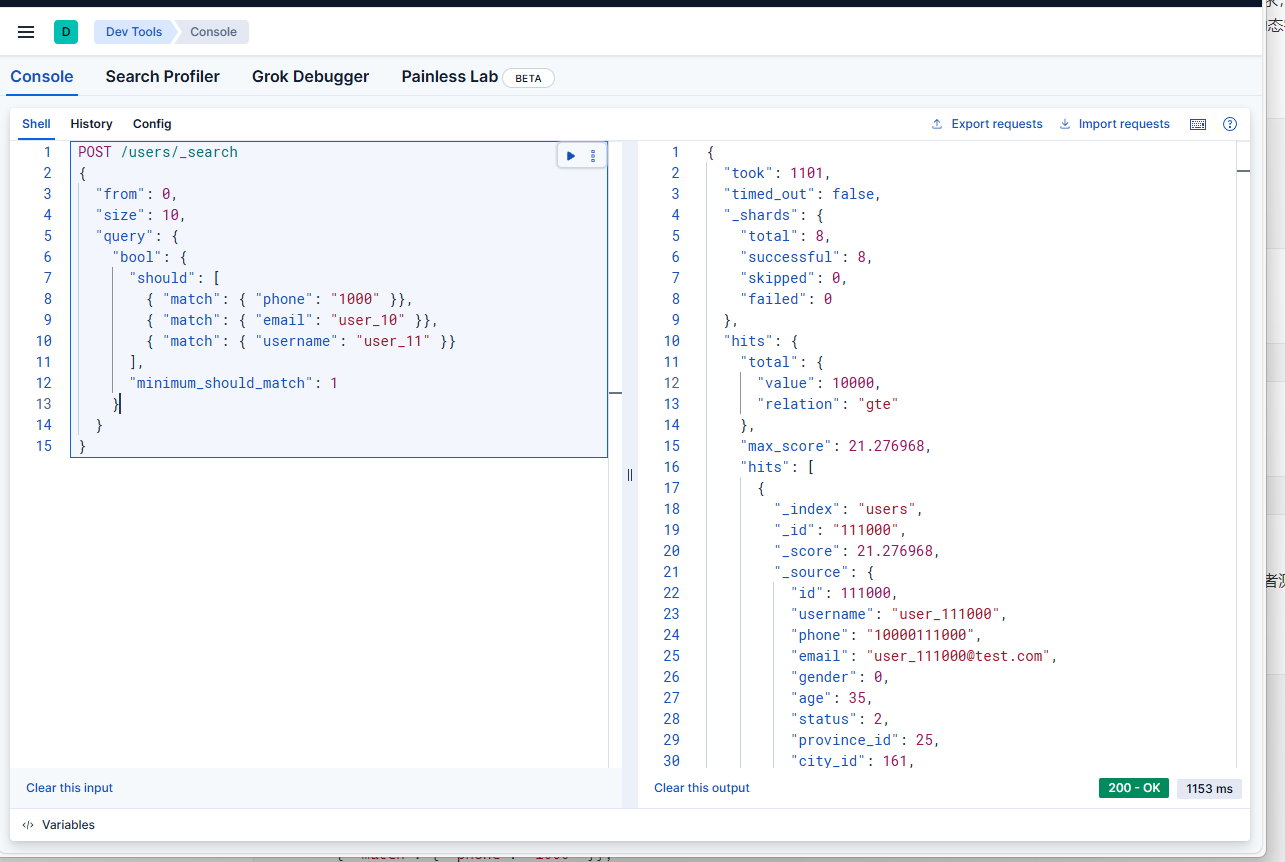
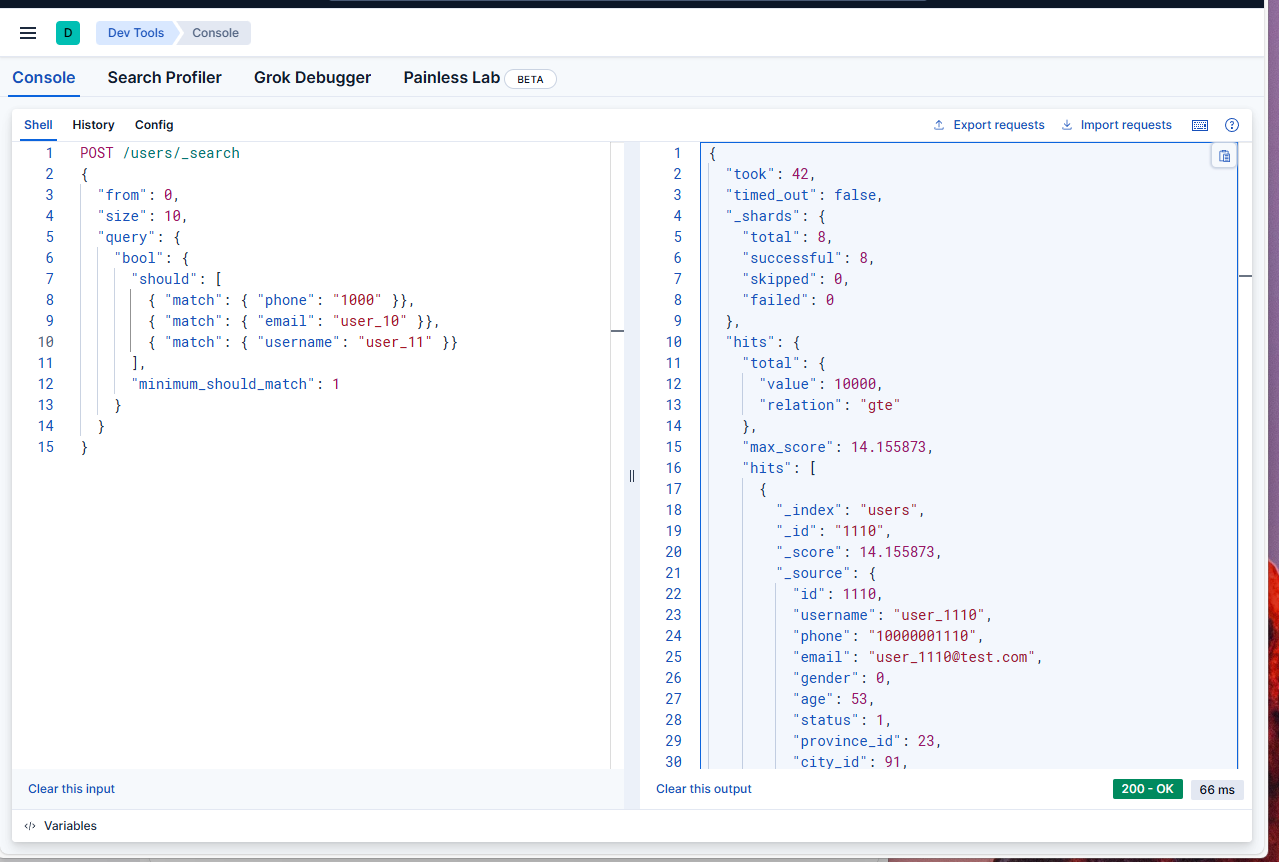
Whether in MySQL or StarRocks, multi-condition fuzzy queries often lead to slow performance because of index mechanisms. In the end, ElasticSearch is often used for fuzzy search, where it performs extremely well.
POST /users/_search
{
  "from": 0,
  "size": 10,
  "query": {
    "bool": {
      "should": [
        { "match": { "phone": "1000" }},
        { "match": { "email": "user_10" }},
        { "match": { "username": "user_11" }}
      ],
      "minimum_should_match": 1
    }
  }
}
A Query Can Only Use One Index
In the MySQL users table, we created many indexes on different fields, including the creation time index idx_created_at_id.
PRIMARY KEY (<code>id</code>),
UNIQUE KEY <code>uk_phone</code> (<code>phone</code>),
KEY <code>idx_status_created_id</code> (<code>status</code>,<code>created_at</code>,<code>id</code>),
KEY <code>idx_created_at_id</code> (<code>created_at</code>,<code>id</code>),
KEY <code>idx_email</code> (<code>email</code>)
If we filter by time range, with the help of idx_created_at_id, will the following SQL execute very quickly?
select *
from users
where phone like '1000%'
  and created_at > '2024-04-25 17:46:20'
order by phone desc
limit 100 offset 10;
Actual test results:
Mysql:
[2026-04-11 11:55:19] Retrieved 9 rows starting from 1 in 24 s 86 ms (execution: 24 s 66 ms, fetching: 20 ms)StarRocks:
Retrieved 0 rows in 19 s 578 ms (execution: 19 s 561 ms, fetching: 17 ms)But we created indexes for both phone and created_at, so why is it still so slow? Let's first look at the execution plan.

There are indeed two indexes:
uk_phone(phone)idx_created_at_id(created_at, id)
The issue is that MySQL usually chooses only one "most useful" index, and then performs table lookups to filter other conditions. So in the query above, MySQL must choose one of the two:
- If it selects
uk_phone(actual execution plan): it can quickly locate the 20+ million rows matchingphone LIKE '1000%', but this index does not include thecreated_atcolumn, so MySQL must check thecreated_atcondition row by row through table lookups. The large number of lookups causes performance degradation. - If it selects
idx_created_at_id: it can quickly locate the 230 million rows matchingcreated_at > '2024-04-25', but this index does not contain thephonecolumn, so it must check thephonecondition row by row. Even more rows need to be scanned, making performance worse.
Therefore, for AND conditions, even if each column has its own index, only one index can typically be used in a single query.
Source: https://dev.mysql.com/doc/refman/8.4/en/optimizing-innodb-queries.html
For or conditions, it is somewhat more flexible and may trigger index merge, but in most cases the behavior is similar to and.
| Logical Operation | Index Usage Characteristics | Common Problems | Best Optimization Strategy |
|---|---|---|---|
AND |
Usually only one index is selected, others require table lookups | Too many table lookups (e.g., your 20 million times) | Composite index (include all AND columns) |
OR |
May trigger index merge but has many limitations | Range queries may invalidate indexes, causing full scans | Rewrite as UNION so each branch can use its own index |
Another important factor is the order of columns in the index, as shown below.
Based on:
where phone like '1000%'
  and created_at > '2024-04-25 17:46:20'
We can create a composite index including both columns.
CREATE INDEX idx_phone_created ON users (phone, created_at);Rebuilding this index took 17 minutes.
However, executing the SQL still takes about 20 seconds. The index still causes the right-side created_at to become ineffective.
SELECT *
FROM users FORCE INDEX (idx_phone_created)
WHERE phone LIKE '1000%'
  AND created_at > '2024-04-25 17:46:20'
ORDER BY phone DESC
LIMIT 100 OFFSET 10;
If you instead create the index like this, the query will end up scanning 238030341 rows.
-- New index: (created_at, phone)
CREATE INDEX idx_created_phone ON users (created_at, phone);
This is because LIKE '1000%' only needs to scan about 20 million rows, while created_at > '2024-04-25 17:46:20' matches too many records — about 230 million rows — causing the query to take several minutes.
Therefore, when designing WHERE queries:
- Place the condition that filters the smallest amount of data first in the index.
- Ensure that this condition can use the index.
- Conditions later in the index may fail to use the index, slowing down the query.
Also, avoid conditions like like %xxx in where, otherwise composite indexes become ineffective.
Using StarRocks BitMap to Optimize Option Filtering
The users table contains the following fields:
gender (0/1/2 → only 3 values)
status (1/2/3 → only 3 values)
register_source (1/2/3/4 → only 4 values)
province_id (province-level ID, about 34 nationwide → low cardinality)
city_id (city-level ID, hundreds to thousands → typical low cardinality)
In real business systems, tables often contain enumeration fields representing statuses. However, indexing these in MySQL is inefficient because the cardinality is low and duplication is extremely high, while MySQL's default index is B-tree.
B-tree indexes are suitable for high-cardinality data such as user_id, phone, and order numbers, as well as range queries and sorting. When the number of possible values is very limited, using this type of index becomes inefficient.
For example, filtering users by region and registration information:
SELECT COUNT(*) FROM users
WHERE
  status = 1
  AND gender = 1
  AND register_source = 3
  AND province_id = 11;
This query ran for 4 minutes and still did not finish.
Add BitMap indexes in StarRocks.
-- Create Bitmap indexes for the users table
ALTER TABLE users ADD INDEX idx_bitmap_gender (gender) USING BITMAP;
ALTER TABLE users ADD INDEX idx_bitmap_status (status) USING BITMAP;
ALTER TABLE users ADD INDEX idx_bitmap_register_source (register_source) USING BITMAP;
ALTER TABLE users ADD INDEX idx_bitmap_province_id (province_id) USING BITMAP;
ALTER TABLE users ADD INDEX idx_bitmap_city_id (city_id) USING BITMAP;
Execute the query:
[2026-04-12 12:56:58] Retrieved 1 row starting from 1 in 116 ms (execution: 92 ms, fetching: 24 ms)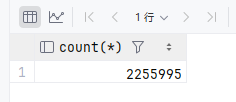
Pagination Strategy for Big Data
In business systems, data often needs to be returned to users through pagination. The frontend typically passes pageNo and pageSize. However, with large datasets, using offset and limit after a where clause consumes significant performance.
As the dataset grows to millions or tens of millions of records, traditional offset pagination becomes extremely slow because the database must scan and skip a large number of rows, potentially causing heavy database load.
For this reason, we adopt a Token cursor pagination approach. This completely abandons the traditional page number and offset model, using only a continuous cursor to achieve high‑performance scrolling pagination.
Token cursor pagination does not support arbitrary page jumps, only sequential navigation.
Pagination Workflow
First request: The frontend may pass pageNo and pageSize to jump to any starting page.
The backend calculates the starting position based on pageNo and pageSize, determines the ID of the last record at that position, and generates the first Token.
Subsequent pages: Only the Token returned from the previous page is needed. pageNo and offset are no longer required, maintaining high performance.
All queries still use where id > ? for efficient retrieval, balancing jump-to-page capability and large dataset performance.
Custom starting page (first request)
- Frontend sends:
pageNo=100,pageSize=20(start directly from page 100) - Backend calculates:
offset = (pageNo - 1) * pageSize - Backend query:
order by id limit offset, pageSize - Retrieve the current page data + ID of the last record
- Generate a token and store the ID in Redis
- Return: data + nextPageToken
Subsequent pages (only pass token)
- Frontend sends:
pageToken=xxx - Backend retrieves the cursor ID from Redis
- Query:
where id > cursorId order by id limit pageSize - Generate a new token and return new data + new token
- No longer need
pageNooroffset
C# code example:
/// <summary>
/// Pagination request (first request may include PageNo to customize the starting page; later requests only use Token)
/// </summary>
public class PageRequest
{
    /// <summary>
    /// Pagination Token (not required for the first request; later requests only pass this)
    /// </summary>
    public string? PageToken { get; set; }

    /// <summary>
    /// Page number (only allowed for the first request to define the starting page)
    /// </summary>
    public int PageNo { get; set; } = 1;

    /// <summary>
    /// Page size (10-100)
    /// </summary>
    public int PageSize { get; set; } = 20;
}

// ======================
// Case 1: Token provided → use cursor pagination
// ======================
if (!string.IsNullOrEmpty(request.PageToken))
{
    startId = RedisPageHelper.GetPageCursor(userId, request.PageToken);
}
// ======================
// Case 2: No Token but PageNo provided → custom starting page
// ======================
else
{
    int offset = (request.PageNo - 1) * request.PageSize;

    // First query the ID of the last record on that page
    var lastId = await _dbContext.Users
        .AsNoTracking()
        .OrderBy(u => u.Id)
        .Skip(offset)
        .Take(request.PageSize)
        .Select(u => u.Id)
        .LastOrDefaultAsync();

    startId = lastId;
}

// ======================
// Unified high-performance query
// ======================
var query = _dbContext.Users.AsNoTracking().OrderBy(u => u.Id);

if (startId.HasValue && startId.Value > 0)
{
    query = query.Where(u => u.Id > startId.Value);
}

// Fetch one extra row to determine if there is a next page
var dataList = await query.Take(request.PageSize + 1).ToListAsync();
bool hasNext = dataList.Count > request.PageSize;
if (hasNext) dataList.RemoveAt(request.PageSize);

// Generate the next page Token
string? nextToken = null;
if (hasNext && dataList.Any())
{
    ulong lastDataId = dataList.Last().Id;
    nextToken = RedisPageHelper.SetPageToken(userId, lastDataId);
}
文章评论